
The Nexode Pro 160W Charger with Retractable Cable (model X776) is one of the two chargers in UGREEN’s newly released Nexode Pro Series. It snaps onto an electrical outlet to charge up to four USB devices at a time, with plenty of interesting tech packed inside a practical design.
Here’s the bottom line: While a bit bulky for a mobile charger, the UGREEN X776 has more than enough to justify its $149.99 suggested retail cost—street prices are often lower. Get one today!
UGREEN Nexode Pro 160W Charger with Retractable Cable (X776)'s Rating
Pros
Up to 140W power output per port with 160W power budget in a compact 4-in-1 design with convenient retractable USB-C cable
Supports USB PD 3.1 and all popular brand-specific charging protocols with built-in Bluetooth and Wi-Fi for connectivity
Helpful programmable smart status screen, highly customizable via mobile app; runs cool
Cons
The retractable cable could be a little longer
A bit bulky
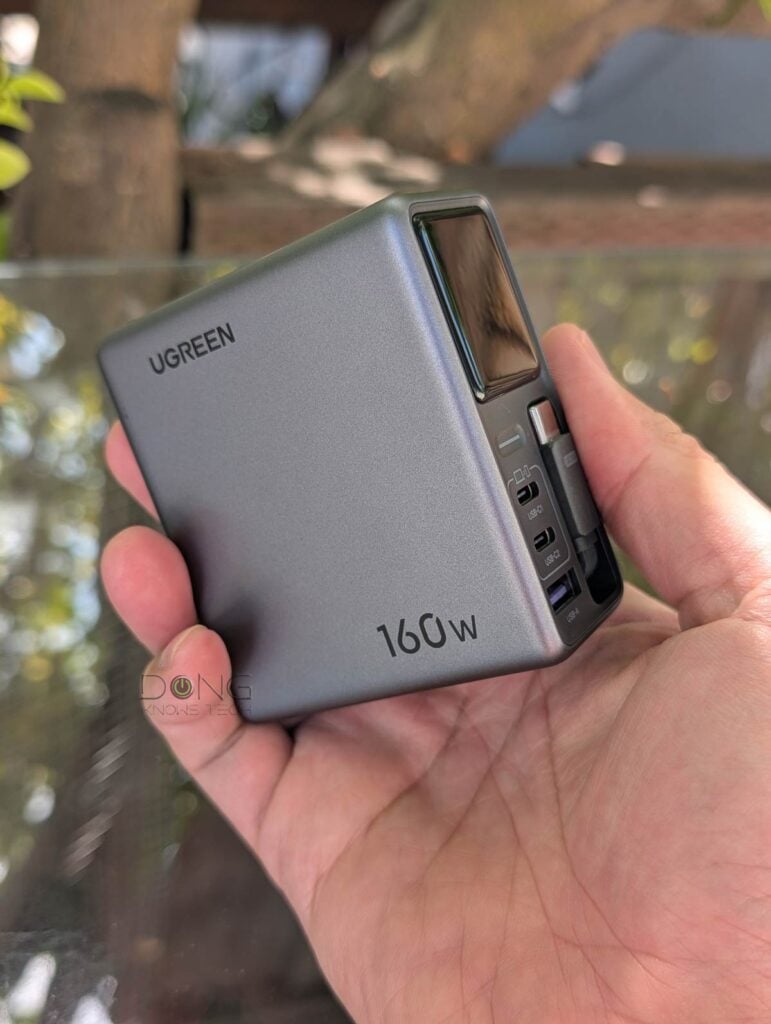
UGREEN Nexode Pro 160W Charger with Retractable Cable: The only charger you’ll need
Out of the box, the UGREEN X776 is a squarish box about the size of a MacBook Pro USB-C power adapter.
That comparison makes the USB charger quite impressive: it offers higher power output, supports all popular charging protocols, can charge up to four devices simultaneously, and features advanced charging technology.
This capability makes up for its slightly bulky size. While you can slip it inside your luggage with ease, it’ll likely block at least one adjacent power socket when plugged in.
Practical design with lots of tech
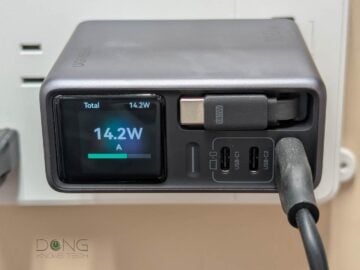
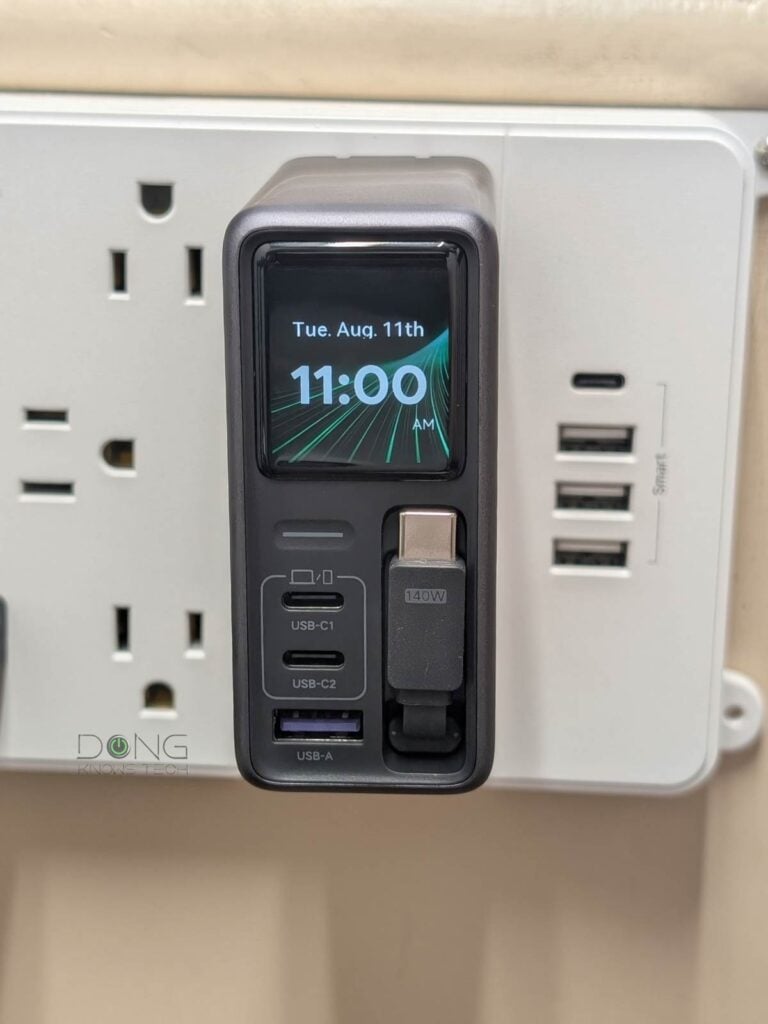
On the front, the Nexode Pro 160W Charger with Retractable Cable comes with two USB-C ports, a USB-A port, and a built-in retractable USB-C cable.
This cable, which stays flush within the charger when retracted, can extend up to 28 inches (70 cm) and has eight length stoppers, making it both convenient and practical: you won’t always need to carry a charging cable or worry about a cable hanging loose between your device and the charger.
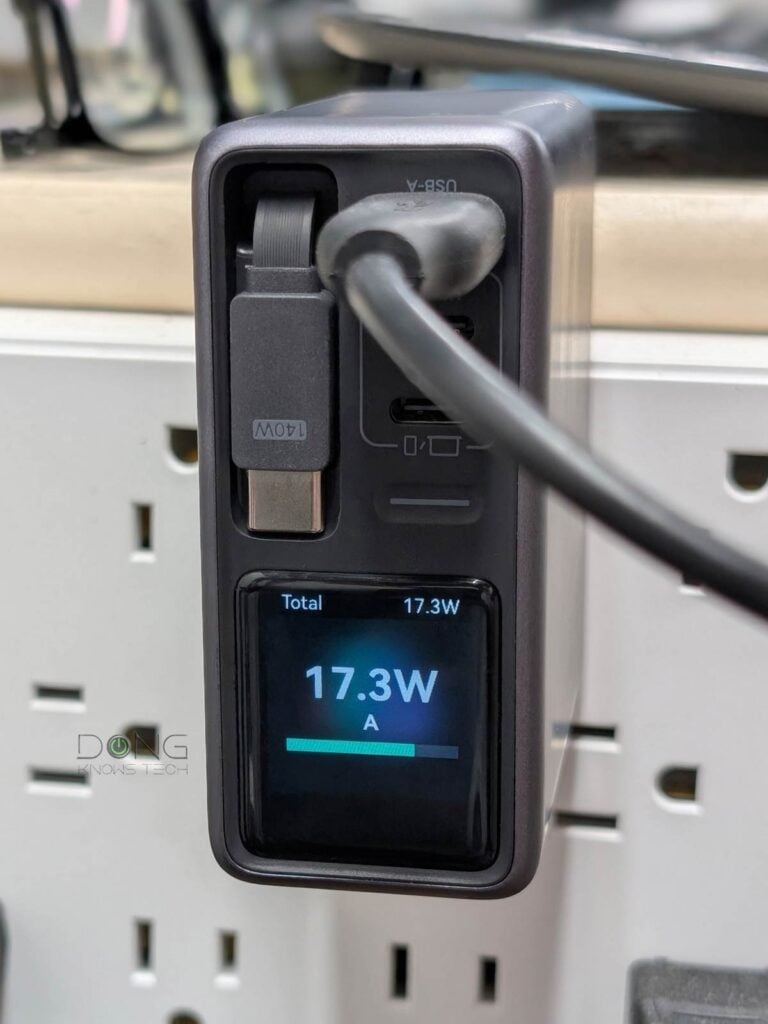
Above these charging outputs is what makes the charger stand out: a sleek square status screen. A few things to note about this screen:
- It’s not a touchscreen and only displays the relevant status or notification, such as real-time total power output.
- It automatically rotates to orient itself depending on how you plug in the charger into a socket, such as sideways or upside down.
- It’s programmable (on/off, auto shutdown, brightness, clock display as screensaver, auto-rotate) via the UGREEN Connect mobile app—more below.
For charging, the Nexode Pro 160W Charger features UGREEN’s SmartCharge Power Distribution, Thermal Guard, and GaNInfinity charging technologies for better safety and efficiency. In addition to USB Power Delivery 3.1, it also supports all popular brand-specific charging protocols.
Tip
GaN, short for the element gallium nitride, is an advanced semiconductor material used in chargers (or power adapters) to deliver high power output in a small physical size with less heat generation. It’s ideal for USB chargers/adapters designed to power multiple devices simultaneously.
Most importantly, all that is user-manageable via the optional UgreenConnect mobile app: the charger uses Bluetooth and Wi-Fi for connectivity.


More on this app below the table that compares the hardware specifications of the UGREEN Nexode Pro 160W Charger with Retractable Cable with those of its sibling in the same series.
Hardware specifications
 |  | |
|---|---|---|
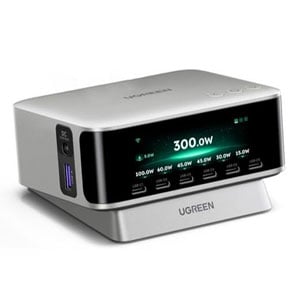
| UGREEN Nexode Pro 160W Charger with Retractable Cable | UGREEN Nexode Pro 300W Desktop Charger | |
| Model | X776 | X783 |
| Dimension | 3.23 x 1.44 x 28.8 in (82 x 36.5 x 73 mm) | 4.41 x 3.39 x 1.81 (112 x 86 x 46 mm) |
| Weigth | .7 lb (310 g) | 2.12 lb (960 g) |
| Number of Concurrent USB Device Support | 4 | 7 |
| Port Arrangement (labels) | 1x USB-C retractable cable, 2x USB-C (USB-C1 and USB-C2), 1x USB-A | 6x USB-C (USB-C1 – C6) 1x USB-A (USB-A) 1x DC Output |
| Total Power Output Budget (all devices) | 160W | 300W |
| Max Power Output Per Port (guaranteed within Total Output Budget) | 145W (USB-C1 and Retractable cable) 100W (USB-C2) 22.5W (USB-A) | 145W (USB-C1 – C3) 100W (USB-C4 – C5) 30W (USB-C6) 22.5 (USB-A) 240W (DC Output) |
| Min Power Budget Per USB Port (estimate when all USB ports are used) | UB-C: 45W USB-A: 18 W | USB-C1-5: 45 W USB-C6: 30 W USB-A: 18 W |
| Charging Protocols | USB Power Delivery 3.1 (with 50-11V PPS and 5-21V PPS) Apple5V/2.4A Huawei’s SCP Samsung’s AFC UFCS AVS | |
| Power Intake | 100-240V ≈50/60Hz 2.3A Max via a two-prong snap-on design | 100-240V ≈50/60Hz 4.2A Max via a standard IEC C5 power connector (cord included) |
| Screen | Status-only screen | Screen with nav buttons |
| Special Features | GaN support Wi-Fi/Bluetooth support with UGREEN Connect mobile app | |
| US Launch Price (check street pricing) | $149.99 | $199.99 |
Helpful mobile app and excellent performance
When it comes to charging, hardly anyone would think of using a mobile app. And you sure can use the UGREEN Nexode Pro 160W Charger with Retractable Cable as is: plug it into a power socket, and it’s ready, with the screen auto-rotating as mentioned earlier, shutting itself off after a few minutes, and turning itself back on each time you plug a device in.
However, if you choose to use the UgreenConnect mobile app, it opens up lots of possibilities you might not have been aware of with a modern charger.
It’s worth noting that to use the app, you’ll need to log in with a UGREEN account. That brings convenience, as you can manage the charger remotely even when you’re out and about, at the expense of your privacy.
UGREEN and your privacy
Signing in with a vendor-linked online account generally means your hardware is connected to the vendor at all times, which creates inherent privacy risks. On this matter, UGREEN, a Chinese hardware maker, offers this Privacy Policy.
Managing your devices via a third party is generally a double-edged sword, and privacy is a matter of degree and trust. Data collection and handling vary by vendor and region.
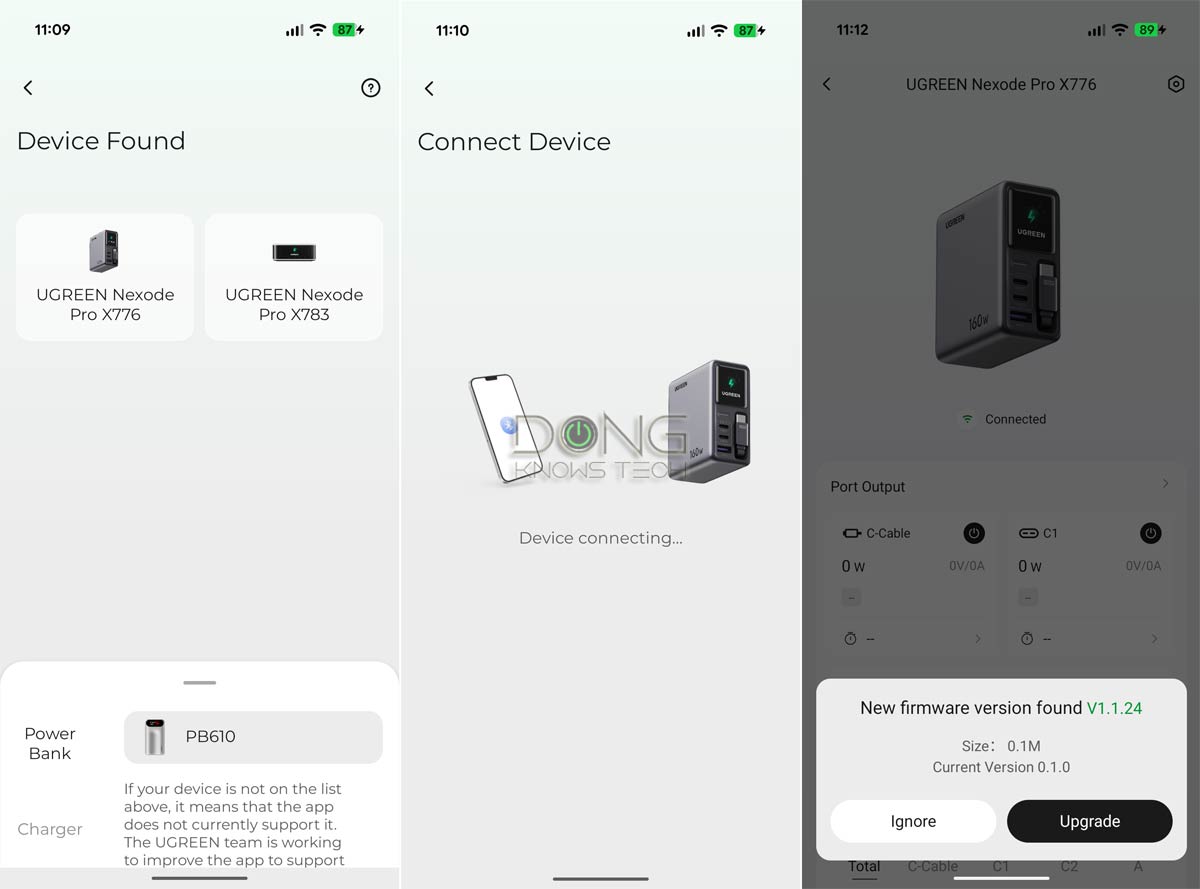
With that out of the way, it was easy to connect the UgreenConnect app to the charger. Here are the steps:
- Open the app on the phone and stand near the charger (plugged into a power socket).
- Tap the detected charger in the app to connect via Bluetooth.
- Enter the Wi-Fi SSID and password (the charger supports Wi-Fi 4, so it’s best to use an IoT network). This step is optional and needed only if you want to manage the charger remotely.
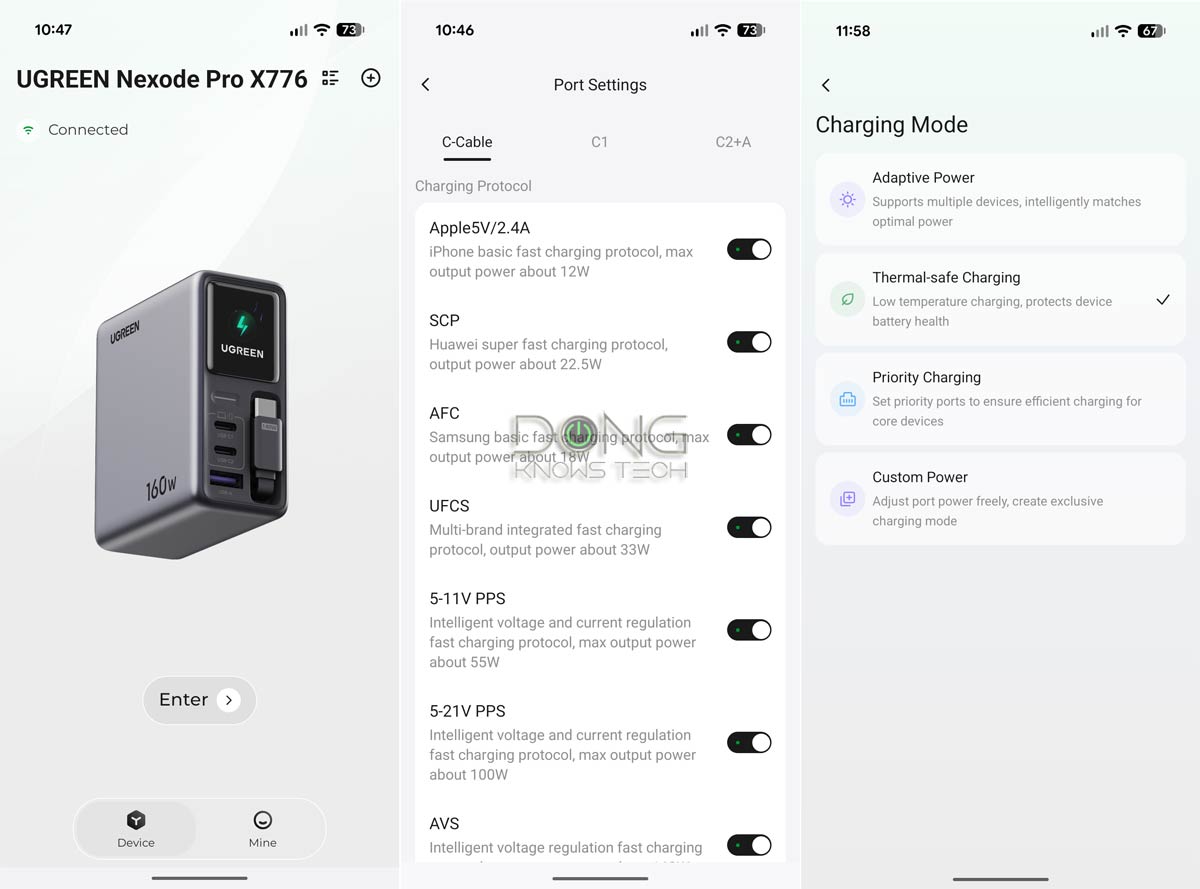
And that’s it. The charger is now connected, and you can use the app to manage it. Among other things, here’s what you can manage with the UGREEN Nexode Pro 160W Charger with Retractable Cable via the app:
- Firmware update.
- Change the charger’s charging mode between Adaptive, Thermal-safe Charging, Priority Charging, and Custom Power.
- Turn each port on or off.
- Change the supported charging protocols and power output for each port.
- Manage the screen: Brightness, auto shutdown, clock, etc.
Overall, while the app isn’t necessary, it’s always nice to be able to customize the charger to fit your charging needs, and it’s amazing how many things you can actually customize on such a small device.
Before publishing this review, I used the UGREEN Nexode Pro 160W Charger with Retractable Cable every day for over a week, and it proved to be the only charger I’d need for my phone, my iPad, and two laptops.
Tip
Despite its name, a USB charger is a flexible power adapter that can provide variable power output (up to a port’s maximum) to meet the connected device’s requirements. As a result, this “charger” plays a minor role in the charging process, which is primarily determined by the connected device: the charging speed depends mainly on the device’s hardware specs, charging protocols, and its battery’s level.
I seldom needed to charge all four at once, but that worked, too, when I tried, since 45W is plenty and the top charging speed for most devices, including my laptops.
Once in a while, I wished the retractable cable was longer. Other than that, the little charger is an excellent device for its intended purpose. By the way, it remained cool to the touch even during heavy operation.
Conclusion
The UGREEN Nexode Pro 160W Charger with Retractable Cable (model X776) is an excellent USB charger for those with multiple devices and who travel frequently. Get it today!


The retractable USB-C cable seems like one of the most practical features here, especially when you don’t want to carry another cable. Being able to charge four devices at once also makes a lot of sense for travel with a phone, iPad, and laptops.
👍