
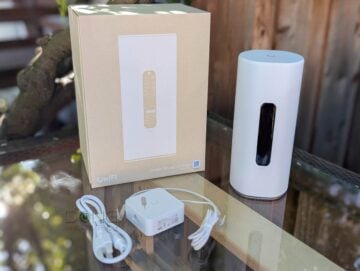
Ubiquiti’s UniFi Dream Router 5G Max (model UDR-5G-Max), first announced in late 2025 and now available for purchase, is a unique UniFi Cloud Gateway (a.k.a. “router”). It’s the first among its peers to feature a built-in 5G cellular modem, and for those who’ve used the AmpliFi Alien, it evokes a heavy dose of nostalgia and possible sadness.
Here’s the bottom line: The Dream Router 5G Max is practically the combo of the UniFi Dream Router 7 (UDR7) and the UniFi 5G Max add-on cellular modem. If you’re looking for a powerful UniFi Network console with built-in 5G as a backup or main Internet source, it’s an excellent deal at $499. Get one today!
Ubiquiti UniFi Dream Router 5G Max's Rating
Pros
Excellent performance and lots of features for homes and business environments, including UniFi mesh and built-in UNVR
One SFP+ and four 2.5GbE Multi-Gig ports with a built-in 5G cellular modem that supports dual-SIM
Comprehensive web-based user interface and optional mobile app—neither requires a login account.
Compact and beautiful design, comparatively affordable, quiet operator
Cons
No 2nd 10Gbps ports, single low-power PoE port
Not wall-mount-ready, internal fan
No external antenna option for cellular, 2.4GHz performance could use some improvement
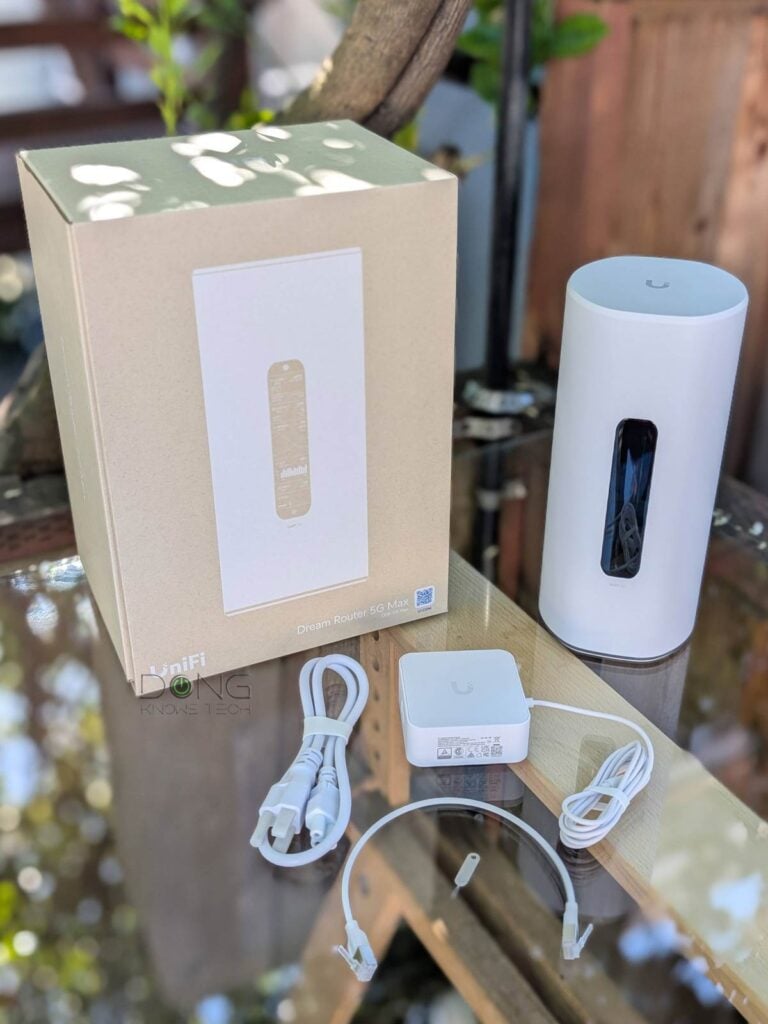
Ubiquiti Dream Router 5G Max: A robust 5G-capable multi-Gigabit UniFi Cloud Gateway
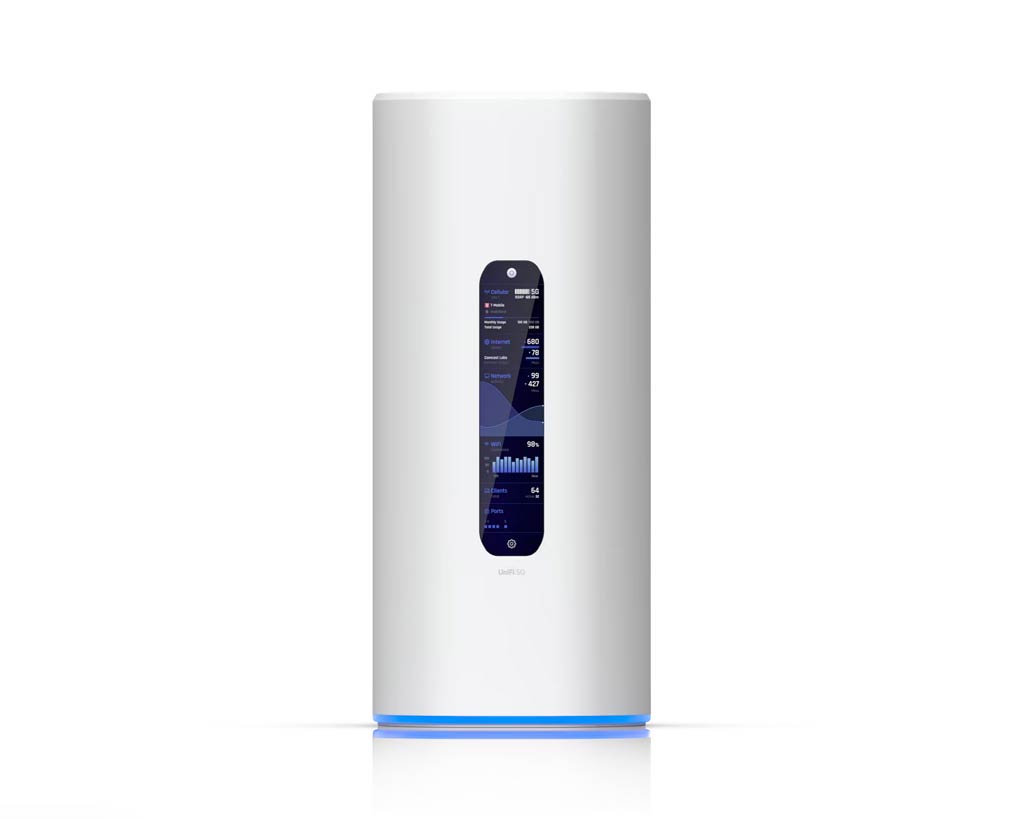
Out of the box, the Dream Router 5G Max looks exactly like a white version of the AmpliFi Alien Wi-Fi 6 router. The two share the same design and physical size, with a large 4.7″ touch screen on the front and all the ports on the back.
In case you’re not familiar with the Alien, this touchscreen displays an array of information about the gateway and its activities across multiple pages that you can swipe left or right between. Additionally, you can use it to perform multiple tasks, such as testing Internet speed, restarting, and controlling lighting.
On the underside, there’s the familiar ring of programmable status lights warping around the edge, and the Dream Router 5G Max now includes a microSD slot, one of many features that help it outshine the previous model.
Tip
UniFi and AmpliFi are two networking product lines from Ubiquiti. They have entirely different architectures and initially serve two separate user demographics.
The UniFi family—powered by the UniFi OS—was initially designed for business, professional, nd enterprise users. Its comprehensive consoles or controllers serve as the central host for various products, with networking only part of the picture.
On the other hand, the AmpliFi family, represented by the Wi-Fi 5 HD Wi-Fi system, first launched in August 2017, and then the Wi-Fi 6 Alien, is explicitly made for the home environment. These simple mesh-ready app-operated Wi-Fi routers are easy to use but have a limited feature set.
In 2019, the UniFi Dream Machine (UDM) was the first UniFi console to also serve as a home router, thanks to its user-friendly design and straightforward setup. Following that, the UDR and the subsequent compact UniFi Cloud Gateway further bridged the gap, making UniFi hardware increasingly suitable for the home.
It appears that Ubiquiti will eventually phase out AmpliFi and focus on UniFi as its only platform for all user demographics.
My take is that by making the Dream Router 5G Max reuse the Alien’s once-unique design, Ubiquiti hints that the AmpliFi family, which was really great in its prime, is officially no longer being developed.
If that’s indeed the case, it would surely render at least a handful of fateful Alien fans out there melancholic. But that makes sense, given the number of home-friendly UniFi “routers” being released in the past couple of years. It’s time to move on!


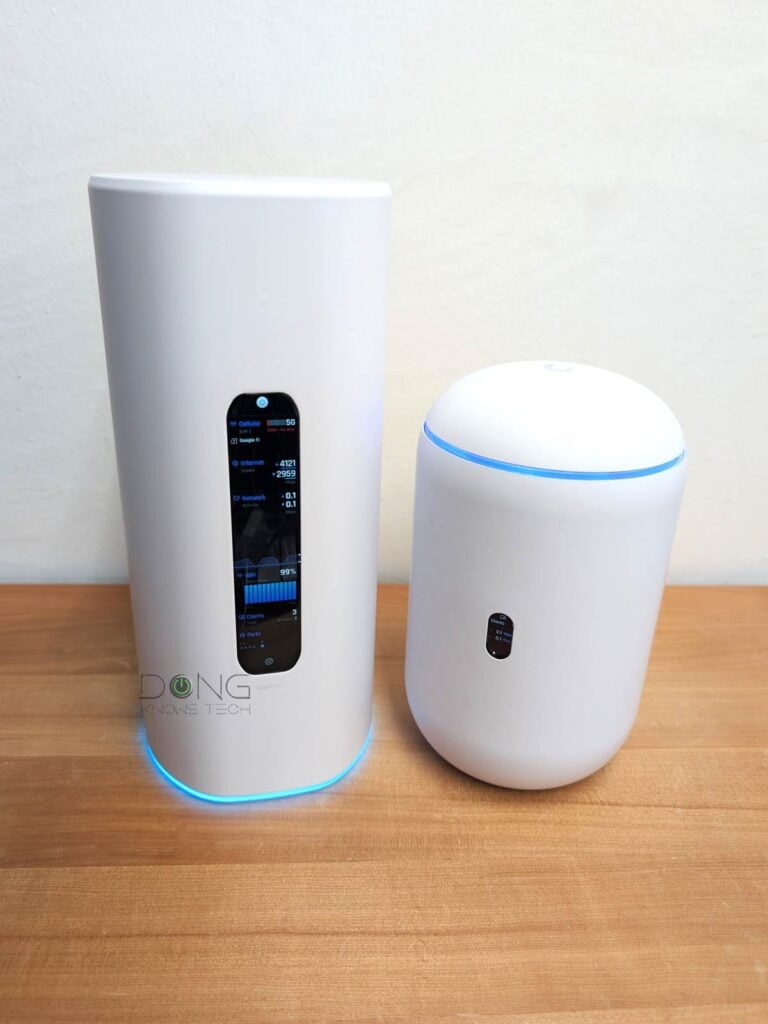
Other than that nostalgia, the new Dream Router 5G Max is more similar to the slightly smaller Dream Router 7. The two share the same hardware specs as UniFi Network consoles: both can host multiple UniFi applications, including Protect, and feature the same Wi-Fi 7 grade and microSD-based storage. They both also include a 64GB miniSD card, though serious users should replace that with a larger one immediately.
The table below shows the hardware specs of the two compact Wi-Fi 7 UniFi Network consoles. You’ll note that they are the same in terms of Wi-Fi specs, ports, and processing power. However, being larger and offering more, the UDR-5G-Max consumed slightly more power in real-world use.
Hardware specifications and real-world power consumption: Ubiquiti UniFi Dream Router 5G Max vs. UniFi Dream Router 7
 |  | |
|---|---|---|
| Full Name | UniFi Dream Router 5G Max | UniFi Dream Router 7 |
| Model | UDR-5G-Max | UDR7 |
| Operating Roles | Cloud Gateway | |
| Wi-Fi Bandwidth | Tri-band BE11000 | |
| 6GHz band (channel width) | 2×2 BE: Up to 5.7Gbps (20/40MHz/160/320MHz) | |
| 5GHz band (channel width) | 2×2 BE: Up to 4.3Gbps (20/40/160/240MHz) | |
| 2.4GHz band (channel width) | 2×2 BE: Up to 688 Mbps (20/40MHz) | |
| Automated Frequency Coordination (AFC) | No | |
| Multi-Link Operation (MLO) | Yes | |
| Wi-Fi Coverage (estimate) | 160 m² (1,750 ft²) | |
| 5G Modem Specs | Category: 5G NR Sub-6 Bands: n1, n2, n3, n5, n7, n8, n12, n13, n14, n18, n20, n25, n26, n28, n29, n30, n38, n40, n41, n48, n66, n70, n71, n75, n76, n77, n78, n79 Max. TX Power: HPUE power class 2: 26 dBm Max Downlink: 3.4Gbps Max Uplink: 560Mbps | None |
| 4G LTE Modem Specs | Bands: B1, B2, B3, B4, B5, B7, B8, B12, B13, B14, B18, B19, B20, B21, B25, B26, B28, B29, B30, B32, B34, B38, B39, B40, B41, B42, B43, B46, B48, B66, B71 Max. TX Power: HPUE power class 2: 25 dBm Max Downlink: 1.6Gbps Max Uplink: 210Mbps | None |
| 3G Modem Specs | Bands: B1, B2, B4, B5, B8, B19 | None |
| Cellular Antenna Gain | 617-960 MHz: 3 dBi 1710-2700 MHz: 7 dBi 3300-5000 MHz: 8 dBi 5150~5925 MHz: 8 dBi | N/A |
| SIM | 2x Nano SIM slots supporting two Nano SIMs or one Nano SIM and one eSIM | None |
| Processing Power | Quad-core Arm Cortex A53 1.5GHz CPU, 3GB RAM | |
| Storage | Undisclosed internal flash, 64GB microSD pre-installed in SD card slot | |
| Dimensions | 4.33-inch (110 mm) wide 9.8-inch (250 mm) tall | 4.33-inch (110 mm) wide 7.25-in (184.2 mm) tall |
| Weight | 3.1 lb (1.4 kg) | 2.4 lb (1.1 kg) |
| PoE Port | 1x 802.3af | |
| PoE Power Budget | 15.4W | |
| Max PoE Per Port | 15.4W | |
| Multi-Gig Port | 1x SFP+ (WAN/LAN), 1x 2.5GBASE-T WAN/LAN), 3x 2.5GBASE-T LAN | |
| Gigabit Port | None | |
| Power Method | Power adapter (included) | Standard AC power cord (included) |
| Power Supply | 54V DC/1.1A | AC/DC, Internal, 50W |
| Supported Voltage | 100-240V AC | |
| Real-World Power Consumption (per 24 hours) | ≈ 430 (tested with no PoE device) | ≈ 315 Wh (tested with no PoE device) |
| Internal Fan | Yes | |
| Max TX Power | 2.4GHz: 23 dBm 5GHz: 26 dBm 6GHz: 22 dBm | 2.4GHz: 23 dBm 5GHz: 26 dBm 6GHz: 24 dBm |
| Antenna Gain | 2.4GHz: 4 dBi 5GHz: 5 dBi 6GHz: 8 dBi | 2.4GHz: 5 dBi 5GHz: 7 dBi 6GHz: 6 dBi |
| Wireless Security | WPA/WPA2/WPA3 | |
| Mesh Ready | Yes (with UniFi access point) | |
| Notable Design | Front-facing 4.7″ touchscreen, microSD slot | Egg shape design, Color-changing ring status light, Front-facing 0.96″ vertical status screen, microSD slot |
| UniFi Application Suite (concurrent supported apps) | Network, Protect, Talk, Access, Connect | |
| Max UniFi Device Support (Concurrent access points, cameras, phones, etc.) | 30+ | |
| Max Camera Support (Protect app) | HD (5) 2K (2) 4K (1) | |
| Max Concurrent User Support (end-devices) | 300+ | |
| IDS/IPS Throughput (routing bandwidth with security turned on) | 2.3Gbps | |
| Software Version (at review) | UniFi OS: 5.0.12 Network: 10.2.89 | UniFi OS: 4.1.18 Network: 9.0.114 |
| Release Date | March, 2026 | February 25, 2025 |
| US Launch Cost (compare prices) | $499 | $279 |
A unique UniFi “router” with a built-in cellular modem
As noted on the table above, the Dream Router 5G Max has its unique purpose and capability: it comes with two Nano SIM slots (plus the ability to host an eSIM) that work with its built-in 5G cellular modem. On this cellular front, it’s the same as the UnFi 5G Max.
In other words, as mentioned at the beginning, the $499 Dream Router 5G Max is a less expensive combo of the Dream Router 7 ($279) and the UniFi 5G Max add-on modem ($399).
Having the cellular modem built in means you won’t need to manage multiple hardware units and run an extra network cable. However, that convenience comes with a drawback: you can’t place the modem away from the “router” to improve cell reception—note that the UDR-5G-Max doesn’t include ports for external cellular antennas, either.
The point is that on the cellular front, the Dream Router 5G Max is great for homes with good cell reception. Otherwise, it’s better to use another UniFi Cloud Gateway, such as the UDR7, with a UniFi add-on cellular modem for the best reception.
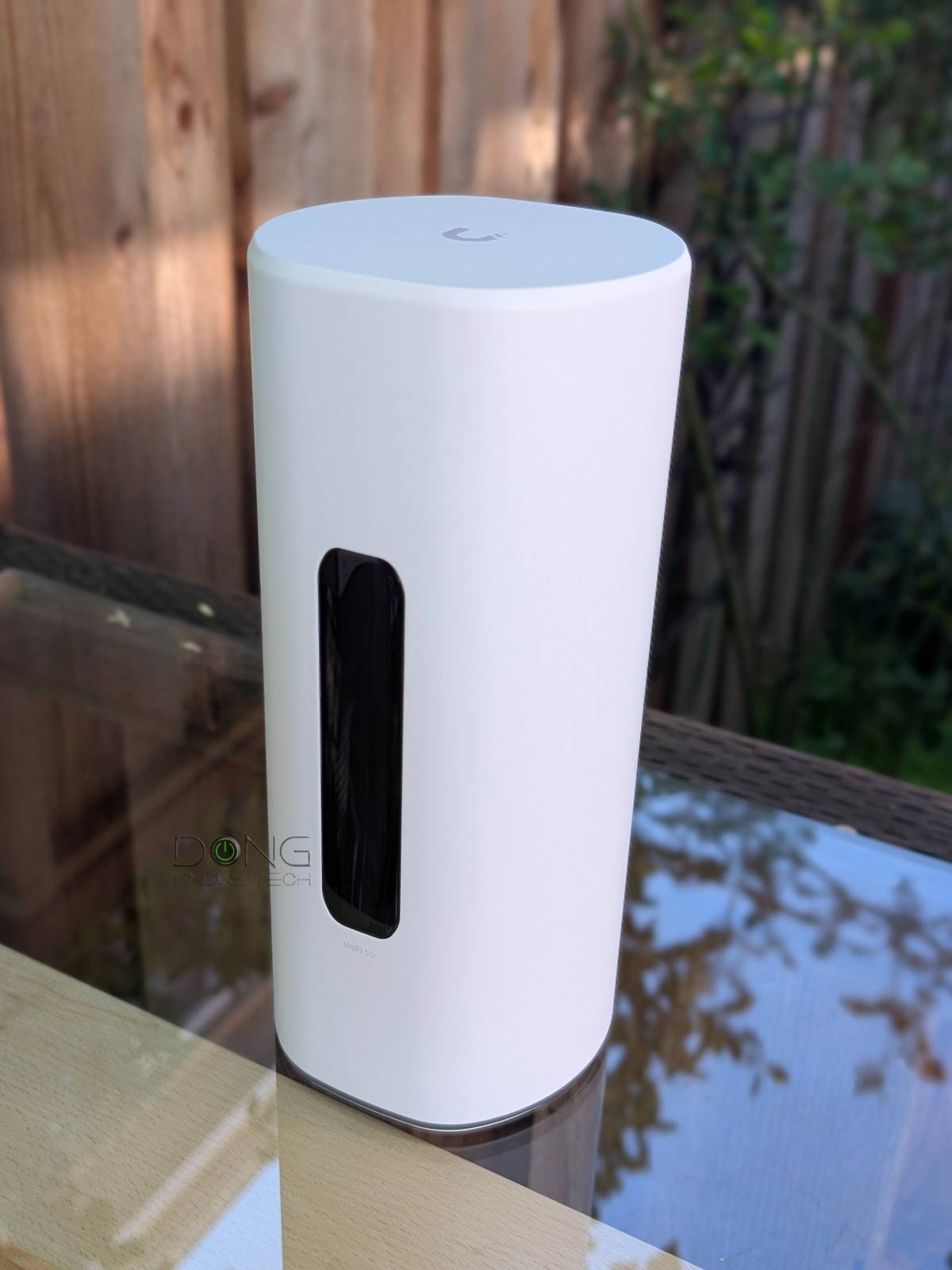
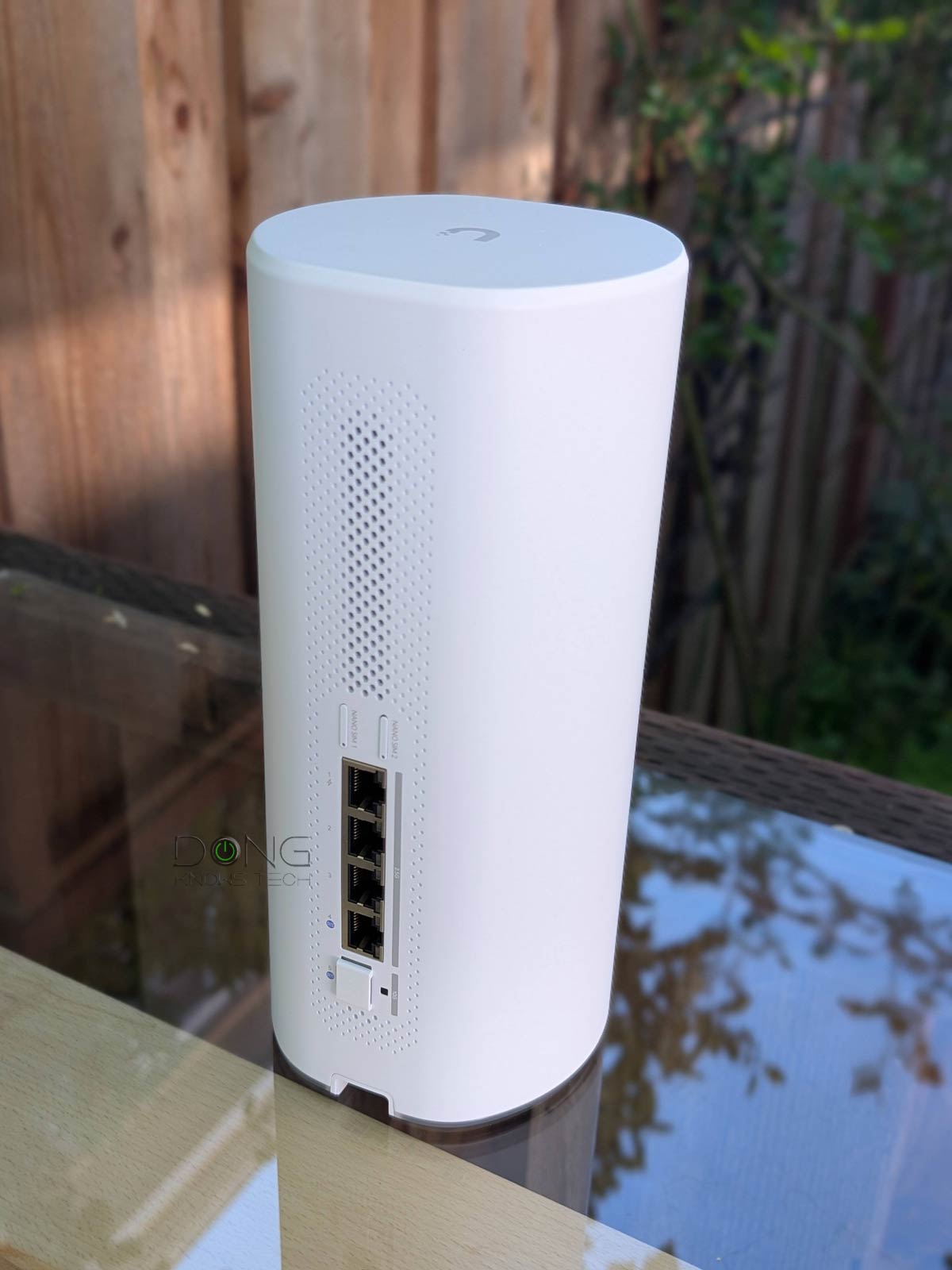
In any case, as a cellular-ready Wi-Fi router, the UDR-5G-Max is light-years ahead of the D-Link G530, another 5G-ready router I’ve tried, in all accounts.
That single-10Gbps-port pain
As shown in the hardware specs, the UDR-5G-Max shares the same ports as the UDR7, which means it has the same pain point I lamented in the review of the latter: the sole 10Gbps SFP+ port.
You can also turn this SFP+ port into a 10GBASE-T via a Transceiver, such as one of these—I used one for the testing.
The fact that this is an SFP+ is not a huge deal—in fact, it can be a plus, as many top-tier switches include this type of uplink port. However, since there’s only one, the gateway can’t offer a real 10GbE-grade network. If there were another, you’d be able to use one for the WAN side and the other for a LAN device, such as a switch.
In any case, like all UniFi Cloud Gateways, you can turn any of the UDR-5G-Max’s ports between the WAN and LAN roles, as long as one of them is a WAN, and it can handle multiple WAN sources simultaneously for failover or load balancing. With four 2.5GbE ports, the router can handle a handful of entry-level Multi-Gig devices on its own.
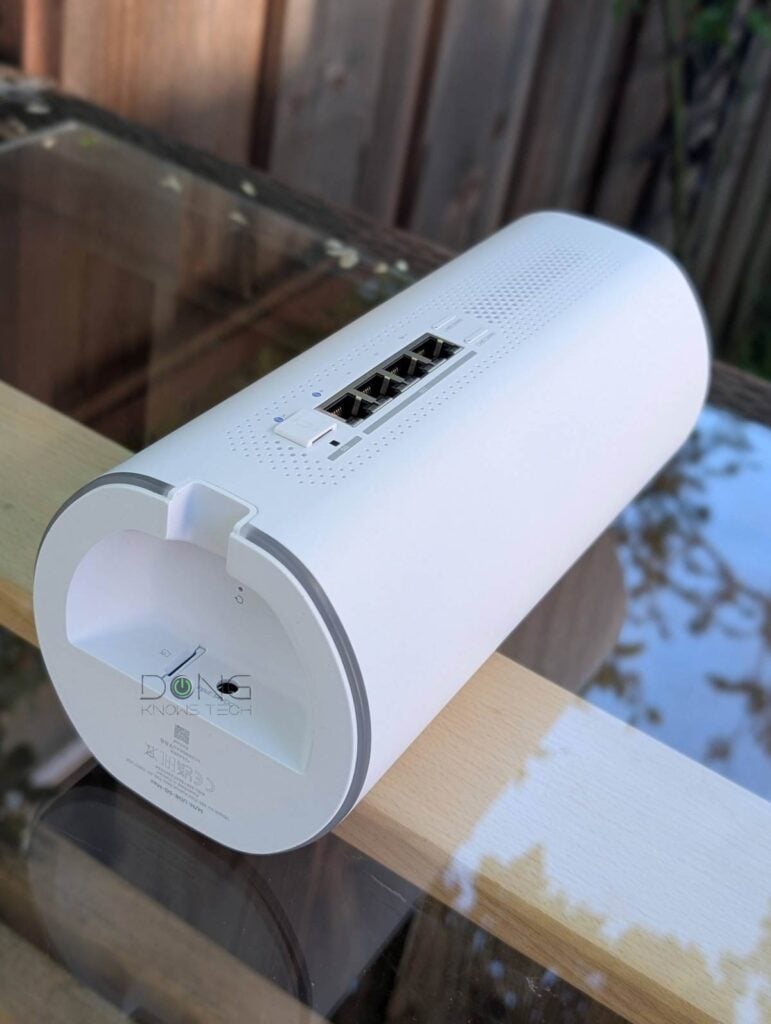
Typical setup process, plug and play SIM support
The Dream Router 5G Max shares the same setup process and management as the rest of the UniFi Network-enabled console.
Specifically, from a connected computer, you can access the web user interface via the default IP address (192.168.1.1), as you would with any standard router. After that, the rest is self-explanatory.
Alternatively, you can use the UniFi mobile app for the job, though I prefer the web interface, which has more in-depth access to the hardware as I detailed in this post on UniFi Network as a whole.
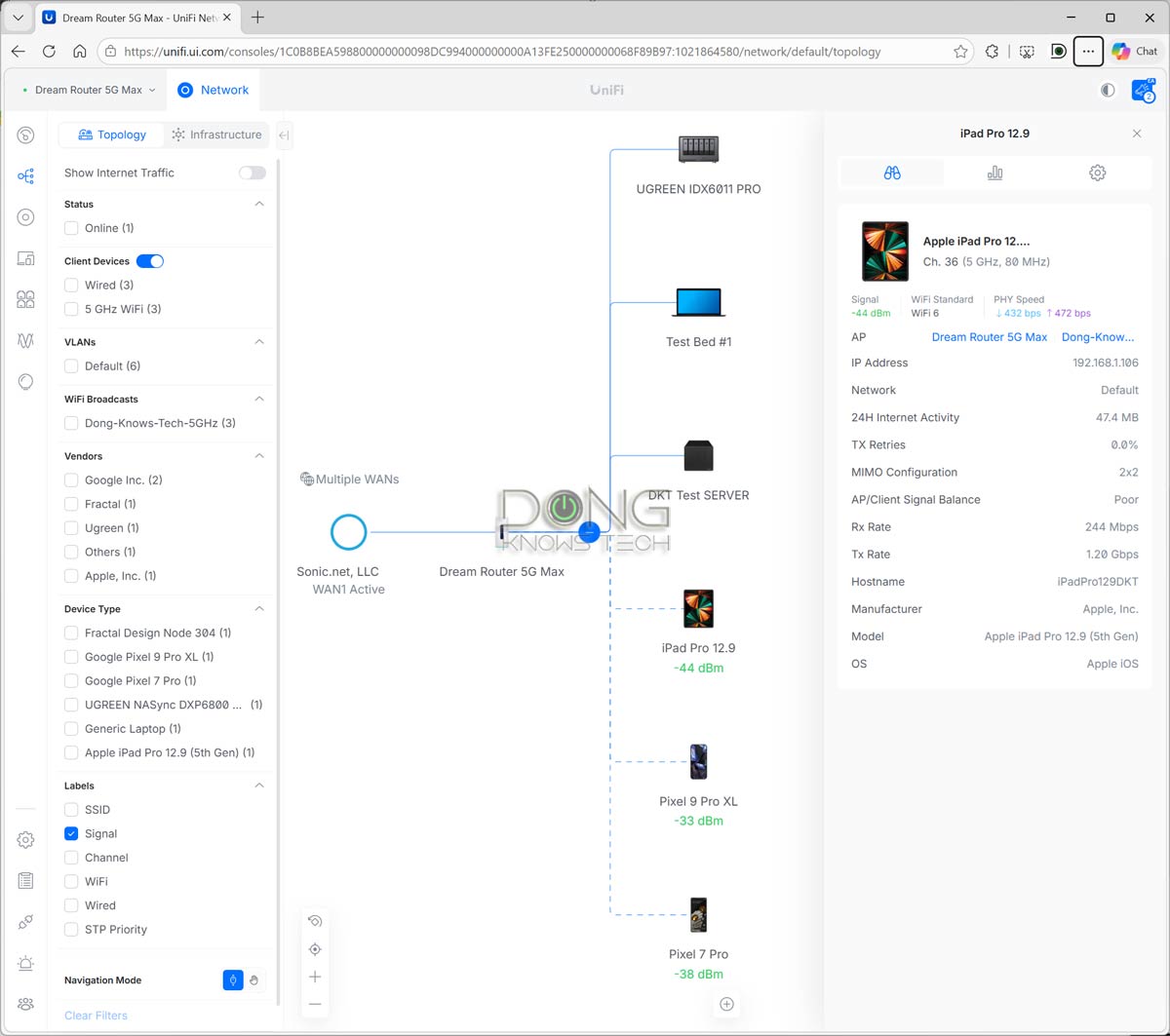
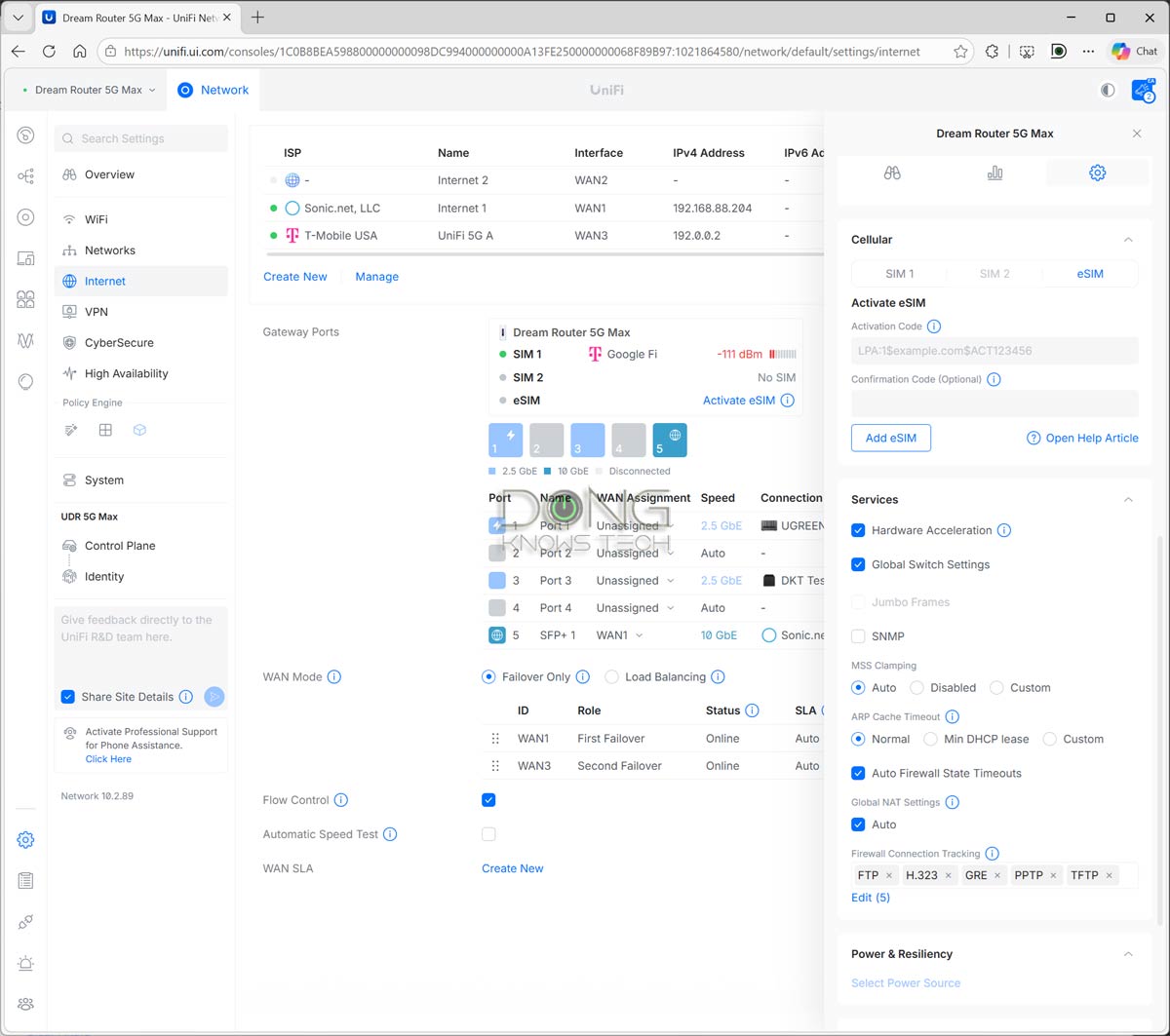
Regarding cellular support, the Dream Router 5G Max proved in my trial to be the same as when I used the UniFi 5G Max add-on modem with another UniFi Cloud Gateway.
Specifically, I popped a couple of physical US data SIMs into either SIM slot, and within a minute or so, the gateway automatically provisioned them as additional WAN sources in Failover mode—the SIMs kick in when the primary WAN port is connected or down.
If, for some reason, you have a SIM that’s not automatically supported, you can manually enter its settings. All that can be managed via the Internet section of the web-based interface, as shown in the screenshot above. I didn’t try an eSIM, but it can be added via a QR code (in the UniFi mobile app) or a provided LPA activation code.
Note: To conserve cellular data, it’s best to use the Dream Router 5G Max’s SIM in Failover (default) mode in a dual-WAN or multi-WAN configuration. Additionally, turn off “Automatic Speed Test” in the console’s Internet section.
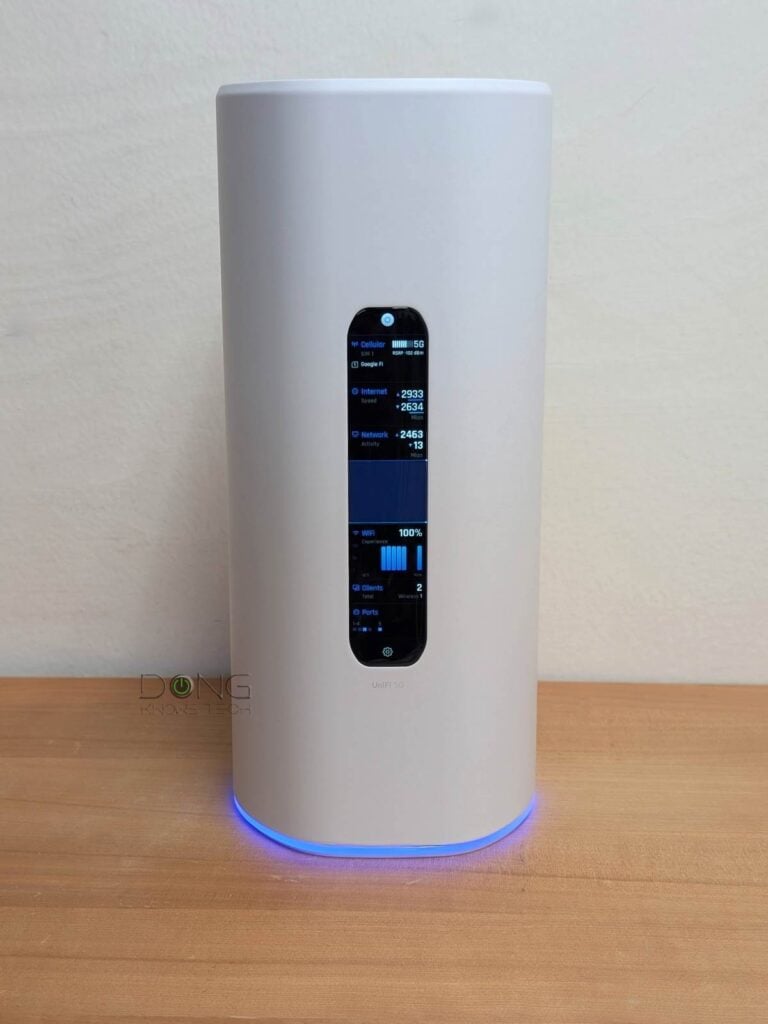
Overall, again, the Dream Router 5G Max is a pleasure to use, and its large front screen is both fun and helpful.
Ubiquiti UniFi Dream Router 5G Max: Excellent performance
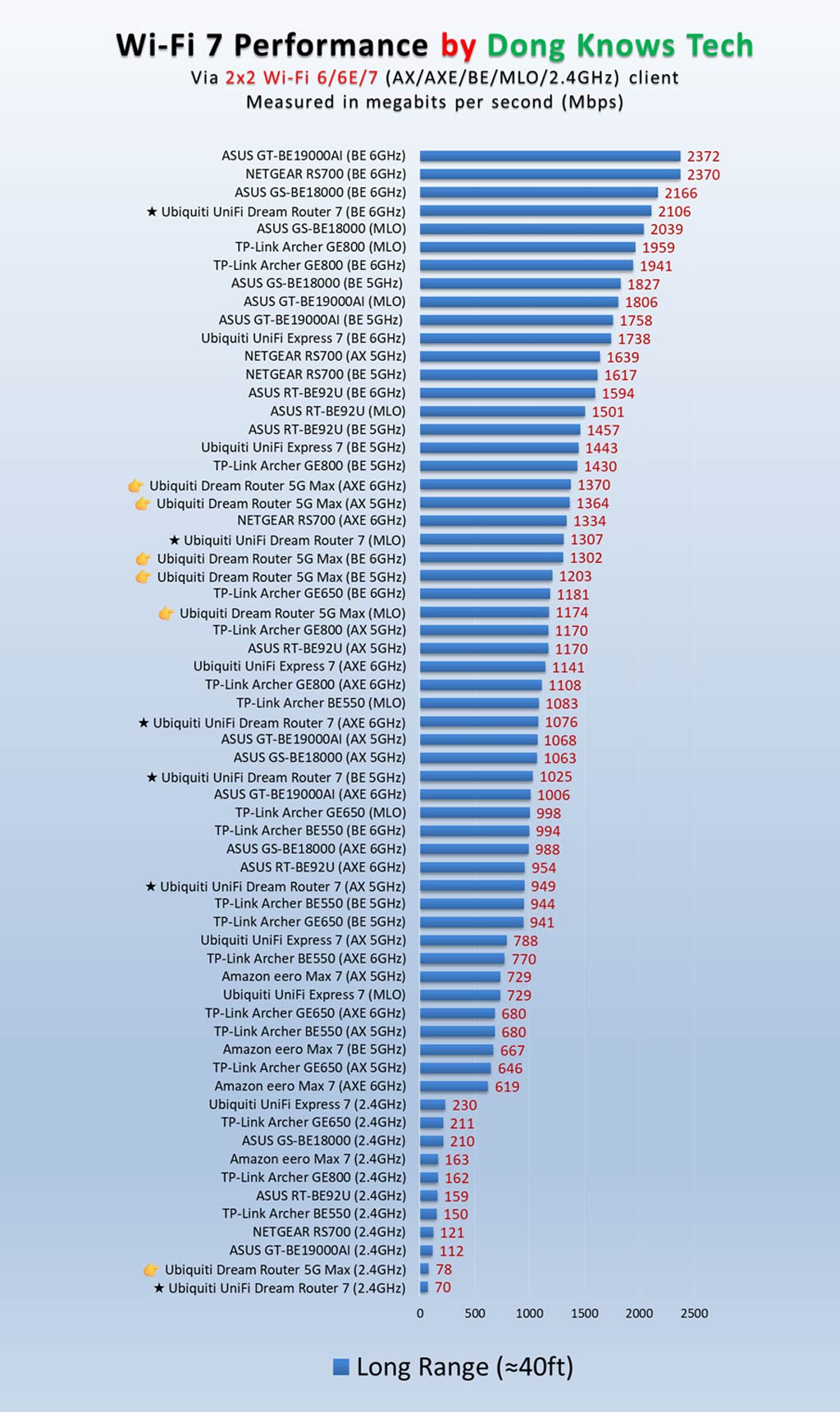
I tested the Dream Router 5G Max for over a week and had nothing to complain about its performance. Overall, it proved to be a similar to the UDR7, though the two had some differences, likely due to a gap between their versions of the UniFi OS and Network app.
Since there’s only one 10Gbps port on the wired front, the gateway is effectively a 2.5Gbps router, and its sustained wired speeds were on par with other routers of the same port grade.
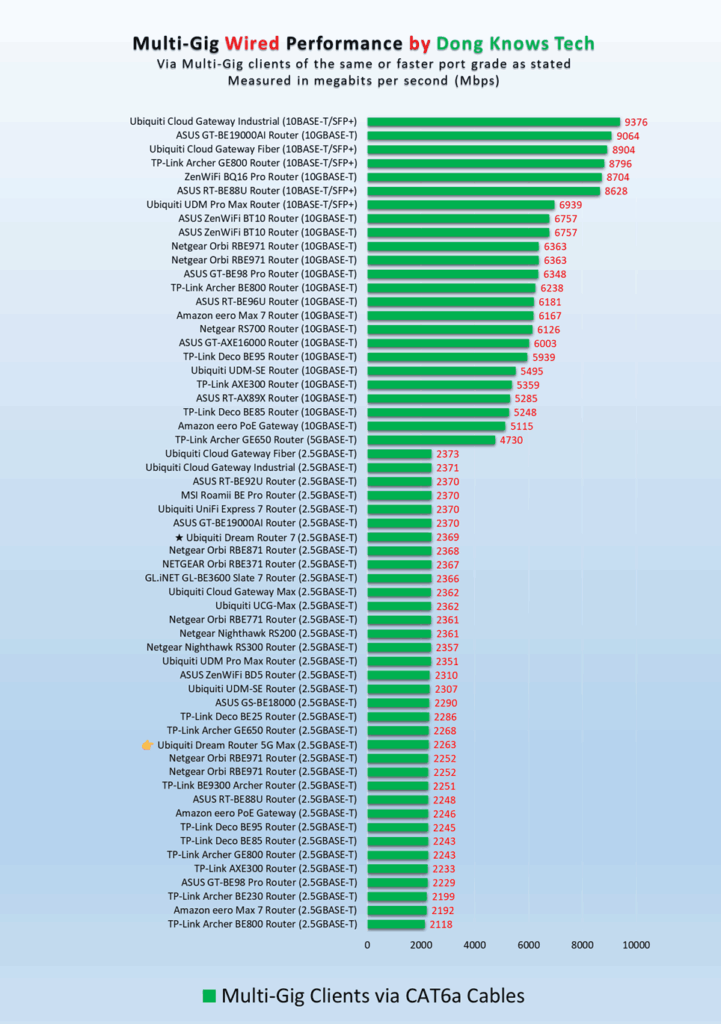
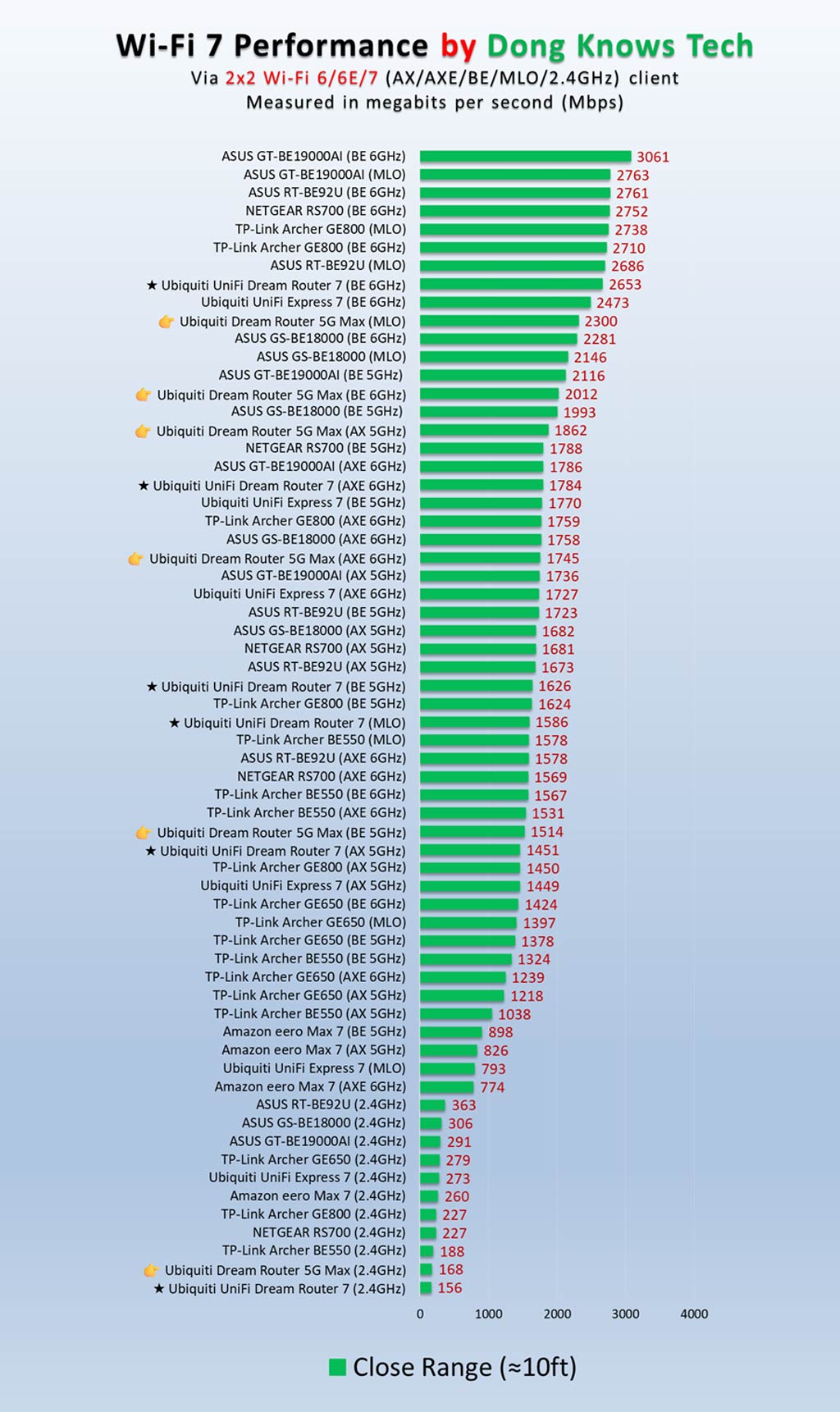
The gateway’s Wi-Fi performance proved excellent for its mid-tier specs. Overall, it was faster than other similar routers, including the UDR7, in most tests.
As shown in the specs table above, the Ubiquiti rates the Dream Router 5G Max’s IDS/IPS Throughput at 2.3Gbps, meaning that’s essentially the max bandwdith you should expect from it. However, with the security feature turned off, I often experience higher real-world speeds, and the router frequently pulls close to 3Gbps of WAN speed from my 10Gbps fiber-optic line.
Still, given the lack of a second 10Gbps port, keep in mind that 2.5Gbps is the limit of this router, which is plenty for most homes or small offices.
The gateways’ cellular performance was the same as the UniFi 5G Max‘s when placed in the same location. I often received around 300 Mbps download speed with my Google Fi data SIM. Of course, the actual performance will vary depending on your location and data plan.
Still, it’s safe to say that in an area with good cell reception, the Dream Router 5G Max’s 5G support is defenitely an excellent way to have broadband backup. As mentioned in the review of the UniFi 5G Max, UniFi Cloud Gateways generally excel at managing multiple Internet connections, and the Dream Router 5G Max did indeed transition seamlessly between my fiber-optic WAN and 5G connection during testing.
As for Wi-Fi range, the gateway had similar coverage to the UDR7. Specifically, it can blanket an indoor area of around 2000 ft2 (186 m2). Of course, your mileage will vary, and keep in mind that you can always get a UniFi access point, such as the UX7, to extend the coverage.
The Dream Router 5G Max seems to have an internal fan—I could hear a faint hum when I pressed my ear to it—and it became slightly warm to the touch during operation, though never hot enough to be a concern.
Conclusion
Ubiquiti’s UniFi Dream Router 5G Max (UDR-5G-Max) is not for everyone—the less expensive Dream Router 7 is more suitable for the masses.
However, if you want an all-in-one Wi-Fi 7 “router” that features advanced 5G support right out of the box, it’s one of the best Wi-Fi 7 solutions. After that, the helpful touchscreen and the ability to host an advanced Protect-based surveillance system are pure bonuses. Grab yours today!


I would love to migrate from Amplify to one of these new Ubiquity routers. But I use Amplifi’s router-to-router Teleport feature all the time, which appears to be not fully implemented in the Ubiquity router line. With this feature, I can Teleport any connected device. With the Ubiquity iteration, I believe I’m limited to forwarding only my connected cell phone. Can you confirm or illuminate on that, Dong? Thank you!
UniFi is much better on this front, Eric, it doesn’t use Teleport for that anymore, but the Site-to-Site VPN feature, among other options. Teleport is also available for clients. In other words, UniFi is many times better in terms of capabilities.