
The Nighthawk 5G M7 Portable WiFi Hotspot with eSIM (model MH7150), unveiled on November 17, 2025, is NETGEAR’s latest mobile router.
From its name, which is a mouthful and leaves nothing to the imagination—I’ll cuts my fingers some slack and shorten it to “M7” or “Nighthawk 5G M7” from here on out—it’s easy to spot that the new device has a lot that sets it apart from previous models, including the similarly named Nighthawk M7 Pro, or most other travel routers for that matter.
Here’s the bottom line: If you’re looking for a travel router with versatile and effective built-in cellular support, the Nighthawk 5G M7 is the one to get. On the downside, its Wi-Fi performance could use some improvement, and then the hefty $499.99 price tag—you’ll likely need to spend a bit more on accessories to get the most out of it.
But chances are you’ll get what you pay for.
NETGEAR Nighthawk 5G M7's Rating
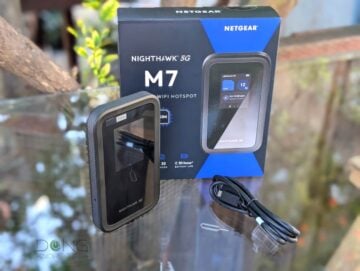
Pros
Strong cellular support, including NETGEAR's eSIM marketplace
Unlocked, flexible, and versatile in handling Internet sources
Excellent NETGEAR mobile app and a robust web user interface
Cons
Expensive with modest Wi-Fi performance, no support for VPN server or client
No integrated network port, Wi-Fi network restarts when applying many changes or switching between Internet sources
Charger and accessories not included, a bit bulky, no USB-based storage or external antenna option
Dong’s note: I first published this post on November 17, 2025, as a preview and updated it to an in-depth review on February 7, 2026, upon thorough hands-on testing.
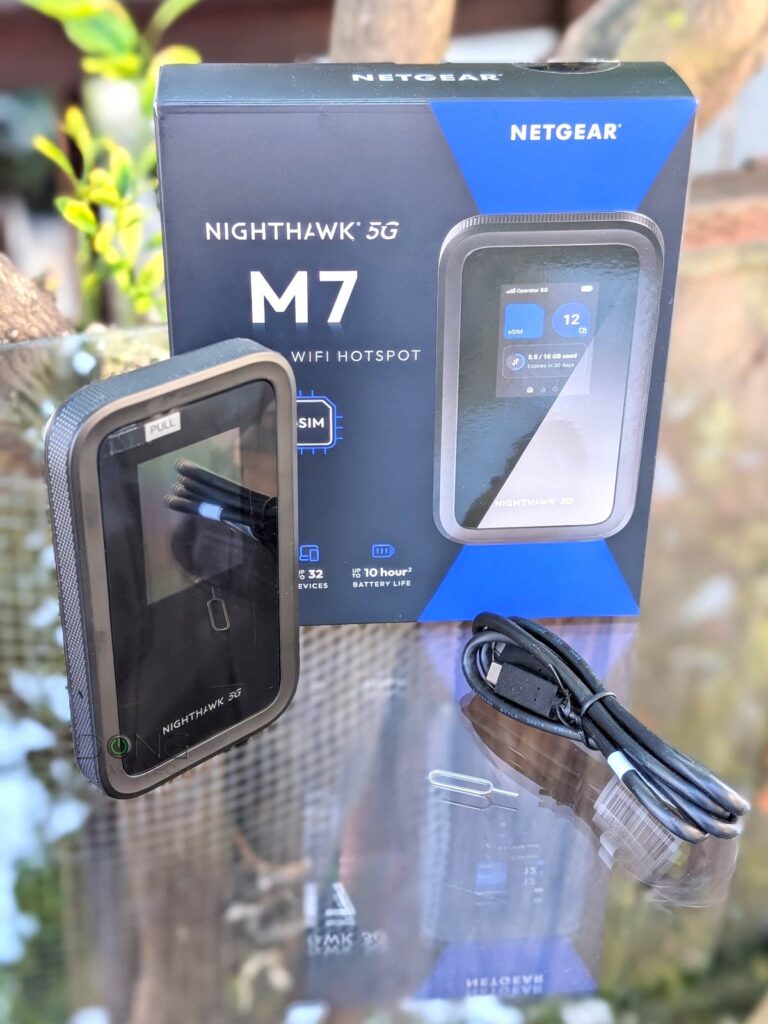
Netgear Nighthawk 5G M7: Everything an (international) traveler needs to stay connected
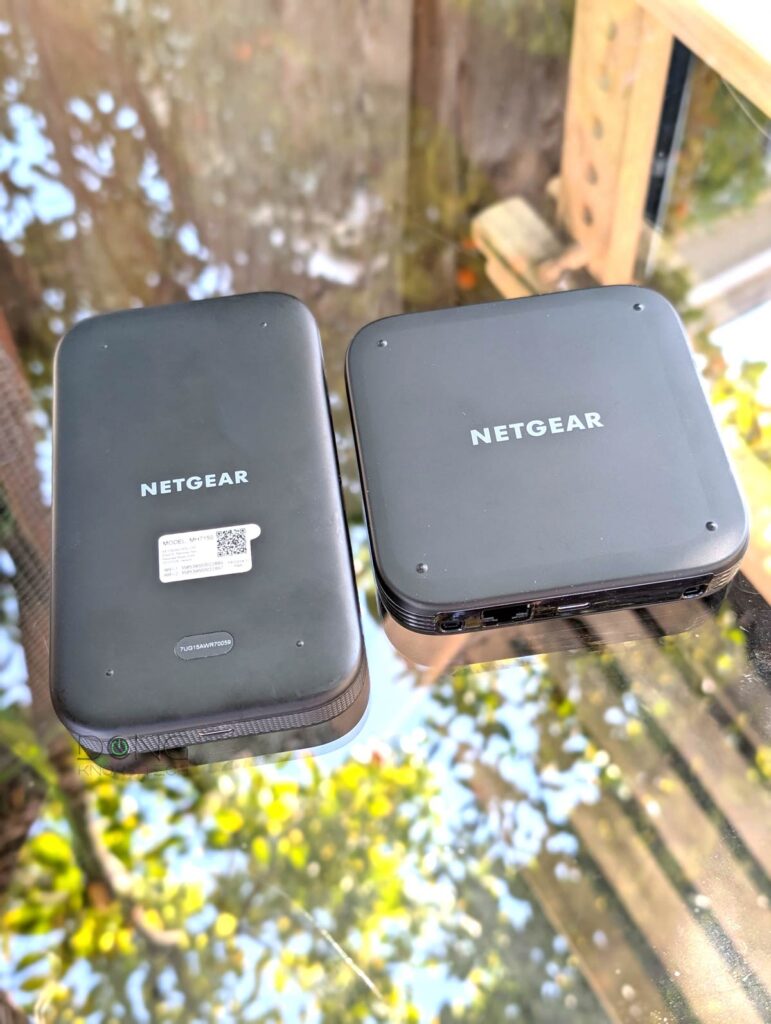
The first thing to note about the M7 is that it’s not a stripped-down version of the M7 Pro that came out late last year. Specifically, the omission of the “Pro” notion doesn’t necessarily make it a “worse” device, though it indeed doesn’t have a built-in network port or the support for mmWave 5G.
The biggest difference between the two is that the Nighthawk 5G M7 is a complete solution for international travellers with a stronger focus on instant cellular-based Internet access, regardless of your current location or incoming destination. In fact, it’s among the first, if not the first, of its kind to offer that.
There are other differences as well, but first, the table below shows the hardware specs for NETGEAR’s three latest mobile routers.
NETGEAR Nighthawk 5G M7 Hotspot with eSIM: Hardware specifications
| NETGEAR Nighthawk 5G M7 Hotspot with eSIM | NETGEAR MR7400 Nighthawk M7 Pro Mobile Router | NETGEAR MR6550 Nighthawk M6 Pro Mobile Router | |
|---|---|---|---|
 |  |  | |
| Model | M7 or MH7150 | M7 Pro or MR7400 | M6 Pro or MR6550 |
| 5G Chipset | Qualcomm Dragonwing SDX72 | Qualcomm Snapdragon SDX75 | Qualcomm SDX65 |
| 5G Speed (up to) | 4Gbps | 6Gbps | 8Gbps |
| 5G Technology | 5G Sub6 NSA/SA (3CC) | Sub6(6CC)/300MHz, NR-CA | Sub 6 and mmWave(9xCA) |
| 4G Speed (up to) | 2Gbps | ||
| 4G Technology | 4G LTE CAT20 (7CC) | CAT 20 LTE A(5xCA) | |
| Wi-Fi Bandwidth | Dual-band BE3600 (5GHz-only by default) | Tri-band BE5600 (only the 5GHz or 6GHz can work at a time) | Tri-band Wi-Fi 6E AXE3600 (only the 5GHz or 6GHz can work at a time) |
| Wi-Fi Security | WPA, WPA2, WPA3 | ||
| Battery | 3850mAh Li-ion | 5040mAh Li-ion | |
| Battery Life (up to) | 10 hours | 13 hours | |
| Power Consumption (per 24 hours) | not measured (battery-powered) | ≈ 70 Wh (measured when plugged in, battery removed) | |
| Dimensions (HWD) | 5.71 x 3.29 x .67 in (145 x 83.6 x 17 mm | 4.14 x 4.14 x .85 in (105 x 105 x 21.5 mm) | |
| Weight (with battery) | .57 lb (258 g) | 0.55 lb (252 g) | |
| SIM Type | 1x Nano-SIM (4FF) slot, up to 7 eSIM | 1x Nano-SIM (4FF) slot | |
| Network | Unlocked | AT&T | Unlocked |
| Ports | 1x USB Type-C (charging/data) | 1x USB Type-C (charging/data) 1x 2.5Gbps Ethernet 2x TS9 RF ports (for external antennas—not included) | |
| USB Standard | USB 3.1 Gen 1 (5Gbps) | USB 3.1 Gen 2 (10Gbps) | USB 3.1 Gen 1 (5Gbps) |
| Ethernet Speed | 1Gbps (via USB Ethernet adapter or via cradle) | 2.5Gbps via native port | |
| Screen | 2.4″ (non-touch) | 2.4″ (non-touch) | |
| Management | Web-based user interface, non-touch screen with control button, NETGEAR mobile app | Web-based user interface, Touchscreen | |
| Operating Roles | Mobile hotspot/USB cellular modem, Wi-Fi repeater (WISP), Wi-Fi router | ||
| Networking Features | • Guest Network • Wi-Fi Protected Setup • WPS on/off control • Wi-Fi on/off control • Wi-Fi SSID broadcast on/off control • VPN passthrough • MAC address filtering • Website filtering • Port forwarding • Port filtering • Password-protected web admin portal | ||
| Max Concurrent Wi-Fi Clients | 32 | 64 | 32 |
| US MSRP | $499.99 | $449.99 | $999 |


A more streamlined design with the familiar web-based user interface
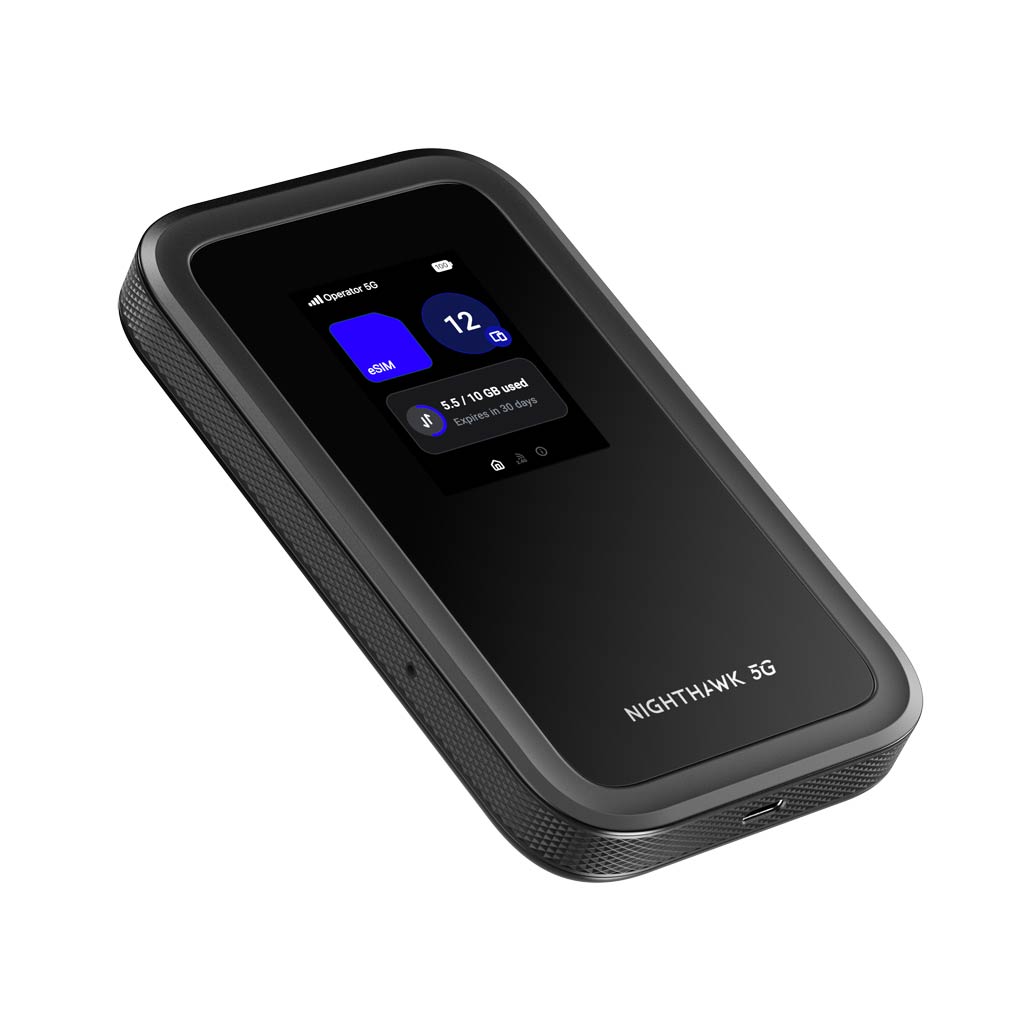
Out of the box, the Nighthawk 5G M7 resembles the previous M7 Pro and the M6 Pro, yet it is totally different. It’s no longer a square box, but now a rectangular device about the size of a mobile phone.
Personally, I like the new design. The older M7 Pro (as well as the M6 Pro) is too wide and can be awkward to hold. On the other hand, the M7 feels comfortable in the hand and slips into a pocket with ease. It’s still quite bulky, though, like a Pixel 10 Pro XL inside a thick protective case.
On top, the Nighthawk 5G M7 has a small, rectangular color screen that is not touchable. Instead, it’s controlled by a single button on the router’s right side: a quick press to cycle through items clockwise, and a long press to select an item.
While that sounds odd, the mechanism worked extremely well in my experience. It’s simple and effective, with little room for mistakes. The screen generally displays no more than a few items per page, enough for users to manage simple settings and status.
Also on the right side of the router, below the control button, is an easily accessible Nano SIM slot, similar to a phone’s. This design spares users the need to open the travel router, as in previous Nighthawk models, to install a physical SIM card.
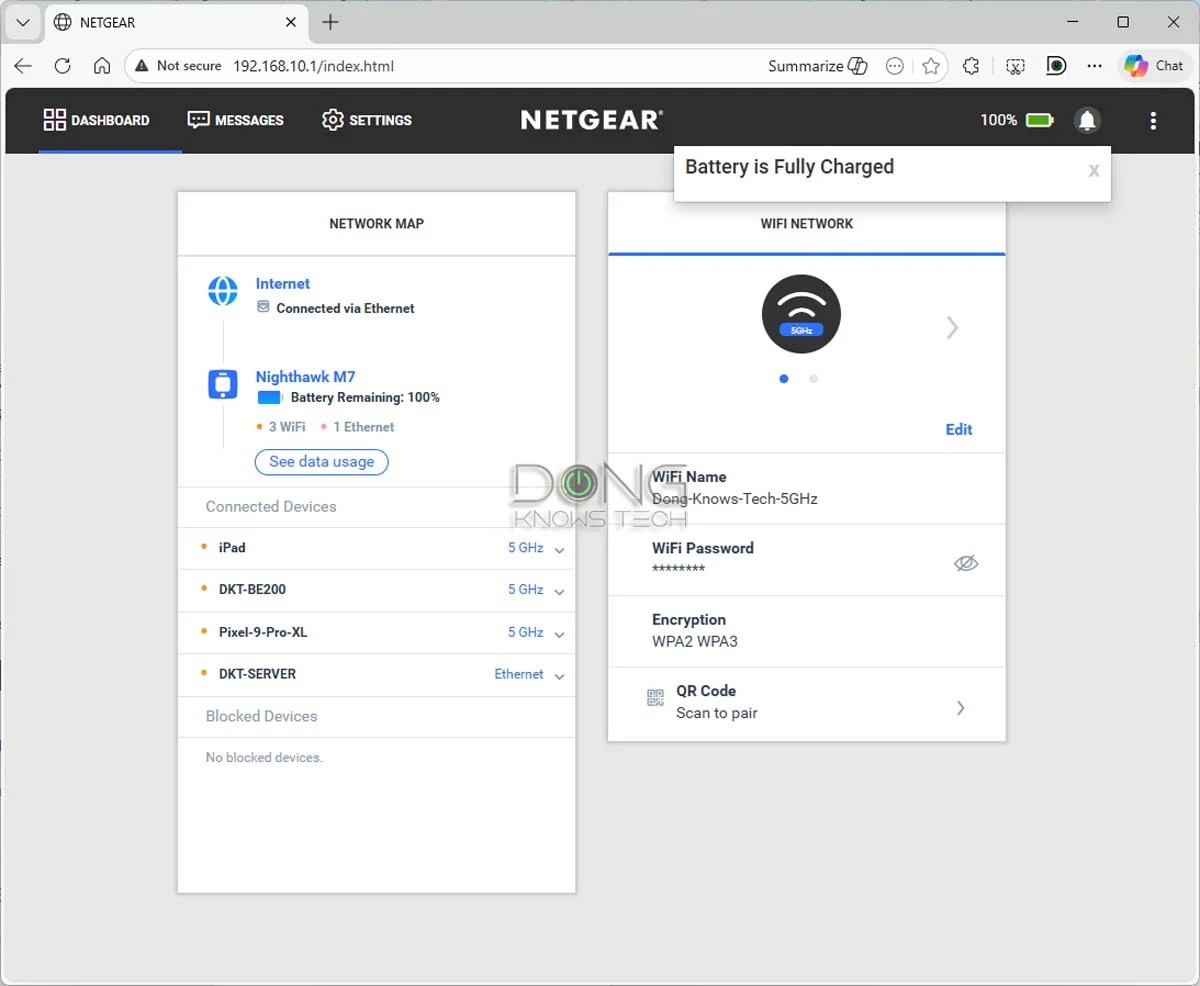
Like previous Nighthawk mobile routers, the M7 also has a web user interface for in-depth settings and customization, accessible via the router’s default IP address, 192.168.10.1.
Specifically, from a connected computer or a phone, open a browser, such as Chrome, and navigate to this IP address—the rest is self-explanatory. The M7 shares a familiar UI with the M7 Pro and M6 Pro, which looks like a mobile app when used within a mobile browser.
Speaking of mobile apps, the new travel router comes with a new NETGEAR app, which brings us to its most interesting feature: support for multiple eSIMs.
Unlocked with eSIM Marketplace accessible via a new NETGEAR mobile app
The Nighthawk 5G M7 is unlocked and supports a Nano SIM or multiple eSIMs from any provider worldwide. That alone makes it a much better device than the M7 Pro, which is locked to AT&T.
And the M7 has much more: in addition to working with existing SIMs like any other mobile hotspot, it also supports up to seven eSIMs and, most importantly, can help you buy tailored ones for your destination and automatically use them upon request. It’s the first travel router I’ve worked with to integrate an eSIM marketplace.


You can’t access this new feature through the router’s web UI. For that, you need to use the new NETGEAR mobile app (available for Android and iOS).
The app required a NETGEAR login account to work. Once logged in, you can use it to “Buy an eSIM” by browsing the eSIM Marketplace and managing your purchase. After that, when the phone is connected to the M7’s Wi-Fi network, the app helps activate the purchased eSIM on the device (or manage traditional eSIMs or the physical SIM). There’s now also a “Get a NETGEAR eSIM” link on the front page for more data shopping.
You can use the NETGEAR app to manage other aspects of the router, such as Wi-Fi settings or the local network, but the web UI has more in-depth settings for those tasks. The app’s primary job is to handle SIMs and eSIM purchases.
Through NETGEAR’s partnership with Gigs, the Nighthawk 5G M7 has access to eSIM plans in over 140 countries, ranging from 3GB to 20GB of included data, with prices varying by location. In general, the higher the data package, the lower the per-gigabyte cost.
You can search for eSIM options by country or region and preview all necessary information before committing to the purchase, without requiring a contract or a physical SIM to arrive in the mail. After that, you can choose to activate and use the eSIM on the M7 immediately or at a later time of your choosing.
I used the NETGEAR app to purchase a few data plans via the eSIM marketplace, and the process was as simple as any in-app purchase. I also tried the M7 with a few Nano SIMs from different US carriers, and they all worked automatically.
If, for some reason, a SIM is not automatically supported, you can manually configure it via the mobile app or the web user interface.
To sum up, the M7 can handle one physical SIM and up to seven eSIMs simultaneously, and users can use the NETGEAR app to manage them, such as purchasing eSIMs and switching between SIMs for data access in real time. By the way, the NETGEAR app is required only when you want to buy or activate a new eSIM. Otherwise, or if you have a physical SIM, you don’t need to use it at all.
The point is that unless you have a data plan that works worldwide, such as one from Google Fi, the M7 proved incredibly versatile and useful for staying connected wherever you end up on your journey. (I spent quite a bit of time browsing the eSIM Marketplace, and the only countries I could think of that weren’t on the list were North Korea and Russia, but you can always get a physical SIM for them.)
Network port available via accessories
As mentioned, the Nighthawk 5G M7 doesn’t have a built-in network port. Instead, it has a USB-C charging port with USB Power Delivery that supports USB-C 3.2 Gen 1 (5 Gbps) standard.


Netgear offers two accessories for this port: a Gigabit USB-C to Ethernet adapter (model USB2ETH) and a Nighthawk Desktop Cradle (MD200) that has a Gigabit WAN port and a Gigabit LAN port. Neither is included, and each comes with a USB-C charging port to add wired connectivity to the M7 without draining its battery.
I tried both of these accessories for my performance testing, and they proved to be incredibly handy.
By default, the USB2ETH adapter works as a LAN port when plugged into the M7’s USB-C port, allowing it to host a wired device, such as a desktop computer (or a switch). However, you can convert this port to a WAN port in the web UI.
The MD200 cradle, on the other hand, has two network ports, so it’s plug-and-play: the M7 can access a traditional Internet source and host a wired client simultaneously. It’s worth noting that the cradle is designed to accommodate previous preivous wider and thicker square models. As a result, it’s not as form-fitting as you would like with the M7—I had to fiddle a bit to align its USB-C port with the cradle’s protruding connector.
In any case, if you want to use the Nighthawk 5G M7 pureless as a wireless device, neither accessory is necessary. However, if a wired connection is required, one of them is essential. Size-wise, the MD200 is an excellent add-on for that cabin by the lake, while the USB2ETH is perfect for a long trip.


A versatile travel router that can be a bit more flexible
As a mobile router, the Nighthawk 5G M7 is designed primarily to connect to the Internet via a cellular connection and then share that connection with multiple devices on its Wi-Fi network. However, the router is much more versatile at connecting to the Internet.
Specifically, other than using its built-in cellular modem to host a SIM, it can use the following Internet sources, as confirmed in my testing:
- Via Ethernet using its USB-C charging port, by:
- Either connect to a traditional landline Internet via its USB-C port (using an Ethernet adapter or a cradle, as mentioned above). Or
- Hosting an external cellular modem or a smartphone in tether mode. In this case, note that it’ll also charge the phone as though it were a power bank.
- Via a Wi-Fi network. This mode is called “Wi-Fi Offload,” in which the M7 connects to the Internet via an existing Wi-Fi network, such as a hotel’s, and then shares that WAN connection with devices on its own Wi-Fi network. In other words, it features the WISP mode.
Tip
WISP stands for Wireless Internet Service Provider. It’s an operating mode in which a supported router receives an Internet connection via Wi-Fi and then distributes it to multiple devices via its own Wi-Fi network. It works similarly to a Wi-Fi extender (or repeater) with two added elements:
- The WISP router’s Wi-Fi network is shielded from the existing Internet-providing Wi-Fi network to keep its connected clients safe and private.
- The WISP router can handle an incoming Internet-enabled Wi-Fi connection that requires a particular authentication method, such as a captive portal or via a paid login account.
When you use a public Wi-Fi network or one with ambiguous security, WISP is recommended.
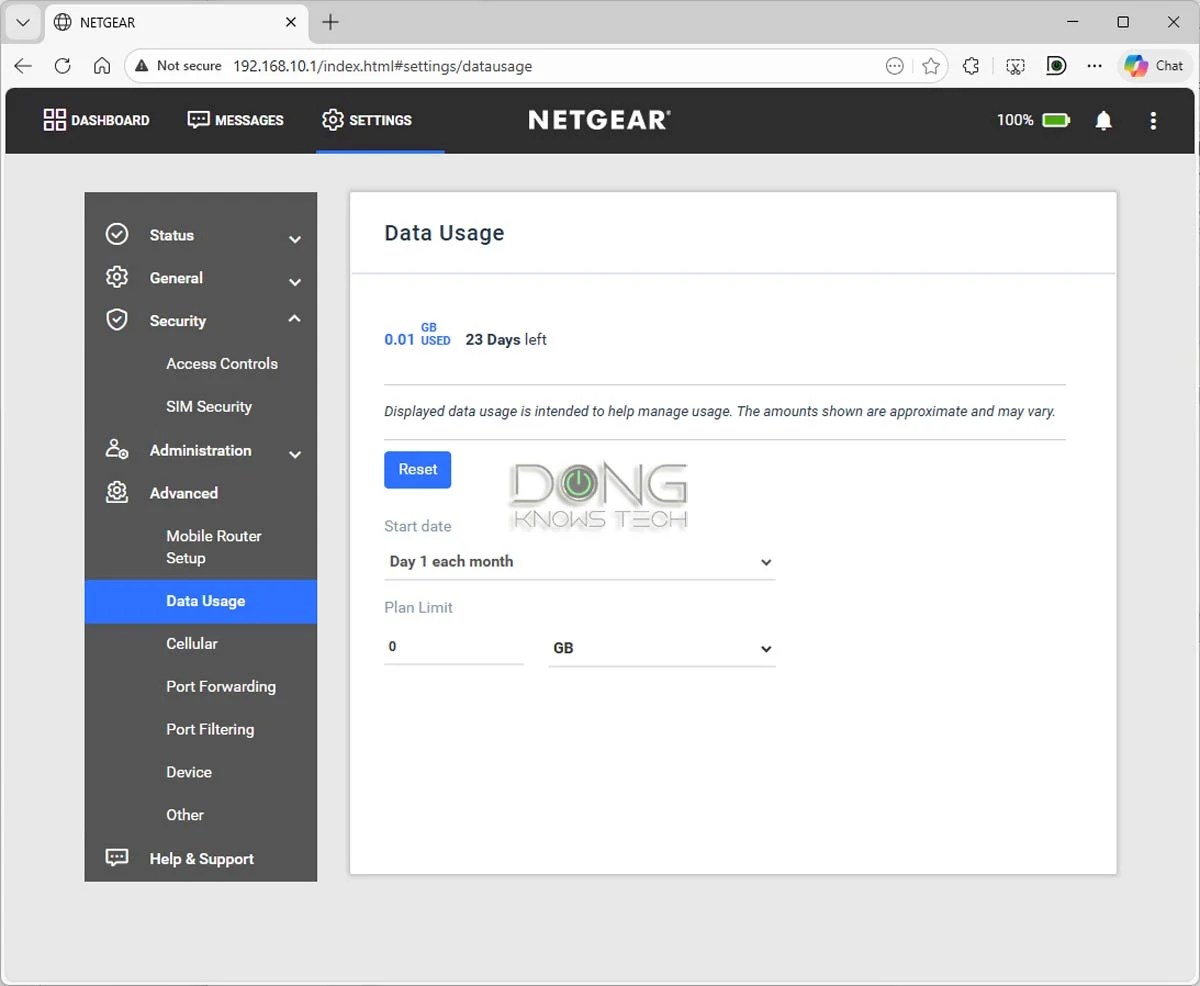
While the M7 can handle all three types of Internet sources—cellular, Ethernet, and Wi-Fi—at the same time, only one is active at a time, with Ethernet and Wi-Fi taking priority over cellular. The router can switch between them automatically, but it could use a bit more flexibility: each time it switches the Internet source, it also restarts its Wi-Fi network.
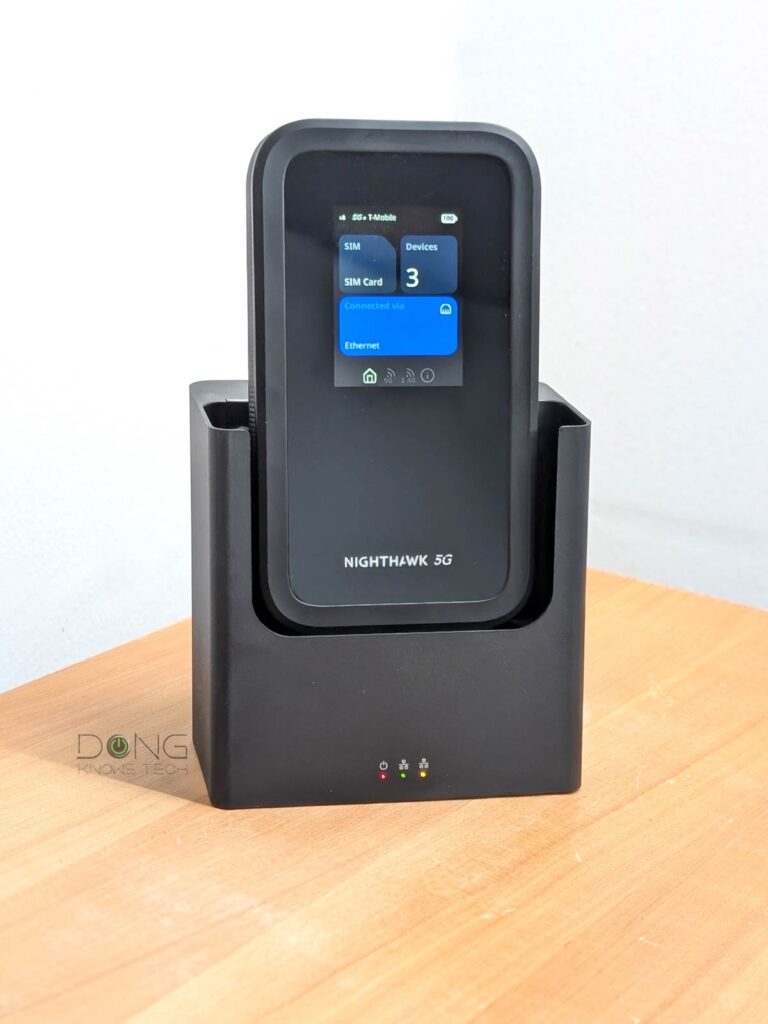
For example, I removed it from the cradle, effectively disconnecting the Ethernet connection. The router automatically switched to its cellular connection and restarted its Wi-Fi network during the process, which took about a minute. During this time, all connected devices were disconnected. The same thing happened when I plugged the router back into the cable.
That’s not a huge deal if accessing the Internet is all you care about. However, if you want to use the M7 so devices can talk to one another locally, this unexpected disconnection can be a downer.
Subdued Wi-Fi 7 specs, no USB-based storage or external antenna option
Speaking of a downer, the Nighakwek 5G M7’s built-in Wi-Fi can be a bit of an unpleasant surprise.
As the first Nighthawk mobile router to feature Wi-Fi 7, it has a built-in dual-band dual-stream configuration, which technically offers a combined bandwidth of 3600 Mbps—2882 Mbps on the 5GHz and 688 Mbps on the 2.4GHz—similar to other low-end routers, such as the ASUS RT-BE58U or TP-Link Archer BE230.
In reality, it’s much more modest than that.
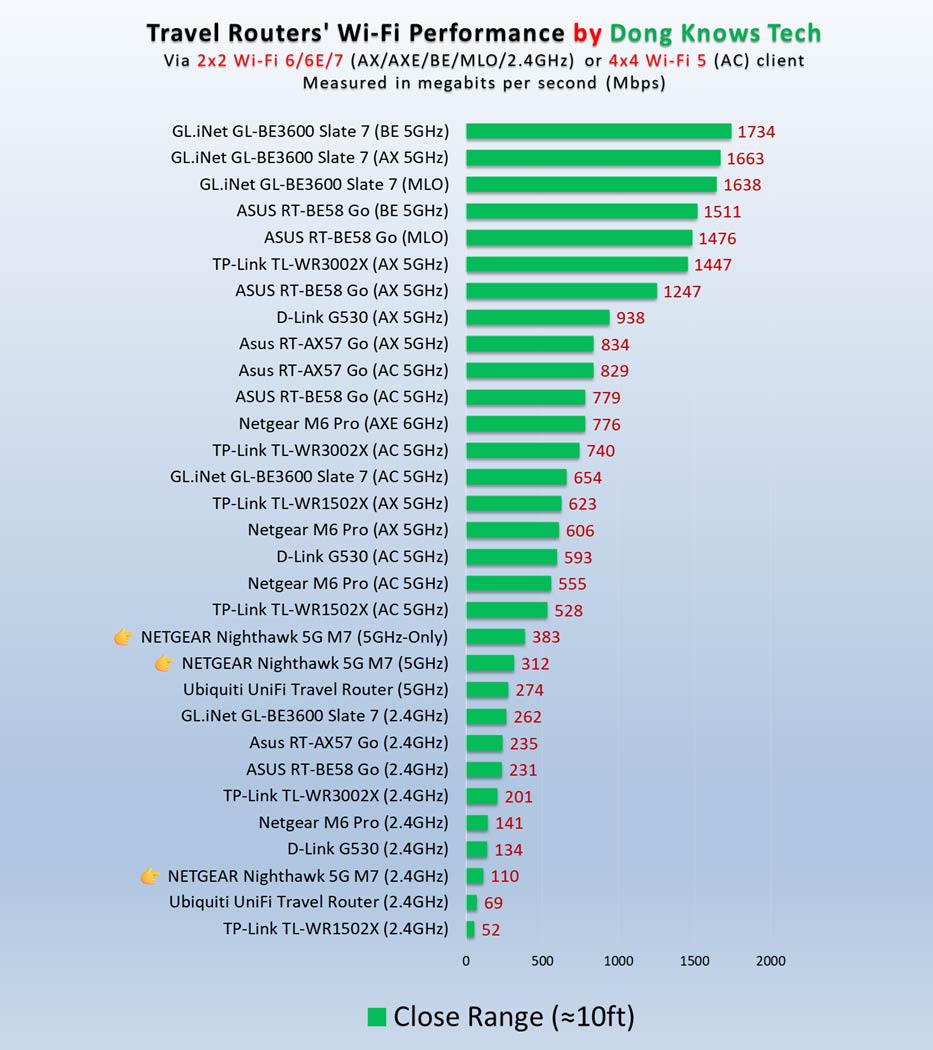
First, by default, it has the 2.4GHz band turned off to work as a single-band router. During testing, I enabled this band, and it worked as expected, but now the performance on the 5GHz band dropped significantly, as you’ll see in the performance chart below.


Secondly, the 5GHz band on the M7 doesn’t support a 160MHz channel width—the maximum is 80MHz (or VHT80). As a result, its theoretical ceiling speed is cut in half to 1441Mbps. In real-world testing, the actual sustained rates were just about a third of that.
Wi-Fi bands vs. channels vs. stream
Wi-Fi uses three frequency bands: 2.4GHz, 5GHz, and 6GHz. The width of each band is measured in MHz—the wider the band, the more MHz it has. Depending on local regulations, only a section or sections of a band may be used for Wi-Fi.
In real-world usage, the Wi-Fi-allowed section of each band is divided into multiple smaller portions, called channels, of different fixed widths. Depending on the Wi-Fi standards and bands, a channel can be 20MHz, 40MHz, 80MHz, 160MHz, 240MHz, or 320MHz wide. The wider a channel is, the more bandwidth it has. The number of channels in each Wi-Fi band varies depending on the channel width and the width of the Wi-Fi-allowed section of the band.
The 6GHz band is the widest of the three, with a total width of 1200MHz, ranging from 5.925GHz to 7.125GHz and enough space for three 320MHz, five 240MHz, seven 160MHz, or fourteen 80MHz channels, etc.
Data moves in one channel of a particular band at a time, using streams, often dual-stream (2×2), three-stream (3×3), or quad-stream (4×4). The more streams, the more data can travel simultaneously. Thanks to the ultra-high bandwidth per stream, Wi-Fi 6 and later tend to have only 2×2 clients.
Here’s a crude analogy:
If a Wi-Fi band is a freeway, channels are lanes, and streams are vehicles (bicycles, cars, buses). On the same road, you can combine multiple adjacent standard lanes (20MHz) into a larger one (40 MHz, 80 MHz, or higher) to accommodate oversized vehicles (a higher number of streams) that carry more goods (data) per trip (connection).
Depending on the standard and band, Wi-Fi clients generally only support 20MHz, 80MHz, 160MHz, and 320MHz channel widths, and use only one at any given time. Generally, no devices (clients) support the 240MHz channel width.
A Wi-Fi connection generally occurs on a single channel (lane) of a single band (road) at a time. The actual data transmission is always that of the lowest denominator—a bicycle can carry just one person at a relatively slow speed, even when used on a super-wide lane of an open freeway.
Other than that, the M7’s USB port can’t be used to host a storage device, and it has no options to host external cellular antennas. On this front, NETGEAR says the router’s new design has built-in antennas for “excellent” cell reception.
NETGEAR Nighthawk 5G M7’s performance: Modest Wi-Fi but overall excellent for a cellular-first travel router
I tested the Nighthawk 5G M7 for over 10 days in various scenarios and was generally happy with it. The mobile router proved to be versatile and reliable as an Internet relaying device. It generally had excellent cell reception, as NETGEAR promised, and it was clearly better than my Pixel 9 Pro on the same network.
However, in terms of output, the M7’s performance was subdued due to the ultra-low specs mentioned above, despite its support for Wi-Fi 7. In fact, it was barely faster than the UniFi Travel Router, which featured the dated Wi-Fi 5.
And that wasn’t a surprise: the M7’s maximum 80MHz channel width is the same as that of most Wi-Fi 5 devices. As a result, I found that all 5GHz clients, regardless of Wi-Fi standard, achieved nearly the same real-world sustained speeds, which topped out at almost 400Mbps when the M7 was used with its default single-band mode. When I enabled the 2.4GHz band to make it a dual-band router, its 5GHz performance dropped by about 20%.
However, for a travel router, I still consider the M7 “fast enough”.
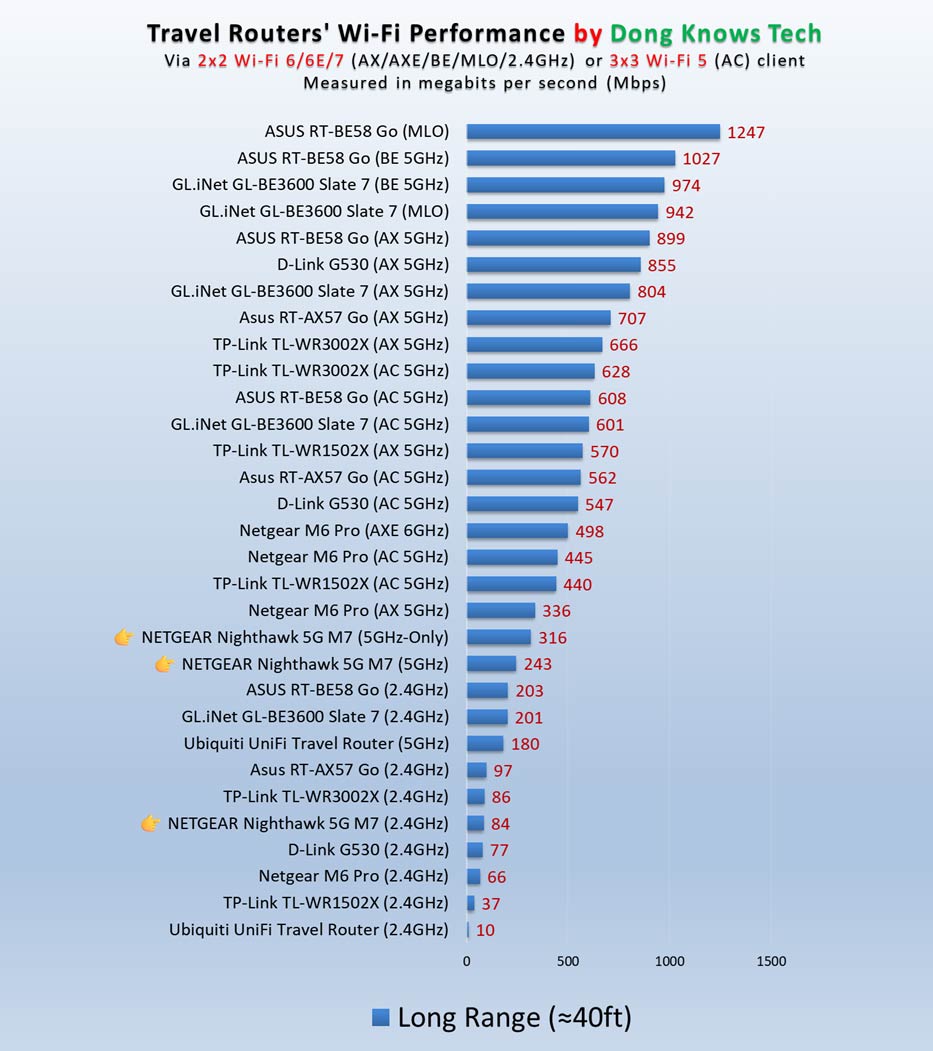
As for range, which is always hard to measure concretely, the Nighthawk 5G M7 performed excellently for its size, covering 1000 ft2 (93 m2) and 1500 ft2 (139 m2), depending on the environment. It’s safe to say it has enough coverage for a small group of devices spread out in a hotel room or a trailer.
The router had excellent battery life, too. At one point, I used it with four devices extensively for about 4 hours, and it still had more than 50% battery life left. One thing to note is that the router can be easily charged from any USB port, such as a computer, a power bank, or a TV’s USB port. For this reason, I’d not be concerned about its battery life.
The M7 remains cool and silent at all times during operation.
Conslusion
With the Nighthawk M7 Portable WiFi Hotspot with eSIM, NETGEAR tried to achieve a lot, and for the most part, it succeeded.
Given the M7’s intended purpose as a “hotspot” and its ability to handle Internet access via Ethernet or Wi-Fi, it’s by far the most comprehensive mobile Internet solution, a versatile travel router. However, to maintain a desired long battery life and compact physical size, something has to give: its Wi-Fi performance, which is appropriate for its modest specs, trails behind that of many other travel routers.
All things considered, though, if you’re looking for a true mobile travel router, the M7 is still an excellent buy. Consider it today!
On the other hand, if you’re looking for a travel router with better Wi-Fi performance or a richer feature set, pick one without built-in cellular support from this regularly updated top-five list!


A couple of questions: does it support mmwave and how does it do in terms of temperature/overheating?
As mentioned in the performance section, it’s cool during operation, Gabe. No mmWave, you need the M7 Pro or M6 Pro for that.
Such an in-depth review indeed! Answers all the questions. Thank you!
I guess what I mean is why don’t other websites do the same? Is it so much to ask?
Thanks… It’s actually a lot of work.
Do you have to use the NETGEAR app if you want to use an eSIM? Does the UI let you load an eSIM from another carrier at an airport counter or from an app like airalo?
You need the app to activate/configure an eSIM (any carrier’s eSIM via a QR code or manually) but not when you just want to use it once activated. In other words, you don’t need to run the app to use the M7 but only when you need to make changes to its eSIM(s).
How exactly can one use USB C tethering from a M6 and maybe an M7 to an iPad. Do I have to enable something on the iPad to receive the WiFi info?
Also I have an M6 that I tried to use in an hospital during a recent stay. The M6 told me that it’s WiFi was restricted, yet other nearby WiFi’s showed up. Can that be disabled?
Tethering, in this case, means the mobile hotspot gets the Internet through its USB port and shares that with Wi-Fi devices connected to its network. It seems you interpreted tethering differently, John. That said, I don’t know what you’re actually asking.
I misunderstood. I thought tethering would allow my M6 to provide my iPad with its cellular WiFi over USB C.
That would be unnecessary since your iPad can connect to the mobile hotspot via Wi-Fi, which is the main role of a mobile hotspot: it gets the Internet via a cellular connection (or an exiting Wi-Fi network via the WISP mode) and shares that via its own Wi-Fi network.
Yes I understand, but while using the M6 in a hospital the M6 was reporting that it’s WiFi was disabled. That is why I tried the tethering. I presume the M6 disabled it, because there were many non-hospital WiFi’s listed in the hospital choices.
Then you need to turn its Wi-Fi back on (enable it), John. There’s a way to disable and enable the Wi-Fi function. And yes, in the case that Wi-Fi is disabled, you can likely also use the M6’s cellular Internet via its USB port, but you also need to turn that on via its web user interface (or maybe the touchscreen). The device doesn’t know what you want to achieve simply by plugging it in. Check the user manual.
Hi again and good review of the M7.
The M6 kept turning it’s WiFi off claiming it was in a RESTRICTED AREA time after time. Then I enabled the M6’s USB port, but simply connecting the two devices with USB C didn’t work. So, I was asking what I need to do to make it work. I guess I have to check out the user manual for the M6, but I’m unsure what I need to do with the iPad, if anything.
I don’t know, John. You need to ask your local authority or NETGEAR. But all wireless devices are regulated.