
At the current retail price of $299 for a 2-pack, the MSI Roamii BE Pro (model MRBE110) is easily among the least expensive tri-band Wi-Fi 7 mesh systems on the market. In real-world testing, that low cost translated into a pleasant surprise.
Here’s the bottom line: The MSI Roamii BE Pro is a straightforward Wi-Fi 7 mesh system that offers much more than its friendly price tag suggests. If you’re in the market for a Wi-Fi 7 solution that delivers solid entry-level Multi-Gig bandwidth (2.5Gbps) via wired or wireless, give it a go today!
MSI Roamii BE Pro's Rating
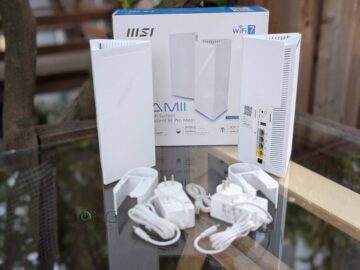
Pros
Affordable with excellent entry-level Multi-Gigabit performance via mid-tier Wi-Fi specs and four 2.5Gbps ports
Non-intrusive hardware with standard feature set, free online protection, robust local web-based UI, and ample USB-based features
Aesthetically pleasing, fanless design, runs cool, wall-mount accessories included
Helpful MSI Router 2.0 mobile app, no privacy risk, no add-on premium
Cons
No 10Gbps ports or AFC, NAS performance when hosting USB drive could be better
Hardware units are not pre-synced, no single router or 3-pack options (for now)
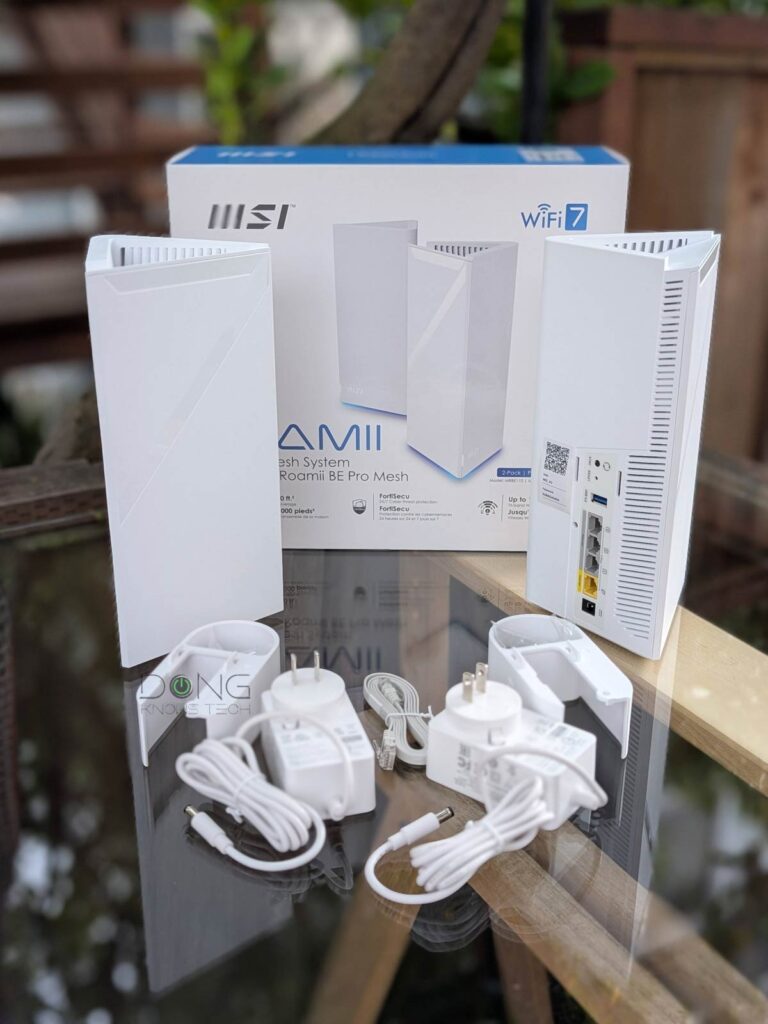
MSI Roamii BE Pro: An effective Wi-Fi 7 mesh system
The Roamii BE Pro is the 2026 tri-band offering in the Roamii lineup, which MSI first announced in early 2024. Previously, there was the dual-band Roamii BE Lite, which came out in late 2024, that I skipped because there were many better options at the time to work on.
In that sense, the Roamii BE Pro is worth the wait. Over the years, the Roamii lineup has benefited from improved firmware, and its support for all three bands with a total theoretical bandwidth of 11000 Mbps doesn’t hurt. In fact, compared to the Netgear Orbi RBE770, which is similar in Wi-Fi specs, it’s a much better deal, offering significantly more.
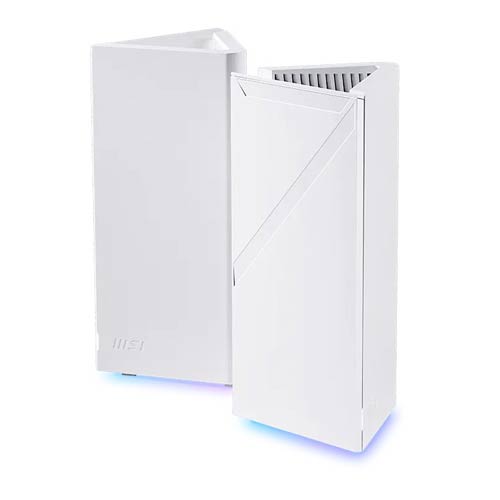
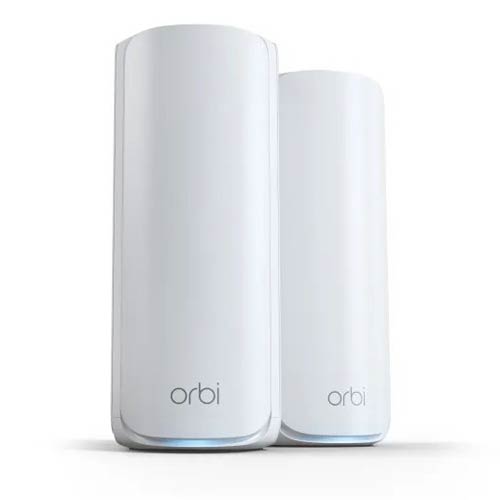
The table below shows their detailed hardware specifications.


MSI Roamii BE Pro vs. Netgear Orbi 770 series: Hardware specifications and real-world power consumption
 |  | |
| Full Name | MSI Roamii BE Pro Mesh System | NETGEAR Orbi 770 Series |
| Model | MRBE110 (each router) | Orbi 770 series Router: RBE771 Satellite: RBE770 2-pack: RBE772 3-pack: RBE773 |
| Mesh Availability | 2-pack | 3-pack, 2-pack, or add-on satellite |
| Dimensions (each unit) | 4.7 x 4.3 x 9.9 in (118.5 x 108 x 252.5 mm) | 9.88 x 5.28 x 3.95 in (25.12 x 13.42 x 10.04 cm) |
| Weight (each unit) | 1.8 lb (830 g) | 2.02 lbs (0.92 kg) |
| Mounting Option | Yes (wall mount included) | No (possible via third-party accessories) |
| Processing Power | Quad Core 1.5GHz | Quad-core 1.5GHz CPU, 4GB flash, 2GB RAM |
| Wi-Fi Bandwidth | Tri-band BE11000 | |
| 2.4GHz Band specs (channel width) | 2×2 AX: Up to 688Mbps (20/40MHz) | |
| 5GHz Band Specs (channel width) | 2×2 BE: Up to 4324 Mbps (20/40/160/240MHz) | |
| 6GHz Band Specs (channel width) | 2×2 BE: Up to 5764 Mbps (20/40/160/320MHz) | |
| Backward Compatibility | 802.11a/b/g/n/ac/ax Wi-Fi | |
| Wireless Security | WPA2, WPA3 | |
| Automated Frequency Coordination (AFC) | No | |
| Multi-Link Operation (MLO) | Yes | |
| Mobile App | MSI Router 2.0 | NETGEAR Orbi |
| Web User Interface | Yes | |
| Add-on Premium | No | Netgear Armor |
| Bridge Mode | No | |
| AP Mode | Yes (as a mesh or a single unit) | |
| USB Port | 1x USB 3.0 | None |
| Internal Fan | No | |
| Gigabit Port | None | |
| Multi-Gig Port | 4x 2.5Gbps (each unit) | Router: 1x 2.5GBASE-T WAN, 3x 2.5GBASE-T LAN, Satellite: 2x 2.5GBASE-T LANs |
| Multi-Gig Wired Backhaul (before a switch is required) | Yes | |
| Link Aggregation | No | |
| Firmware Version (at review) | 1.03.002 | V10.5.8.1 |
| Power Input | 110-240V | |
| Real-World Power Consumption (per 24 hours) | ≈ 250 (router unit) ≈195 (satellite unit) | ≈ 260 Wh (router unit) |
| Release Date | January 2026 | June 11, 2024 |
| US Retail Price (check current pricing) | $299 (2-pack) | $699.99 (3-pack) $549.99 (2-pack) $299.99 (satellite unit) |


MSI Roamii BE Pro: Practical design
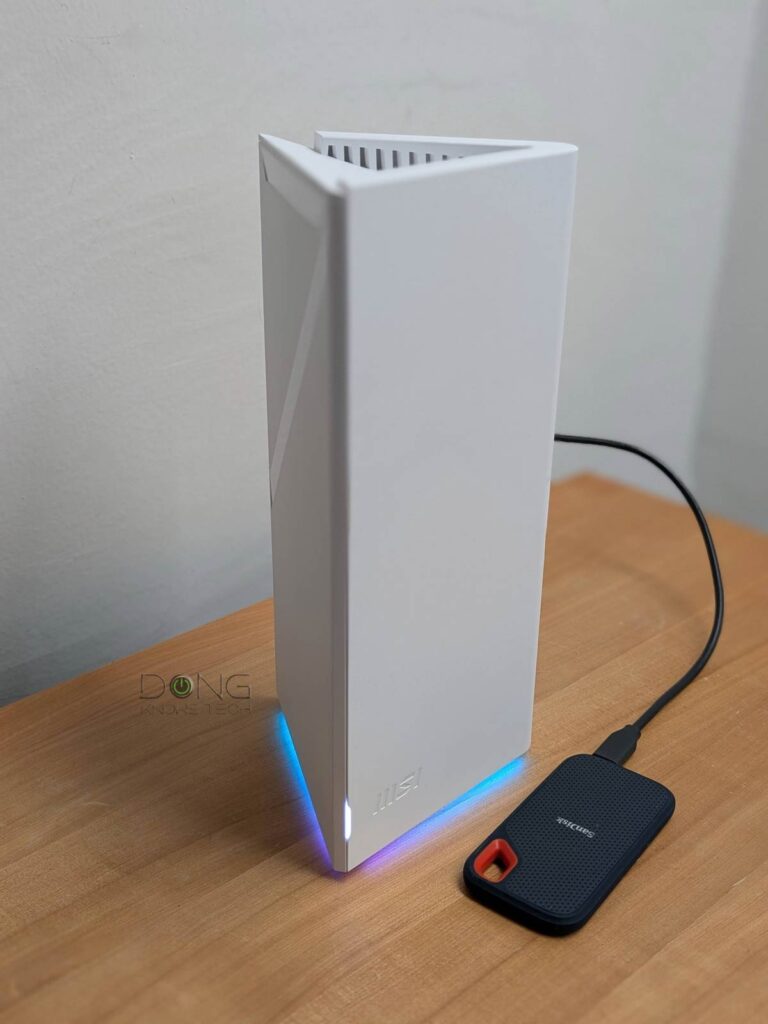
The Roamii BE Pro comes with two identical mesh routers, each shaped like an elongated equilateral triangle.
On the back, each router comes with a 2.5Gbps WAN port and three 2.5Gbps LAN ports. Additionally, there’s a USB 3.0 port to host an external drive for a few network-attached storage (NAS) features, including shared folders, PC-less torrent downloads, and an FTP server. And then, there are two mounting holes for the included wall-mount accessories.
On the front, there’s a small color-changing status LED, and two large programmable decorative LED lines run along the two sides of the triangle.
Overall, I like the MSI Roamii BE Pro’s design. It’s practical and ethically pleasing enough to fit in anywhere—you won’t need to worry about that “spouse approval” hurdle.


Non-intrusive hardware approach
The Roamii BE Pro is currently available in a 2-pack, though a single router option might be available down the line. Pick either as the primary router, and the other can be added to work as a satellite via a mesh (wireless) or wired backhaul to extend coverage.
It’s worth noting that the units within a pack are not pre-synced, as is the common case with other purpose-built mesh packs. Instead, you’ll need to manually add the second unit as the satellite. That’s a bit of an inconvenience, but not a huge deal—the process took less than a few minutes in my trial, with the help of the Sync button on the back.
Despite the home-friendly design, the Roamii BE Pro is not another app-controlled mesh system, like TP-Link Deco or Amazon eero. Instead, it’s completely the opposite, coming with a well-laid-out, responsive web-based user interface accessible via the router unit’s default IP address, 192.168.10.1, similar to the previous MSI router and those from ASUS.
Additionally, there’s the optional MSI Router 2.0 app, which users can use for setup and ongoing management. No matter which you use, the web UI or the app, MSI doesn’t require a login account. As a result, the Roamii BE Pro carries low privacy risks by default.
Standard setup, management, and feature set
The web UI makes the Roamii BE Pro’s setup process similar to that of any standard router. All you have to do is open a web browser on a connected computer and go to the IP address above; the rest is self-explanatory. The router’s default login information is printed on the hardware label on its underside.
After that, the Roamii BE Pro comes with a standard set of network/Wi-Fi settings and features, presented in a well-organized, straightforward user interface.


For Wi-Fi, it features one main network (SSID) and three virtual SSIDs for purpose-based segmentation, including “IoT Network”, “Guest Network”, and “Child Network”. Each of these networks has its own specific settings, such as captive portal, scheduled availability, or isolation (internet-access only).
Of these four, only the main SSID features Wi-Fi 7’s MLO feature and allows for customizing each band’s channels and channel width. After that, all SSIDs allow users to select the bands being used and their security mode.
As for network customization, the Roamii BE Pro offers standard features, including a VPN server (supporting all four popular protocols), a VPN client, easy IP reservation, port forwarding, Dynamic DNS (featuring dyndns.com and no-ip.com services), web-based remote management, and a standard QoS engine.
Additionally, there are online protection and parental control features called FortiSecu that require the MSI Router 2.0 mobile app. It’s worth noting that enabling these features generally means you agree to allow a third party to scan the router’s traffic. In Roamii BE Pro’s case, turning on FortiSecu also allows the app to manage this feature remotely—other settings require the phone to connect to the local Wi-Fi network.
Overall, the Roamii BE Pro has an excellent balance of features and settings while respecting users’ privacy. And that’s never a bad thing.
MSI Roamii BE Pro: Excellent performance
I tested a 2-pack MSI Roamii BE Pro for over a week and was happy with it. The hardware performed well for its specs and passed my 3-day stress test without any issues. With no internal fan, it remained completely silent throughout and only became slightly warm to the touch. The glowing lighting on the underside, which can be scheduled, adds to the nice design, making the whole a good fit for almost any room.
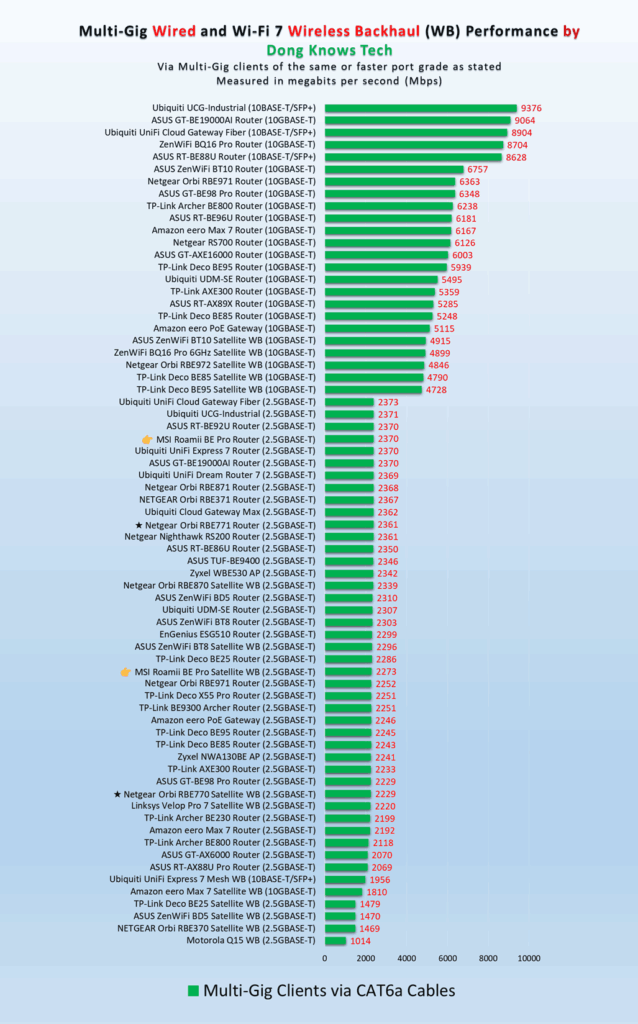
In terms of real-world performance, the MSI Roamii BE Pro proved excellent overall.
In the wired tests, the 2.5Gbps ports’ real-world rates ranked among the highest among routers of the same port grade, and they delivered close to 2.4Gbps of broadband speed from my 10Gbps fiber-optic line. Additionally, the wireless backhaul bandwidth was among the best.
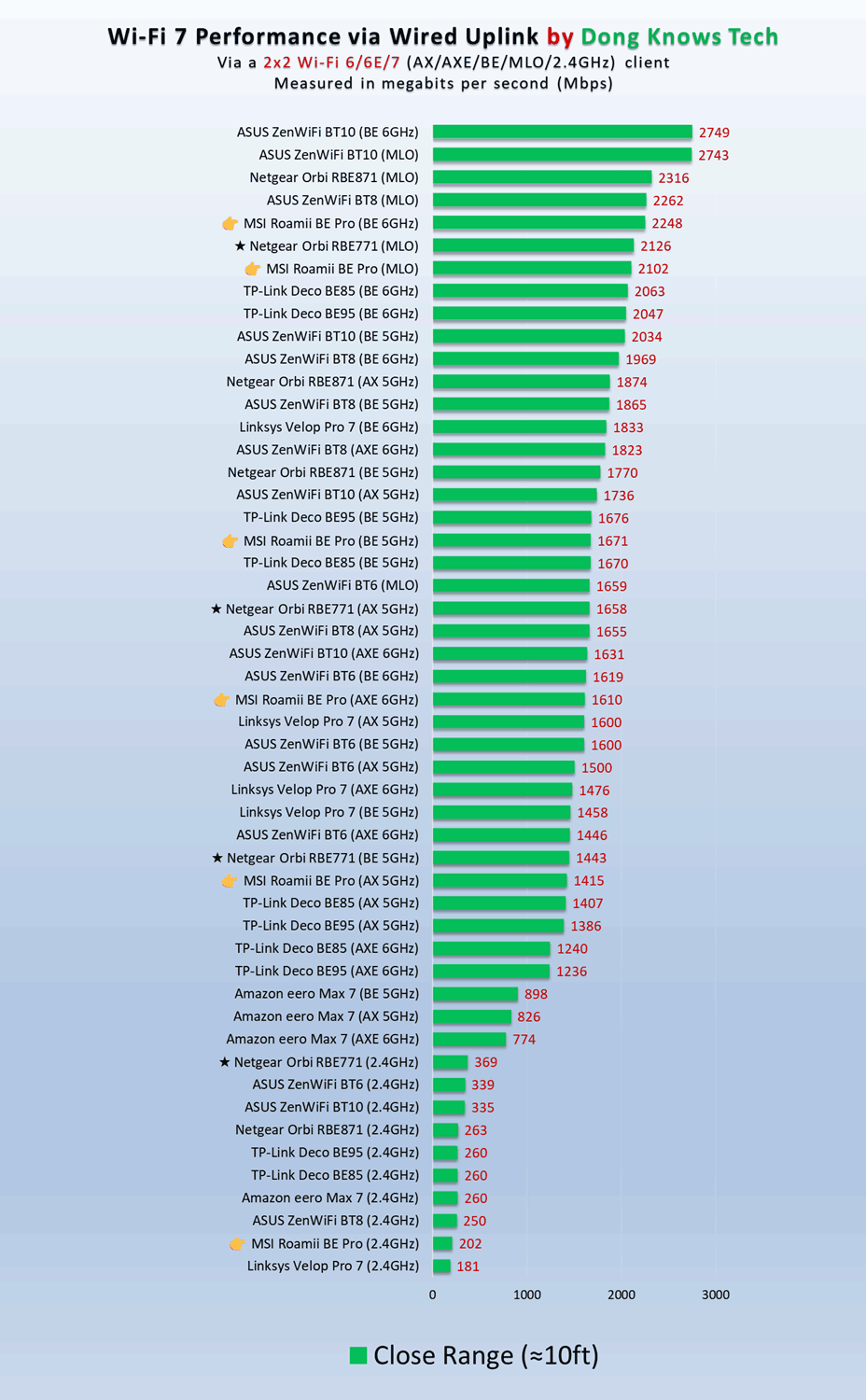
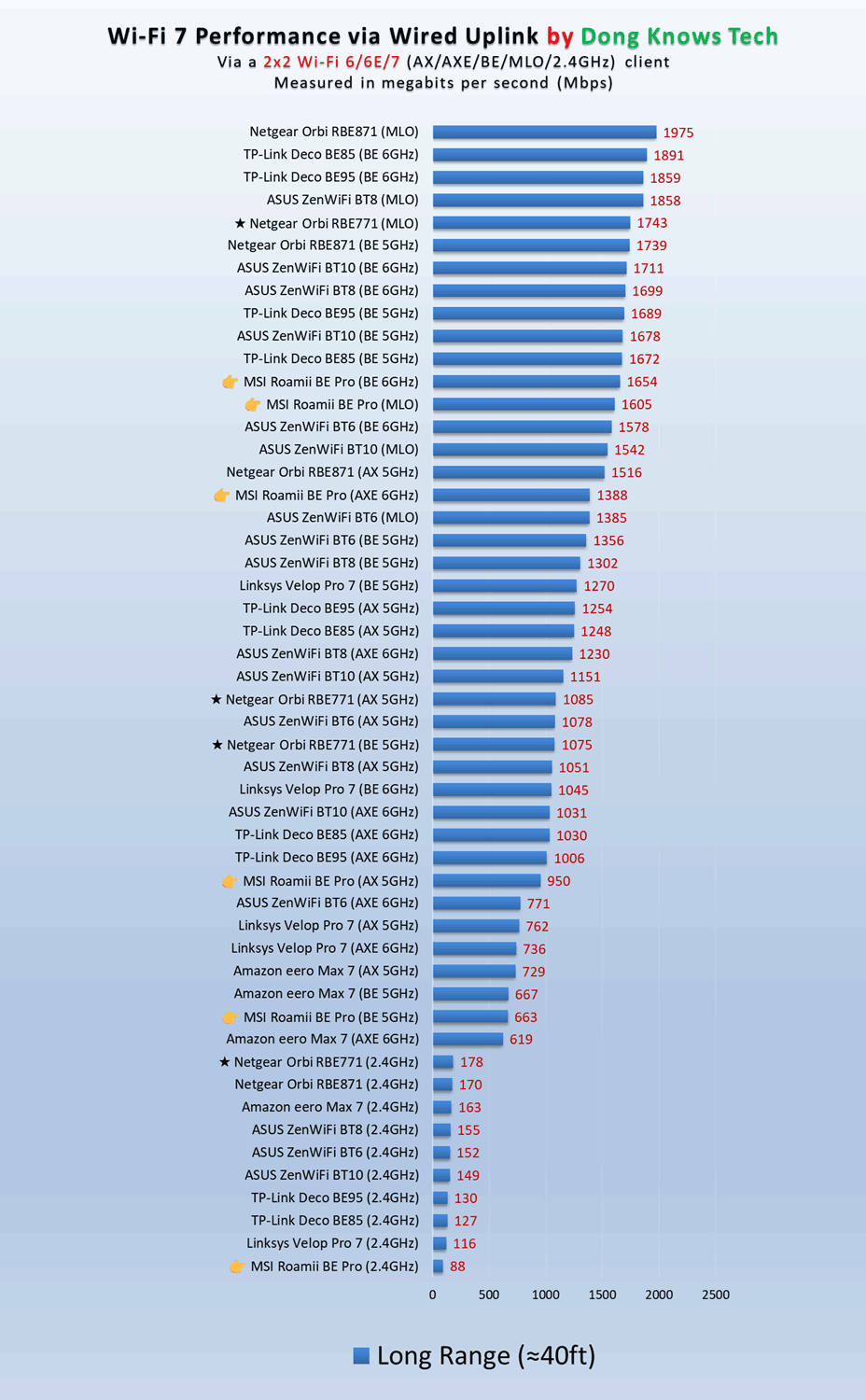
As for Wi-Fi, I tested the hardware as a standalone router, a satellite with wired backhaul, and a mesh unit, and was happy with the performance. In most cases, the MSI Roamii BE Pro’s sustained rates decidedly edged out the much more expensive NETGEAR Orbi 770 series.


The hardware has excellent range, too, with a single unit covering some 2000 ft2 (186 m2) of space. Depending on the environment and hardware placement, a 2-pack can cover approximately 3,500 ft2 (325 m2). Keep in mind that the Wi-Fi range is tricky, and your mileage will vary depending on your environment and how you arrange the hardware units.


However, the MSI Roamii BE Pro wasn’t perfect: when hosting a portable SSD, its NAS performance could use some improvement. While it wasn’t the slowest on the chart, the sustained rates were far lower than those of a 2.5Gbps wired connection.
Conclusion
While a bit late to the Wi-Fi 7 game, the MSI Roamii BE Pro makes it well worth the wait by offering excellent value. It’s a robust mid-tier mesh system for everyone living in a large home with entry-level multi-gigabit bandwidth (2.5Gbps) at an incredibly affordable price. Get one today!


Thank you for the review. Bought 4 to replace orbi 5400 in a large villa. Have to say, great upgrade. Covering 10k sq ft including outside areas at 4 bars and good/great throughput. Had IOT band, guest band…very nice. Easy setup, no netgear add on costs for security protection (trendmicro is included) and good advanced options. And yes, wife isnt complaining about the looks. Wall mounts much appreciated (netgear you have to buy them). Only real feature missing is AFC, but seems thats par for the course as it hasnt seen much adoption even in routers that announced support but havent delivered (asus bq16?). Thanks for your review!
AFC is quite finicky and only avaible in certain regions, Aaron. Currently, you only have it (for sure) with the GS-BE18000 and some UniFi access points.