
The TL-WR3002X is TP-Link’s worthy upgrade to the TL-WR1502X, which came out less than half a year ago. The new travel router shares the same design but has practically double the hardware specs.
Update
In early 2026, TP-Link quietly introduced the “Roam” branding for its travel routers. With that, the Wi-Fi 7 TL-WR3602BE becomes Roam 7, and the previous Wi-Fi 6 model, the TL-WR3002X, becomes Roam 6.
Here’s the bottom line: While not perfect, the TP-Link Roam 6 is an excellent router for connecting multiple devices on the go. The little router has everything to justify its friendly cost. If you can’t wait for the Wi-Fi 7 version, the TL-WR36002BE, which is due out later this year, get the TL-WR3002X today for your upcoming summer travels. You likely won’t be disappointed.
Dong’s note: I first published this post as a preview on March 12, 2025, and updated it to an in-depth review after hands-on testing on April 5, 2025.
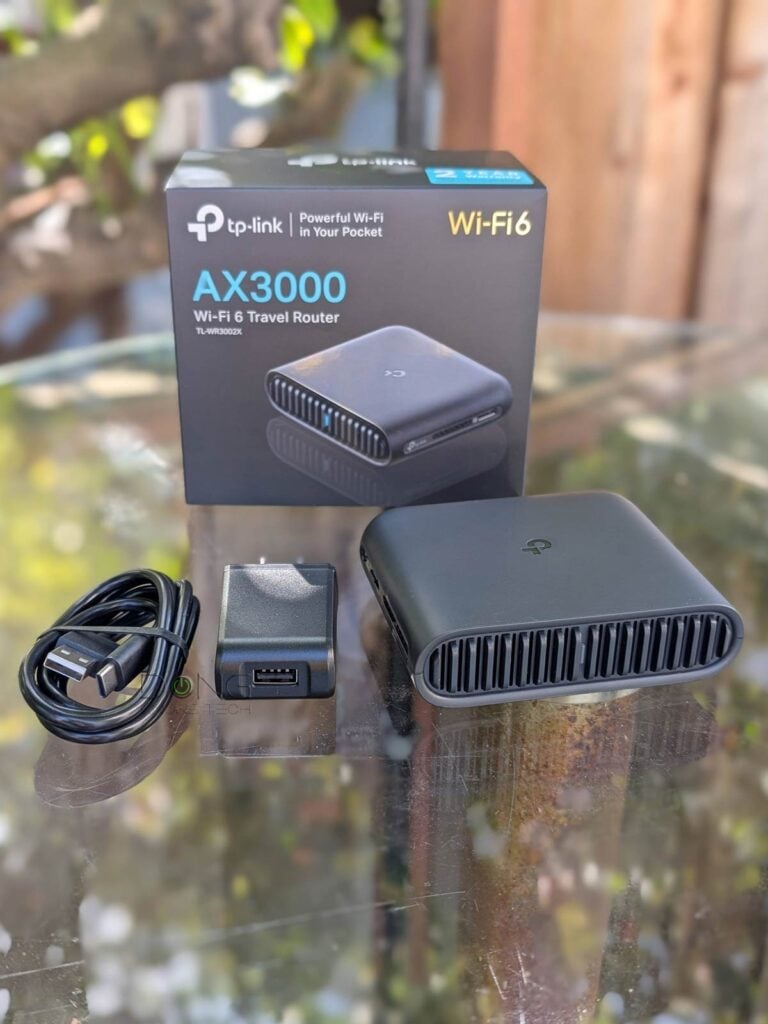
TP-Link TL-WR3002X vs. TL-WR1502X: The same physical size but double in almost everything else
Out of the box, the TP-Link Roam 6 TL-WR3002X shares the same physical size and looks as its older cousin, the WR1502X. At a glance, you can’t tell them apart, considering the only visible difference is the former’s microSD card slot.
However, in terms of specs, the new router is quite different.
On the Wi-Fi front, the TL-WR3002X now supports the 160MHz channel width on the 5GHz band and Wi-Fi 6 on the 2.4GHz band (instead of Wi-Fi 4), doubling the theoretical bandwidth.
While that sounds great, in reality, the two will likely have similar real-world Wi-Fi bandwidth, since other DFS can complicate the availability of the 160MHz channel width. Additionally, the performance of the 2.4GHz band has remained largely unchanged since Wi-Fi 4.
What will have more impact on real-world performance, however, is that the TL-WR3002X features a 2.5Gbps WAN port, allowing it to handle broadband speeds beyond Gigabit. Additionally, it comes with a USB 3.0 port for cellular tethering. So, it’s ready for much faster broadband intake.


Finally, there’s a microSD slot to host storage space for a mobile network-attached storage (NAS) feature, even when the USB port is already used for cellular tethering. That said, the new TL-WR3002X is undoubtedly an improvement over the previous TL-WR1502X.
The table below shows the hardware specs of the two.
TP-Link TL-WR3002X vs. TL-WR1502X: Hardware specifications
 |  | |
|---|---|---|
| Full Name | TP-Link Roam 6 AX3000 Wi-Fi 6 Travel Router | TP-Link TL-WR1502X AX1500 Wi-Fi 6 Travel Router |
| Model | TL-WR3002X, Roam 6 | TL-WR1502X |
| Dimensions | 4.09 × 3.54 × 1.10 in (104 × 90 × 28 mm) | |
| Weight | 5.4 oz (153 g) | |
| Wi-Fi Technology | Dual-Band AX3000 | Dual-Band AX1500 |
| 2.4GHz Band (channel width) | 2.4GHz 2×2 AX: Up to 578 Mbps | 2×2 Wi-Fi 4: Up to 300Mbps |
| 5GHz Band (channel width) | 2×2 Wi-Fi 6: Up to 2.4 Gbps (20/40/80/160MHz) | 5GHz 2×2 Wi-Fi 6: Up to 1.2 Gbps (20/40/80MHz) |
| Backward Compatibility | 802.11a/b/g/n/ac | |
| Wireless Security | WPA, WPA2, WPA3 | |
| Built-in Cellular Modem | None | |
| Mobile App | TP-Link Tether | |
| Web User Interface | Yes | |
| Networking Features | VPN (Server and Client) Device-based QoS, Dynamic DNS | |
| VPN Server Support | OpenVPN WireGuard L2TP/IPSec PPTP | OpenVPN |
| Operating Roles | Router Mode (supporting broadband and USB cellular tethering) Client Mode Hotspot Mode (WISP Mode) Access Point/Repeater/Client Mode | |
| Firmware Version (at review) | 1.0.3 Build 20250221 Rel. 47347(5553) | 1.0.0 Build 20240109 Rel.69467(5553) |
| USB Port | 1x USB-C (power) 1x USB 3.0 (cellular tethering and storage) | 1x USB-C (power) 1x USB 2.0 (cellular tethering and storage) |
| Card slot | 1x microSD (up to 512GB) | None |
| Gigabit Port | 1x LAN | 1x LAN, 1x WAN |
| Multi-Gig Port | 1x 2.5Gbps WAN | None |
| Dual-WAN | Yes (broadband with cellular backup) | |
| Link Aggregation | No | |
| Power Intake | USB-PD via USB-C (9V minimum) | |
| Power Consumption (per 24 hours) | ≈ 140 Wh | ≈ 105 Wh |
| US Launch Price (Check street prices) | $99.99 | $59.99 |


A familiar TP-Link router
Aside from the improved hardware specs, the new TP-Link TL-WR3002X will be pretty similar to the previous version in terms of features, settings, and overall experience.
Like all TP-Link Archer routers, the travel router comes with a web user interface accessible via the default IP address 192.168.0.1. In other words, you can handle the TL-WR3002X the way you would any standard router. Optionally, there’s also the TP-Link Tether mobile app for the initial setup and ongoing management for those more comfortable with a phone’s small screen.
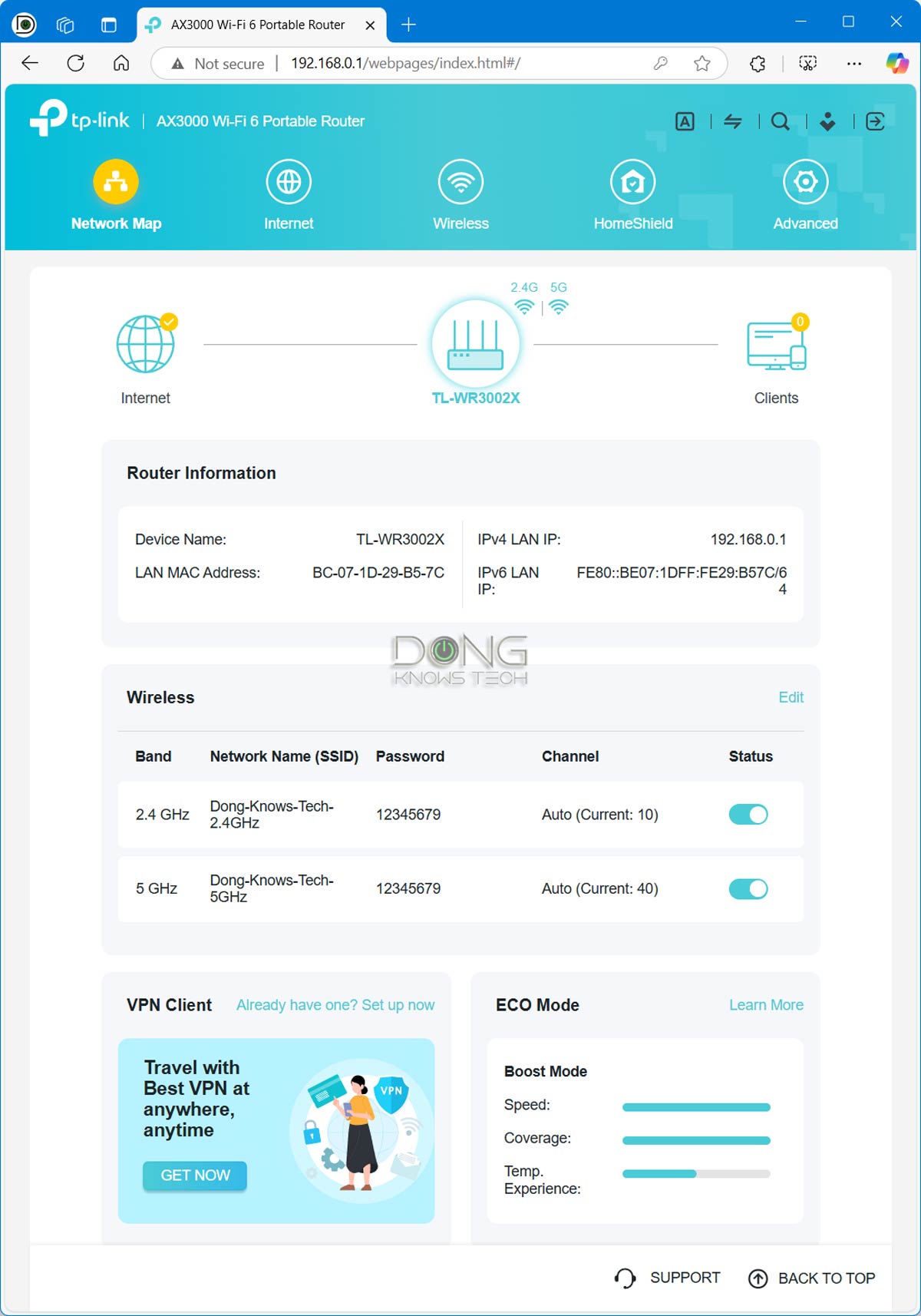
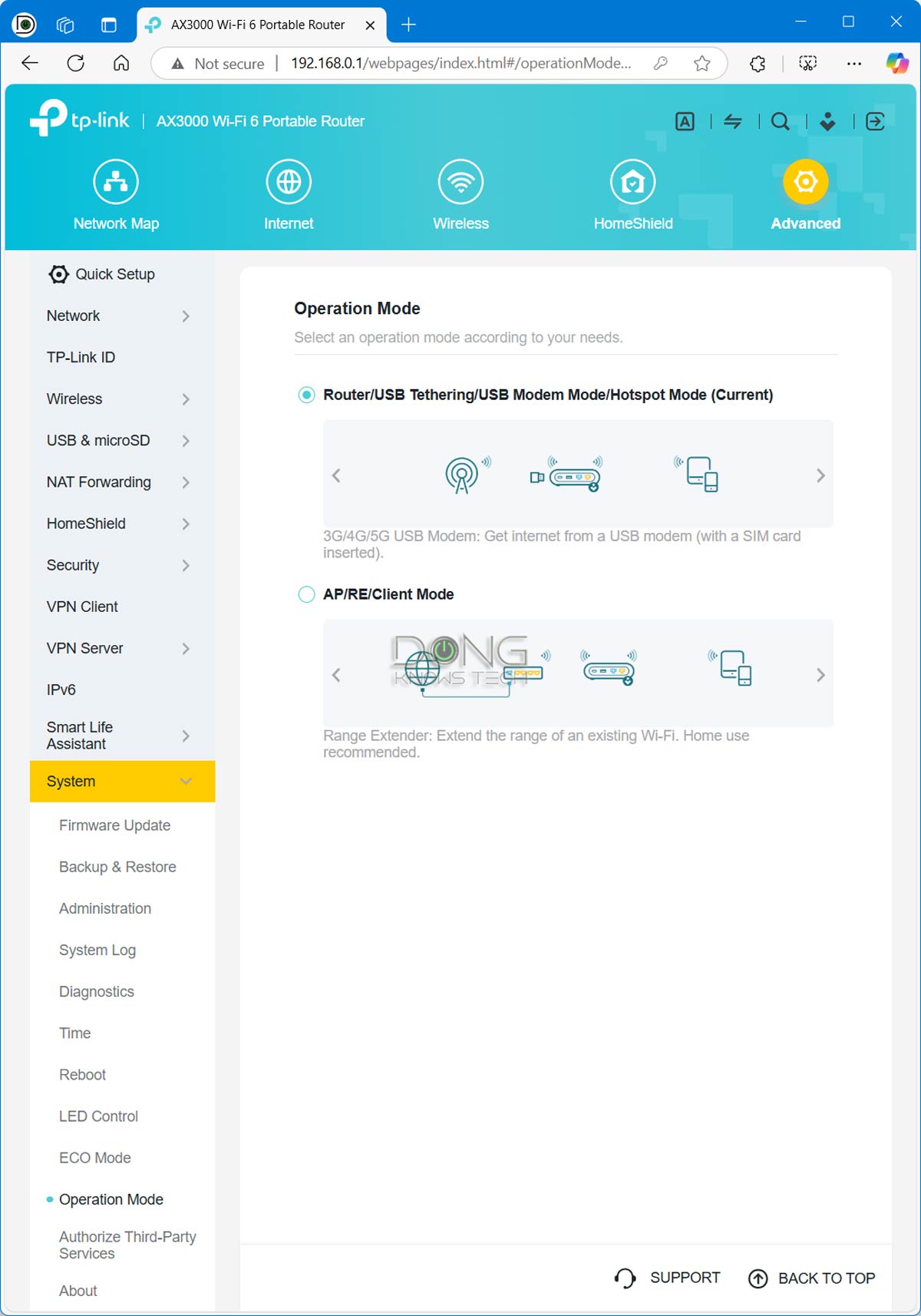
Designed for mobile usage, the TL-WR3002X has a few operating modes:
- As a router: In this case, it can host a standard internet connection via its 2.5Gbps WAN port, or a cellular modem/cellphone via the USB port. You can also use both at the same time, with the latter being the backup. It’s basically Dual-WAN with failover.
- As a hotspot: The router can connect to an existing Wi-Fi network and use it as the broadband source for its network. This mode is often known as the WISP mode, a.k.a. public Wi-Fi mode.
- As an access point, an extender (repeater), or a client (bridge).
That said, the TL-WR3002X offers virtually any hardware feature you want in a Wi-Fi router, as is generally the case with travel routers, including the previous TL-WR1502X.
Flexible and advanced VPN
What the TL-WR3002X decidedly outdoes its predecessor in terms of features is the VPN support. While both routers can work as VPN clients (which allow the entire network to be part of a remote network) or as VPN servers, the TL-WR3002X is much more powerful as a VPN server host.
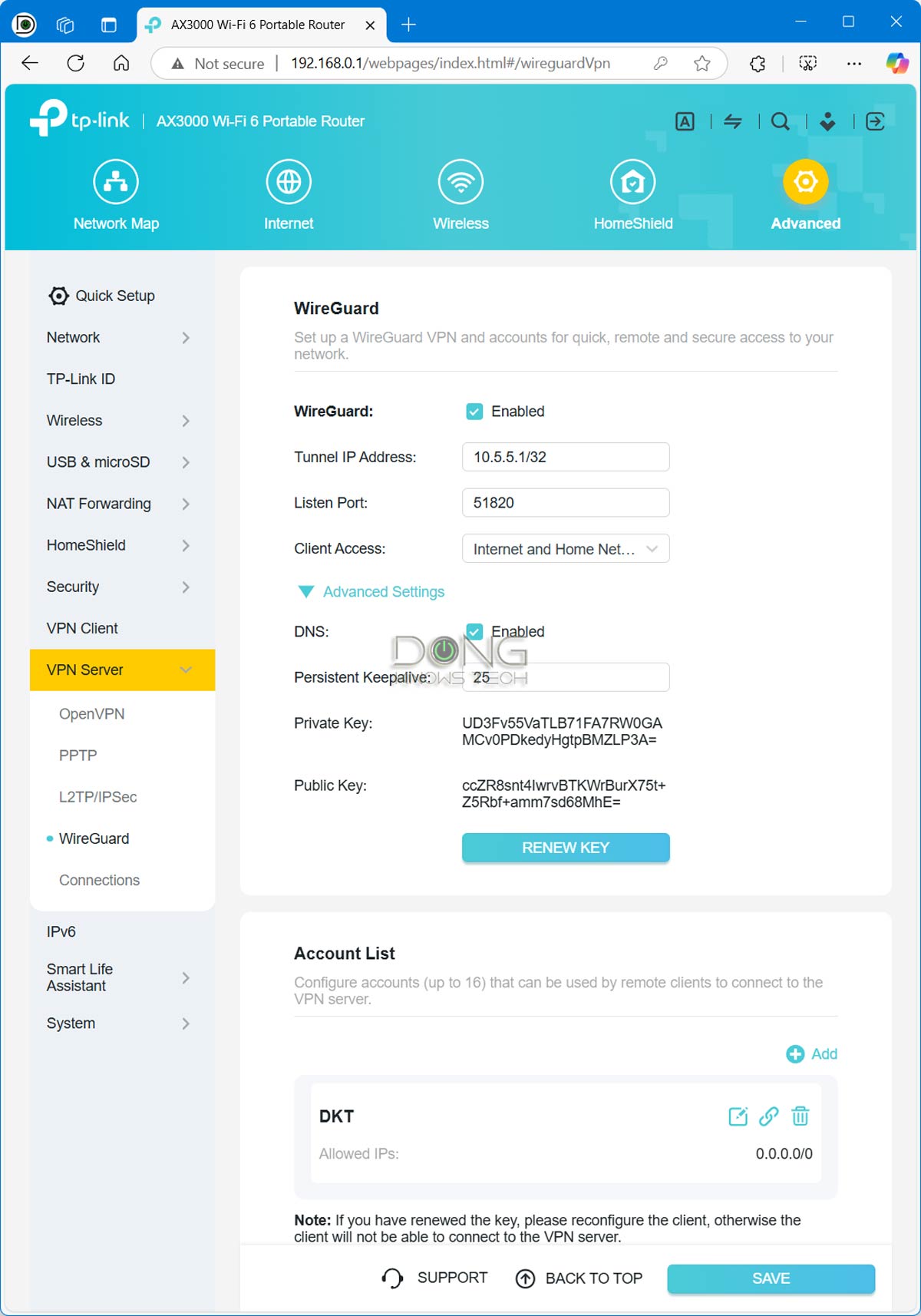
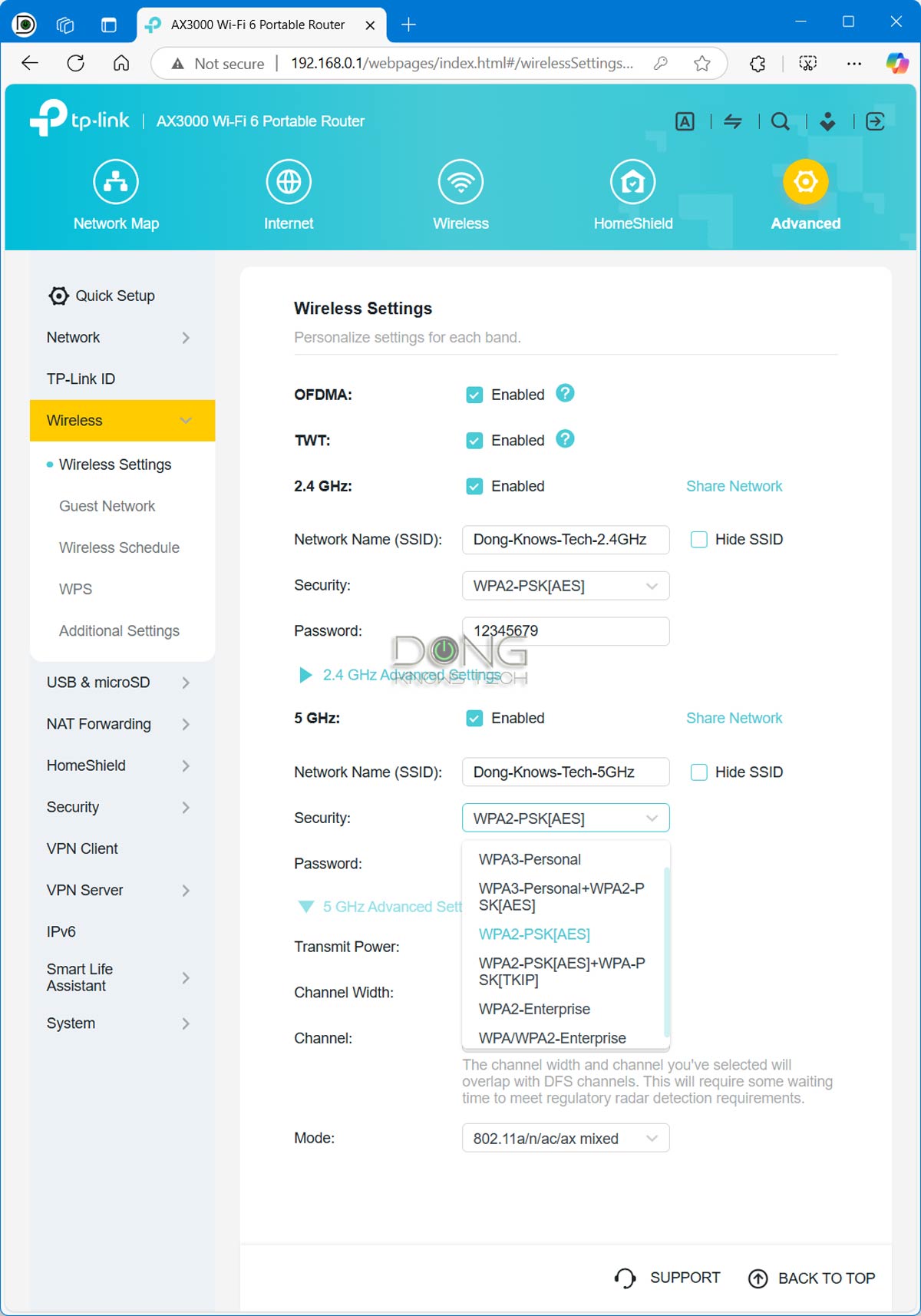
The router supports all popular VPN protocols, unlike the older model, which only supported OpenVPN, and can handle them simultaneously. It also allows you to view each person’s number of connections in real time. Each server can handle up to 16 clients.
Popular VPN protocols
WireGuard
WireGuard is the latest VPN protocol. It debuted in 2016, initially only for Linux, but has been available cross-platform (Windows, macOS, BSD, iOS, Android) since 2020.
The new protocol, which uses cryptography, is slated to be extremely simple yet fast. WireGuard is still under development, but has proven to be the most secure, easiest-to-use, and simplest VPN solution.
WireGuard is on the way to possibly replacing all existing protocols below.
OpenVPN
As the name suggests, OpenVPN is a flexible VPN protocol that uses open-source technologies, including OpenSSL and SSL.
As a result, it is highly customizable, secure, and cannot be blocked.
In return, OpenVPN requires extra client software, making it less practical. But this protocol is the best if you are serious about VPN.
L2TP/IPsec
Short for Layer 2 Tunnel Protocol, it’s the second most popular VPN protocol. It’s also a built-in application in most modern operating systems—and an interesting one.
It does not have encryption by default, so it’s not secure unless the IPsec—or IP security—portion is used to provide encryption. Therefore, this protocol is rigid in port use and can be blocked by a third party.
The point is that L2PT/IPsec is great when it works. And it does in most cases, which ultimately depends on whether the remote device’s local network allows it to pass through.
PPTP
Short for point-to-point tunneling protocol, PPTP is the oldest of the four and is being phased out.
First implemented in Windows 95, it has been part of the Windows operating systems and many other platforms. So, PPTP is well-supported and easy to use. However, it’s also the least secure. It’s better than no VPN at all, and it does its purpose of making a remote device part of a local network.
That said, if you take security seriously or have other options, skip it. Still, it is better than nothing and good enough for most home users.
That said, if VPN is on the required list, the TL-WR3002X checks all the boxes.
TP-Link Roam 6: Excellent performance
I tested the TP-Link Roam 6 for almost a week across various scenarios, and it worked as intended. It’s worth noting, though, that in most cases the router proved quite cluttered in use. That’s because you’ll need to connect a few extra cables or devices to it, in addition to the power cable.
For example, in the cellular weather mode, you’ll need to attach a modem (or a smartphone) to its USB-C port. The modem (or phone) can be as big as the router itself, if not larger. Things could be much leaner if the router had a built-in modem and a SIM slot or was battery-powered.
Other than that, as a Wi-Fi 6 router, the Roam 6 is quite excellent, packing a bunch in a tiny package thanks to its 2.5Gbps WAN port.

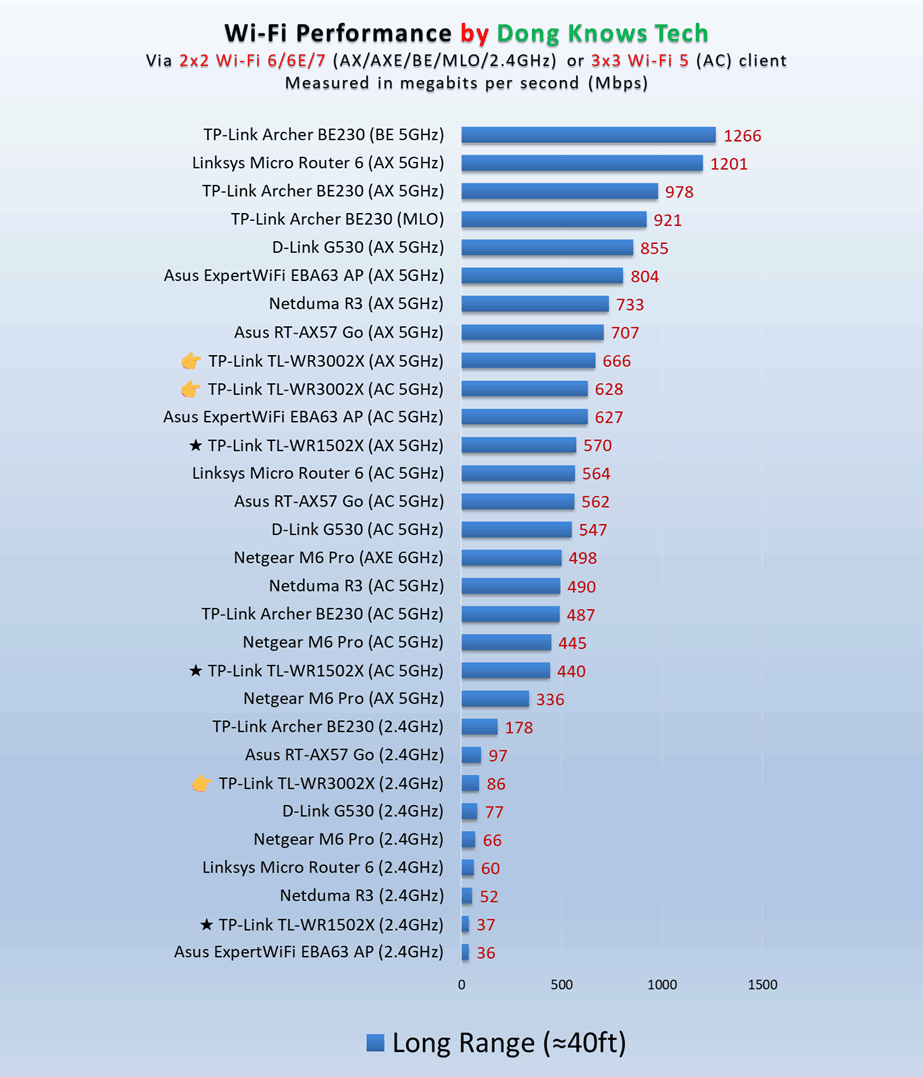
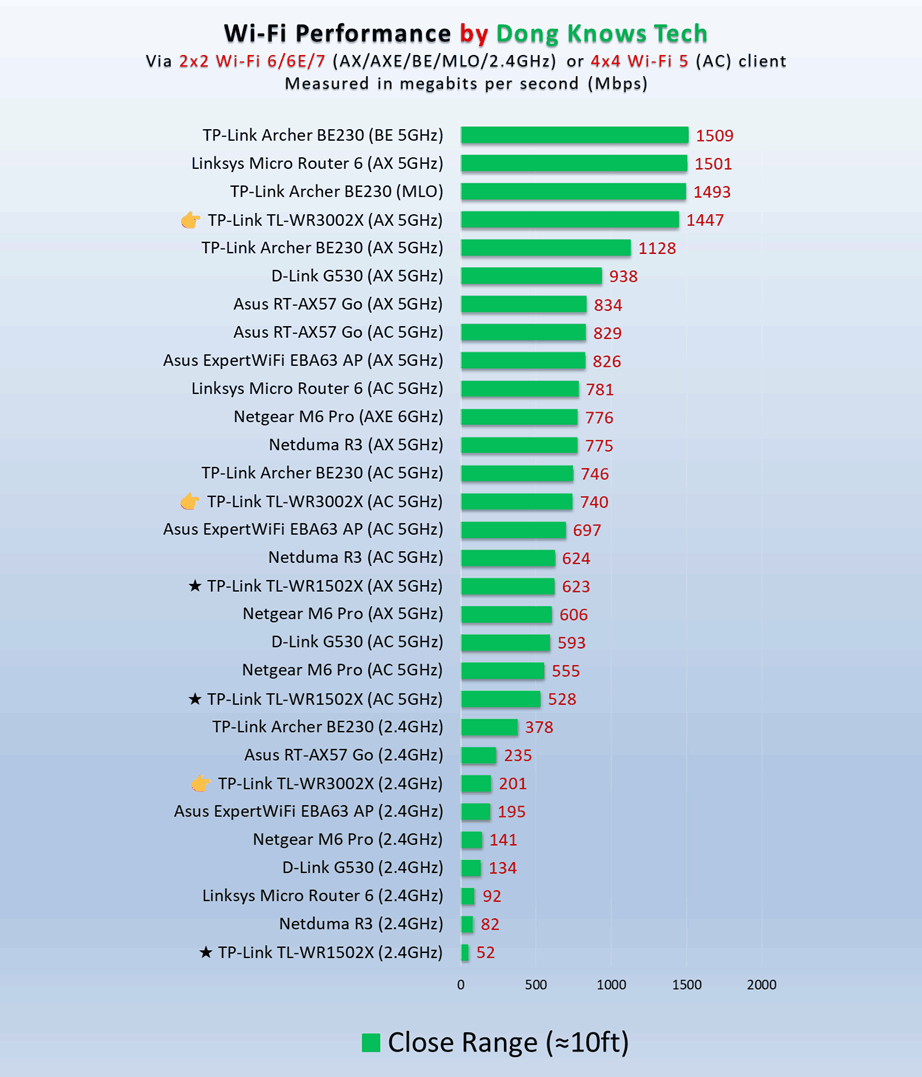
In my testing, it was the fastest at close range compared with other compact, mobile, or travel routers with similar specs, delivering consistently sustained Gig+ speeds. Since it’s a travel router, a range of 20 feet (6 meters) or closer is all you’ll need. Still farther out, the router wasn’t exactly slow, maintaining around 600 Mbps.
Tip
Gig+, or Gig Plus, denotes a speed grade between 1Gbps and 2Gbps. So, it’s 1.5Gbps, give or take a couple of hundred megabits per second, and it’s not speedy enough to qualify as Multi-Gig Ethernet or multi-Gigabit. Intel coined the term to describe its Wi-Fi 6E client chips, the AX210 and AX211, in terms of their real-world speeds.
Gig+ primarily applies to sustained Wi-Fi 6 or Wi-Fi 7 speeds via a 2×2 at 160MHz connection, or to broadband internet speeds.
The router proved to be reliable, too, passing my 24-hour stress test without disconnecting once. In terms of range, it was about the same as its older cousin. It’s always tricky to measure Wi-Fi coverage, and your mileage will vary. However, when placed in the center, the TL-WR3002X can blanket around 1000 ft2 (92 m2) of residential environment, which is more than enough for an RV, a boat, or a hotel room.
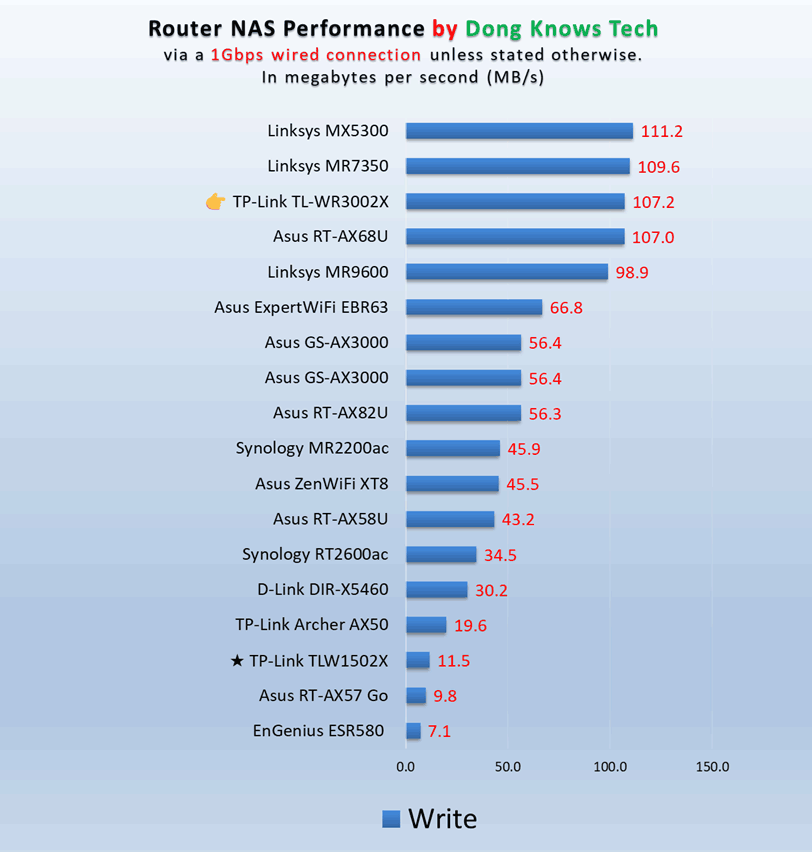
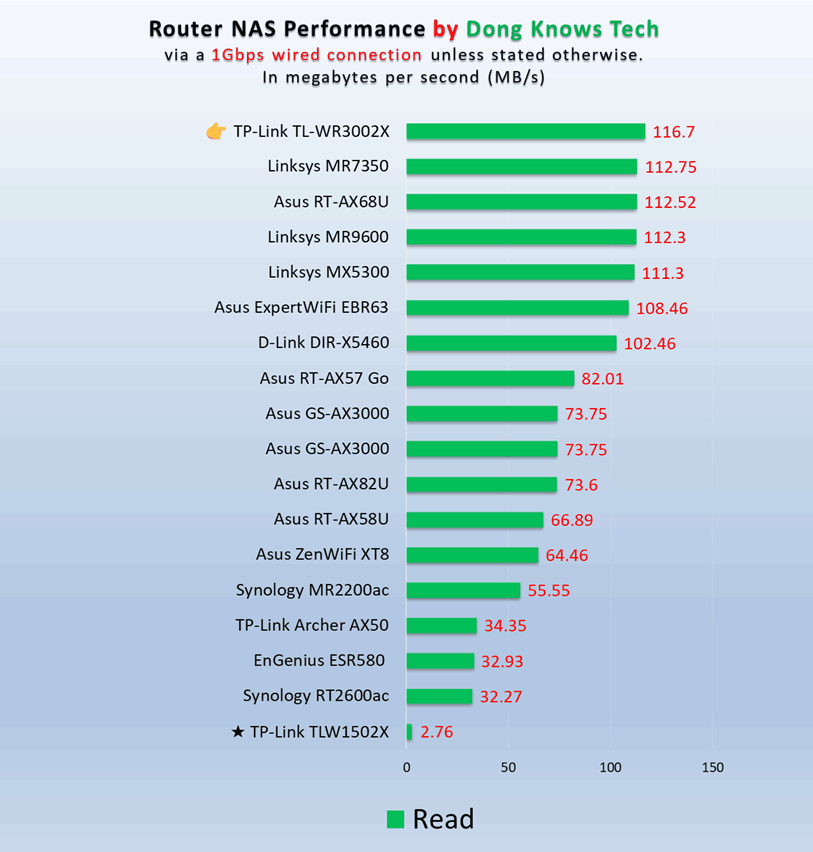
Impressively, the TL-WR3002X also worked quite well as a mini NAS server. I tested it with a portable SSD connected to its USB port, and its sustained copy speed generally saturated the Gigabit connection. In addition to hosting shared storage, the router can also serve as a DLNA streaming server.
So, put your media on a large portable SSD, and you likely won’t need access to Netflix or any streaming services on the go. By the way, the router’s USB port has enough power to power all portable SSDs I’ve tried with it, and it can charge a connected smartphone, too.
TP-Link Roam 6 (TL-WR3002X)'s Rating

Pros
Compact design with 2.5Gbps WAN port and 160 MHz channel width support, excellent real-world performance
Useful features tailored to travelers, including multiple operation modes, built-in NAS capability, and advanced VPN support
Robust web user interface with a useful optional mobile app; standard USB-C charging
Cons
No built-in cellular modem
No battery option
Conclusion
The TP-Link Roam 6 Dual-Band Wi-Fi 6 AX3000 Travel Router (model TL-WR3002X) is an excellent accessory for connecting a group of devices on the go. It’s a clear better alternative to the previous TL-WR1502X. Still, if you already have the older model, there’s no need to upgrade. In many cases, both will give you a similar experience. Wait until the Wi-Fi 7 version is out.
However, if you want a travel router today, the TL-WR3002X is an excellent buy. Get it today!


This product works really well. It wildly improves my baseball by a lot.
Not sure how this travel router could improve your baseball but thanks for sharing, Jaquan. 🙂
Does it support eap ? I want to connect with university WiFi.
That’s the WISP mode you want to use, Teerapat, as mentioned in the review.
Just wondering if this new version allows for MAC Spoofing? This is the only thing that is holding me back from purchasing this because I read that this doesn’t have this feature.
Not sure what you mean by that, Arthur. MAC spoofing has nothing to do with a router. But if by that you mean MAC cloning, the answer is yes.
Thank you! Critical info I needed.
👍