
The TP-Link RE653BE is a versatile BE10000 tri-band Wi-Fi 7 range extender that can also operate as a standard access point with a 2.5Gbps uplink port or as an EasyMesh node, when coupled with a supported router. In other words, it’s much more than a simple Wi-Fi “booster”, the type I’m not a big fan of.
Here’s the bottom line: If you need to extend Wi-Fi coverage to a far corner of a large home and either can run a network cable there or are currently using a TP-Link tri-band Wi-Fi 7 router, the RE653BE is an excellent option, worthy of its $199 price tag. Get one today!
Note: TP-Link also offers a variant, model RE655BE, that’s practically the same in real-world experience.
TP-Link RE653BE's Rating
Pros
2.5Gbps uplink/LAN port with various operation modes (extender, access point, and EasyMesh node)
Top-tier Wi-Fi 7 specs with fast, reliable performance and good coverage
Convenient design, full web interface
Cons
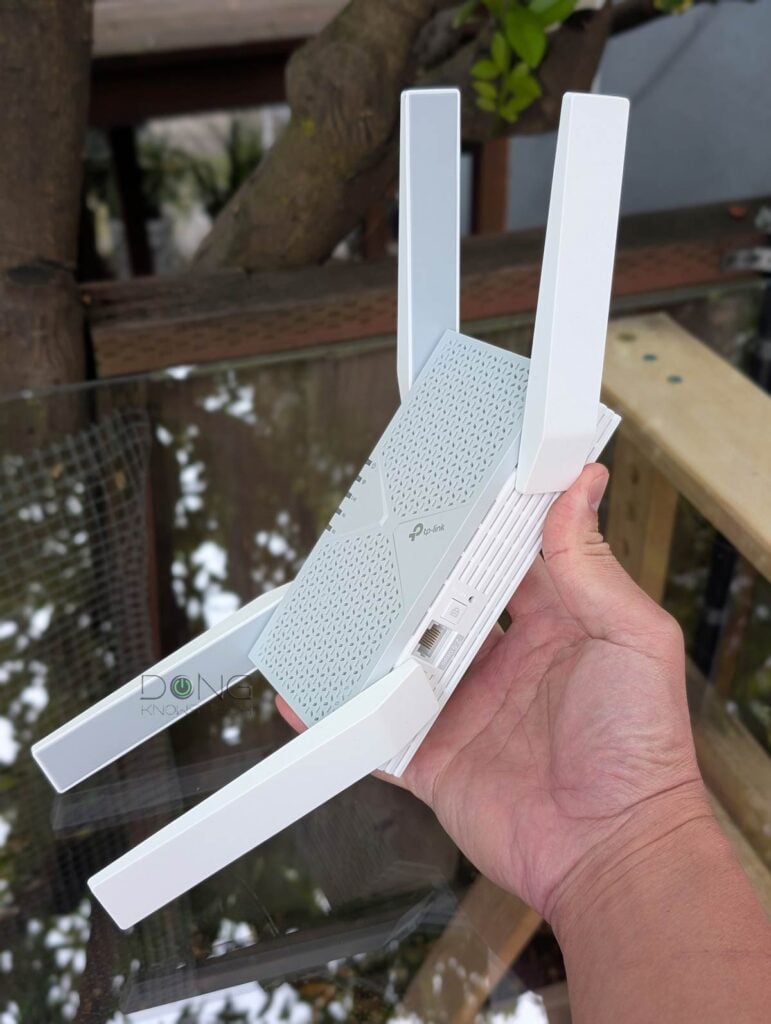
Bulky design with no pass-through power socket
Awkward support for MLO, IoT, and Guest SSIDs when working as an extender or EasyMesh point
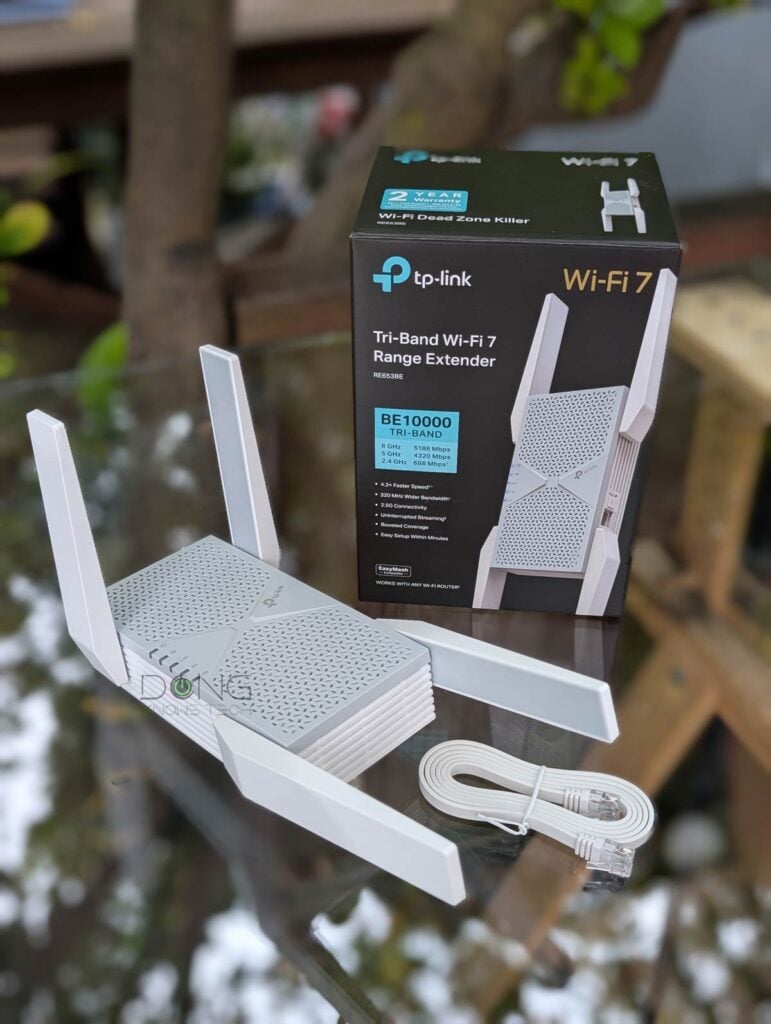
TP-Link RE653BE Extender: A versatile 2.5GbE Wi-Fi access point
The TP-Link RE653BE is a typical example of how Wi-Fi hardware, such as routers and access points (APs), can often operate in different roles—most Wi-Fi routers can also function as a media bridge, an extender, or an access point.
But first, below are the raw hardware specs of this range extender.
TP-Link RE653BE: Hardware specifications and real-world power consumption
| Full Name | TP-Link RE653BE BE10000 Tri-Band Wi-Fi 7 Range Extender |
| Model | RE653BE |
| Dimensions (W x D x H ) | 4.2 ×1.5 × 6.3 in. (107.2 × 39 × 161 mm) |
| Weight | 0.99 lb (444 g) |
| Wi-Fi Technology | Tri-band BE10000 |
| 6GHz Wi-Fi Specs | 2×2 BE: Up to 5188 Mbps (20/40/80/160/320MHz) |
| 5GHz Wi-Fi Specs | 2×2 BE: Up to 4320 Mbps (20/40/80/160/240MHz) |
| 2.4GHz Wi-Fi Specs | 2×2 BE: Up to 688Mbps (20/40 MHz) |
| Backward Compatibility | 802.11a/b/g/n/ac/ax |
| Wireless Security | WPA2, WPA3 |
| Web User Interface | Yes |
| Available Operating Mode | Access Point (AP) Repeater (Extender) |
| Mesh-Ready | Yes (EasyMesh) |
| Gigabit Port | None |
| Multi-Gig Port | 1x 2.5GbE Multi-Gig (LAN or uplink in AP mode) |
| Input Power | 100-240V~50/60Hz |
| Real-World Power Consumption (over 24 hours) | ≈ 200 Wh (as tested) |
| US Price (at review) | $189 |
As noted above, the TP-Link RE653BE can work in three distinctive roles: a standard extender (default), an access point, or an EasyMesh node (satellite unit). The main difference between the roles lies in how the hardware handles the backhaul link.
Backhaul vs. fronthaul
In network connectivity, there are always fronthaul and backhaul.
Fronthaul (or downlink) refers to the signal from a host device (such as a router) going toward an end device (such as a computer). Backhaul (or uplink) is the signal from an end device going to the host device.
In most cases, the backhaul and fronthaul are the same—it’s just a matter of perspective.
However, a go-between device that relays the signal, such as a network switch or a Wi-Fi access point, has two distinct backhaul and fronthaul ends: the backhaul (the uplink to a single host) determines the max bandwidth (to the router or the Internet) shared between all of its connected end devices on the fronthaul (such as wired computers, Wi-Fi clients, or more go-between devices).
Additionally, keep the following in mind about the uplink for a wireless go-between device, such as a satellite/extender unit (a mesh point or node) of a Wi-Fi system:
- Generally, one of the Wi-Fi bands (2.4GHz, 5GHz, or 6GHz) is used for the uplink (backhaul), resulting in two scenarios:
- If this Wi-Fi band also handles fronthaul simultaneously, only half of its bandwidth is available to either end (and the half used for the uplink is the maximum bandwidth available to all of its connected end devices).
- If this Wi-Fi band is used solely for backhauling, as is often the case in tri-band hardware, the link is called a dedicated backhaul. In this case, this band is no longer available for the fronthaul.
- Some Wi-Fi 7 hardware can combine multiple bands into a single backhaul link via the MLO feature, allowing these bands to operate simultaneously as both backhaul and fronthaul. In this case, half of their combined bandwidth is available to either side.
For the best performance and reliability, network cables are recommended for uplink (a.k.a. wired backhaul), which is only possible when the go-between device has a network port, preferably a Multi-Gig port.
No matter how you use the RE653BE, TP-Link’s claim that it has “Unrivaled 10.2 Gbps Wi-Fi Speeds” based on its Wi-Fi specs is pure marketing nonsense, though that’s a common practice.


Note its three-pronged power connector and the lack of a power outlet passthrough.
A powerful tri-band Wi-Fi 7 extender
As an extender (the default role), the TP-Link RE653BE generally uses all of its bands to connect to an existing Wi-Fi network. The user can then create the same or different SSIDs on the extender for clients to connect to.
In other words, each of its bands, by default, serves as both backhaul and fronthaul. In this standard extender mode, the RE653BE will lose half of its Wi-Fi bandwidth to the uplink, leaving the other half for its clients. So, it’s either the backhaul or front-haul, whichever is slower, that will determine the real-world bandwidth of each band.
The point is that sustained rates will still be far below the advertised 10.2 Gbps “speed”—theoretically, you’ll get half the speed of its fastest band (5188 on the 6GHz), which is 2594 Mbps.
That doesn’t mean the TP-Link RE653BE will be “slow” thanks to its vast Wi-Fi 7 bandwidth, especially for the 5GHz and 6GHz bands, as you will note in the performance section below.


An entry-level Multi-Gig access point
As mentioned, despite the “extender” in the name, the TP-Link RE653BE can be a viable access point thanks to its 2.5 GbE network port.
Use this port to connect to an existing router, and it will function as a standard AP, allowing it to use all of its Wi-Fi bands for front-haul traffic—serving connected clients.
In this case, as you can imagine, the 2.5Gbps uplink connection is its top bandwidth, no matter how fast Wi-Fi can be. Still, using a network cable is also the preferred way to use the hardware as wired bakchaul is much more reliable.
A robust EasyMesh satellite unit
Finally, whether you want to use the TP-Link RE653BE as an extender or an access point, it’s best to use it in a network hosted by a TP-Link Archer Wi-Fi 7 router. In this case, it can work as a member of an EasyMesh Wi-Fi system, as a mesh unit, or via wired backhaul.


In either case, its performance remains, but you’ll be able to manage it as part of a system with better signal handoff and less unnecessary interference. This use case is part of my general recommendation in picking the right extender.
TP-Link RE653BE: Familiar setup process
The TP-Link RE653BE shares the same firmware as previous TP-Link extenders, such as the RE715X, and hence the same setup process.
Specifically, to set up the RE653BE in a network hosted by a non-TP-Link router, you first connect a Wi-Fi device to its default open SSID, “TP-Link_Extender”, then open a browser and navigate to http://tplinkrepeater.net/ to access its web-based user interface.


Now, the rest is self-explanatory. You’ll be asked to create a new admin password, choose the operating role (either AP or Extender mode), and connect it to an existing Wi-Fi network.
Alternatively, you can use the TP-Link Tether mobile app, which requires a vendor account.
On the other hand, if you have a TP-Link Archer Wi-Fi 7 router and want to use the RE653BE as part of a Wi-Fi system, you can use the WPS buttons on both devices to sync them, as mentioned in this TP-Link EasyMesh post.
In any case, after the initial setup, you can always return to the interface to further customize the device, including creating virtual SSIDs, as mentioned above.
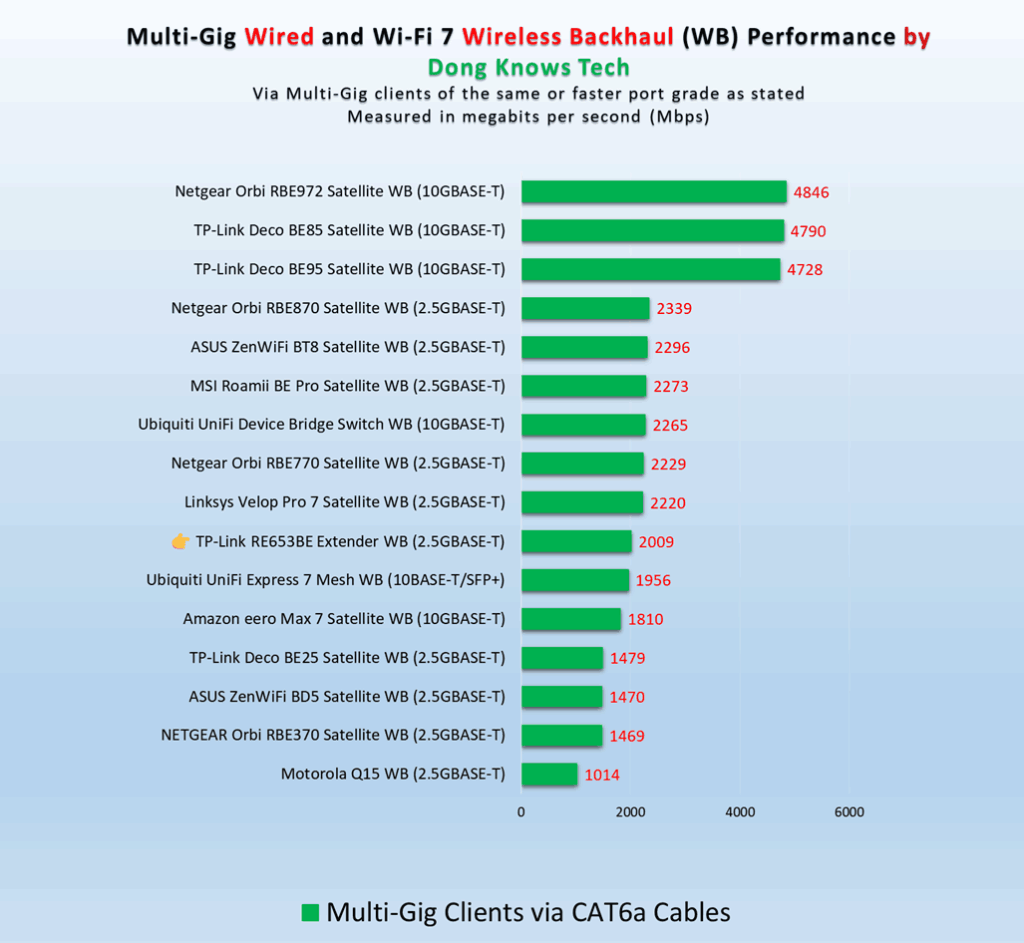
TP-Link RE653BE: Excllent performance
I tested the TP-Link RE653BE for over a week in all different roles, and it proved to be a formidable performer.


The numbers you see on the charts are for its access point roles or for a mesh member in a network hosted by a TP-Link Archer GE650 router. That’s because I’d recommend using it with a TP-Link EasyMesh router or as an access point.


In terms of coverage, which is always hard to quantify, you can expect the RE653BE to cover some 1500 ft2 (139 m2) of a residential area when placed at the center and used with wired backhaul. When used as a wireless extender or mesh point, the add-on’s extended coverage will depend on how far you place it from the original access point. In any case, your mileage will vary depending on the layout of the place.
When set up properly, the TP-Link RE653BE passed my 3-day stress test without any disconnection. It became a bit warm to the touch, but never hot enough to cause concerns.
Conclusion
The TP-Link RE653BE BE10000 Tri-Band Wi-Fi 7 Range Extender is an excellent way to extend your Wi-Fi coverage, especially when used as an access point or as part of an EasyMesh system.
If you have a wired home or a tri-band TP-Link Wi-Fi 7 router and need to expand coverage, consider the TP-Link RE653BE today!


Comments are subject to approval, redaction, or removal. You're in the no-nonsense zone and that applies BOTH ways.
It's generally faster to get answers via site/page search. Your question/comment is one of many Dong Knows Tech receives daily.
Thank you!
(•) If you have subscription-related issues or represent a company/product mentioned here, please use the contact page or a PR channel.