
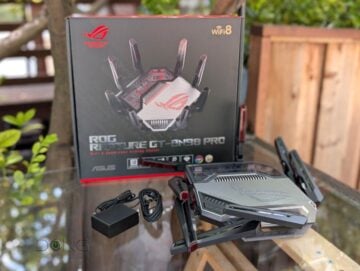
The ASUS ROG Rapture GT-BN98 Pro, first announced in August together with the non-Pro version, is the first Wi-Fi 8 router to be available in the US. It was a bit of a pleasant surprise, considering the FCC’s router ban instituted earlier this year.
Because of this ban, TP-Link’s first Wi-Fi 8 router, the Archer BN800, wasn’t immediately available in the North American market.
In more ways than one, this new router is an improved variant of the Wi-Fi 7 GT-BE98 Pro, just as Wi-Fi 8, still in draft at the time of this review, is a more refined version of Wi-Fi 7.
Here’s the bottom line: While not a must-have, the GT-BN98 Pro is an excellent router, worthy of its $899.99 price tag. Get one today if you want to build a cutting-edge home network, or a couple of units to build a top-tier Wi-Fi 8 mesh system. The new router works well with existing Wi-Fi 7 (and older) devices and is poised to get even better over time as this latest Wi-Fi standard matures.
Dong’s note: I first published this piece on September 11, 2026, as a preview and updated it on October 27, 2026, to an in-depth review after thorough hands-on testing.
ASUS ROG Rapture GT-BN98 Pro's Rating
Pros
Quad-band with top-tier Wi-Fi 8, including AFC (planned) and MLO, and excellent real-world performance
ASUSWRT 6 firmware with lots of free, in-depth, and valuable networking features and settings (VPN, AiProtection, Parental Control, Guest Network Pro, Bandwidth monitoring, etc.); tons of gaming-related features; AiMesh-ready
Two 10Gbps and four 2.5Gbps Multi-Gig ports with WAN/LAN flexibility, Dual-WAN, and Link Aggregations
No vendor-required login account; fanless design, runs cool
Cons
Bulky design, no SPF+ port
A bit expensive, a tad ahead of its time (Wi-Fi 8 still in draft with clients unavailable)

ASUS ROG Rapture GT-BN98 Pro: More than the Wi-Fi 8 version of the GT-BE98 Pro
As the name suggests, the new GT-BN98 Pro is first and foremost the Wi-Fi 8 version of the previous Wi-Fi 7 GT-BE98 Pro.
Mind the little detail: In the model names of the two routers above, BE stands for Wi-Fi 7 (802.11be), and BN stands for Wi-Fi 8 (802.11bn).
As Wi-Fi 8 shares the same ceiling speed as Wi-Fi 7, the two routers share identical total Wi-Fi bandwidth: 30000 Mbps across their four bands. And their quad-band configuration is the same, too: both come with 6 GHz split into two sub-bands.

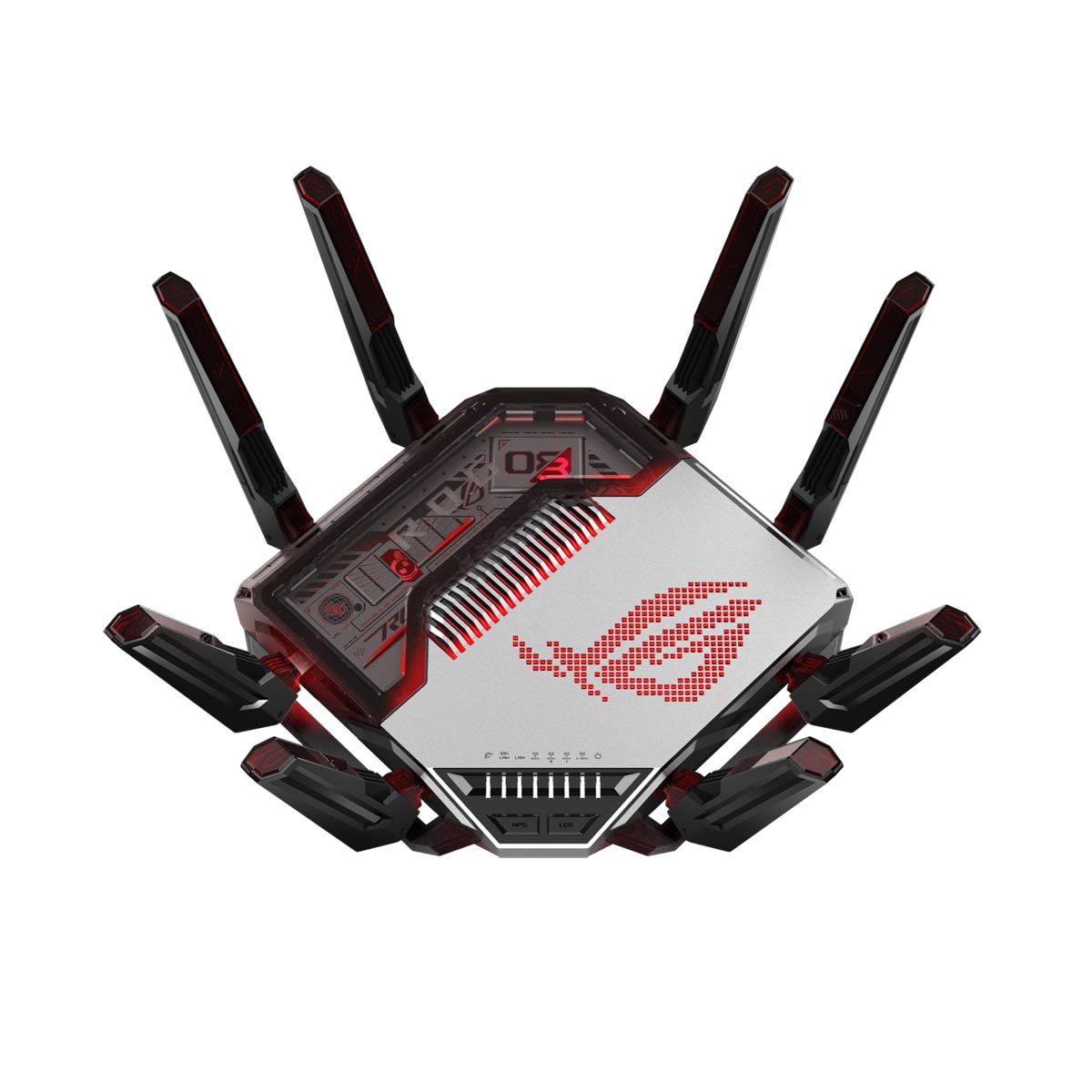
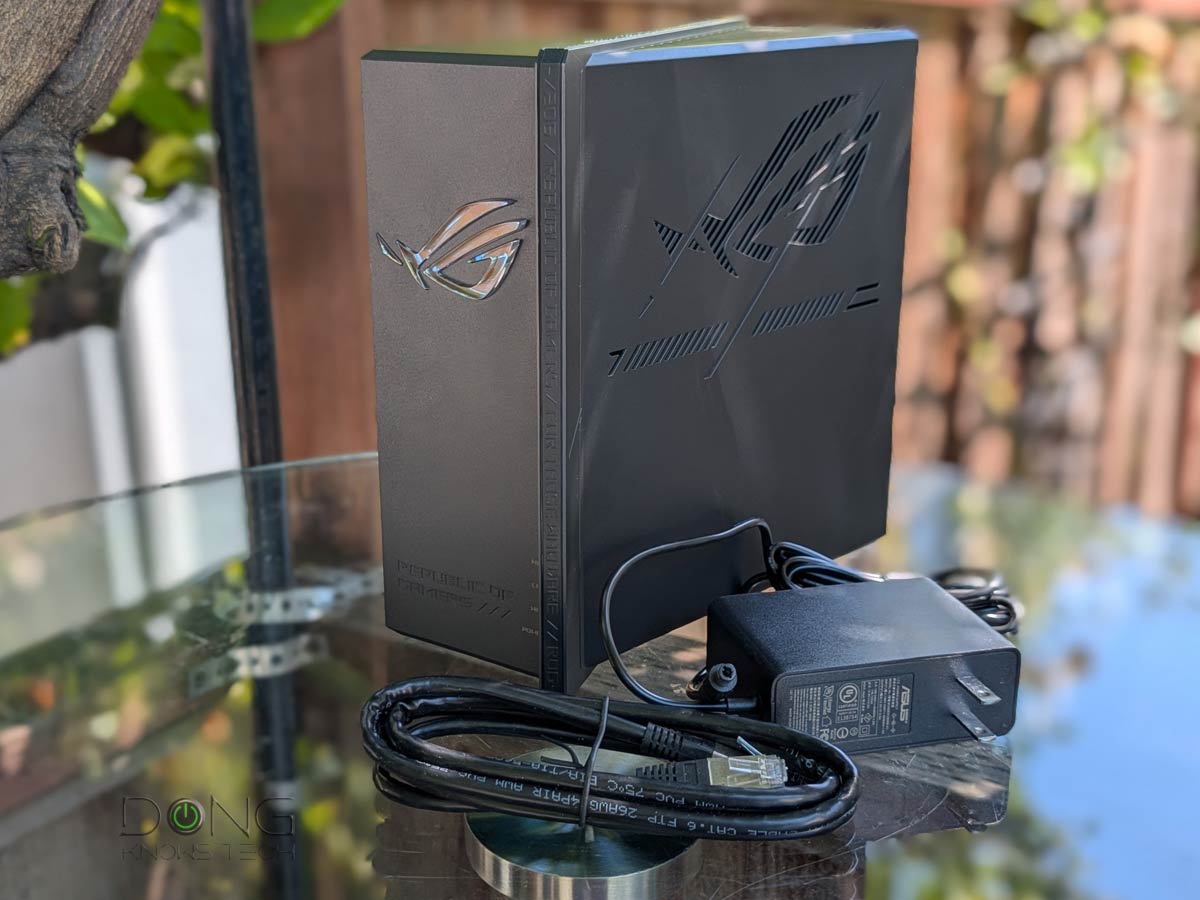
Design-wise, the GT-BN98 Pro looks identical to the previous model, albeit in a slightly different color theme. It has the same “dead spider” shape, with eight external (non-detachable) antennas attached around the massive, squarish body. The GT-BN98 Pro’s antennas can only swivel around the joint, while remaining at 90 degrees relative to the router’s body—those of the GT-BE98 Pro can also be extended outward.
This design began with ASUS’s Wi-Fi 5 hardware and has remained largely unchanged for over a decade. It thus can be “iconic” to some and “boring” to others. One thing is clear: it likely won’t pass that “spousal approval” hurdle in many cases.
On top, the router comes with the familiar large programmable ROG Aura RGB light, which is the hallmark of ASUS gaming gear. Around the body, it has the same number of ports: two 10GbE ports, four 2.5GbE Multi-Gig ports, one Gigabit port, and a couple of USB ports.
According to ASUS, like the GT-BE98 Pro, the new GT-BN98 Pro has no internal fan, which is always a good thing. Fans are generally no good, as moving parts tend to have a limited lifespan, not to mention the noise. To further emphasize this fanless notion, ASUS says it has applied the “most advanced thermal” design to the GT-BN98 Pro. Specifically, the router features five passive heat sinks—one on top and four on the underside—reflecting the company’s substantial investment in PCB layout design to “maximize performance, reliability, and long-term durability.”
That said, you can expect the GT-BN98 Pro to be completely silent during operation, which has been the case in my experience. The router also remained cool to the touch during my month-long trial.

Despite all the similarities, the GT-BN98 Pro, as ASUS’s latest router of a new Wi-Fi standard, has a few notable features that previous models lack. We’ll get to those after the table below that compares the hardware specs of the two flagship routers.
Hardware specifications and real-world power consumption
 |  | |
|---|---|---|
| Name | ASUS ROG Rapture GT-BN98 Pro Quad-band Wi-Fi 8 Gaming Router | ASUS ROG Rapture GT-BE98 Pro Wi-Fi 7 Gaming Router |
| Model | GT-BN98 | GT-BE98 Pro |
| Antennas | 8 x external | |
| Wi-Fi Bandwidth | Quad-band BN30000 (Wi-Fi 8) | Quad-band BE30000 (Wi-Fi 7) |
| Modulation Scheme (QAM) | 4096-QAM (all bands) | |
| 1st Band (channel width) | 2.4GHz: 4×4 BN with up to 1376Mbps (20/40MHz) | |
| 2nd Band (channel width) | 5GHz: 4×4 BN with up to 5762Mbps (20/40/80/160MHz) | |
| 3rd Band (channel width) | 6GHz-1: 4×4 BN with up to 11,525Mbps (20/40/80/160/320MHz) | |
| 4th Band (channel width) | 6GHz-2: 4×4 BN with up to 11,525Mbps (20/40/80/160/320MHz) | |
| Multi-Link Operation (MLO) | Yes | |
| Automated Frequency Coordination (AFC) | Yes (at launch) | Planned (not yet available in late 2026) |
| Network Standards | IEEE 802.11a, IEEE 802.11b, IEEE 802.11g, IEEE 802.11n, IEEE 802.11ac, IEEE 802.11ax, IEEE 802.11be, IPv4, IPv6 | |
| ASUSWRT Firmware Version (at launch) | ASUSWRT 6 | ASUSWRT 5 |
| Firmware version (at review) | 3.0.0.6.102_41973 | 3.0.0.6.102_32882 |
| Network Features | Web User Interface ASUS Mobile App ASUS Core Features ASUS Gaming Features Advanced VPN (server/client) with VPN Fusion, Instant Guard and 1-year NordVPN subscription | |
| Mesh-Ready | Yes (AiMesh) | |
| Processing Power | Quad-core 2.6GHz CPU, 256MB Flash, 2GB DDR4 RAM | |
| Operation Mode | Router Access Point Repeater Media Bridge | |
| Multi-Gig Port | 1x 10GBASE-T WAN/LAN, 1x 10GBASE-T LAN, 1x 2.5GBASE-T WAN/LAN, 3x 2.5GBASE-T LAN | |
| Gigabit Port | 1 x Gigabit LAN | |
| Link Aggregation | Yes | |
| Dual-WAN | Yes | |
| USB Port | 1 x USB 3.0, 1 x USB 2.0 | |
| Hardware Buttons | Power Switch, Reset Button, WPS Button, LED Control | |
| Dimensions (with antennas) | 14.12 x 14.12 x 8.77 in (358.6 x 358.6 x 222.8 mm) | |
| Weight | 4.41 lbs (2 kg) | |
| Release Date | October 2026 | Q1 2024 |
| Real-World Power Consumption (measured over 24 hours) | ≈ 610 Wh | ≈ 560 Wh |
| US Launch Price (check street prices) | $899.99 | $799.99 |
| Warranty | 3 years | |

ASUS GT-BN98 Pro: Three things that set it apart from the previous model
Despite sharing the same appearance as shown in the photos above, the GT-BN98 Pro is next-gen hardware that has three things that set it apart from its older cousin.
1. The (partial) effect of Wi-Fi 8
The first thing is Wi-Fi 8.
On this front, it’s important to note that Wi-Fi 8 is currently in draft, with many features not yet finalized. That said, we’ll have to wait till it’s ratified with supporting clients, slated to be available by late 2027, to see how it pans out in full effect.
In any case, as mentioned, the new Wi-Fi standard doesn’t increase the wireless bandwidth, but instead focuses on connection quality. That said, existing Wi-Fi 7 and clients can benefit from higher-quality signal, and that proved to be the case in my trial. In fact, the GT-BN98 Pro, even at its current early stage, proved to deliver faster sustained throughput, as shown in the performance section below.

2. Support for Automated Frequency Coordination (AFC)
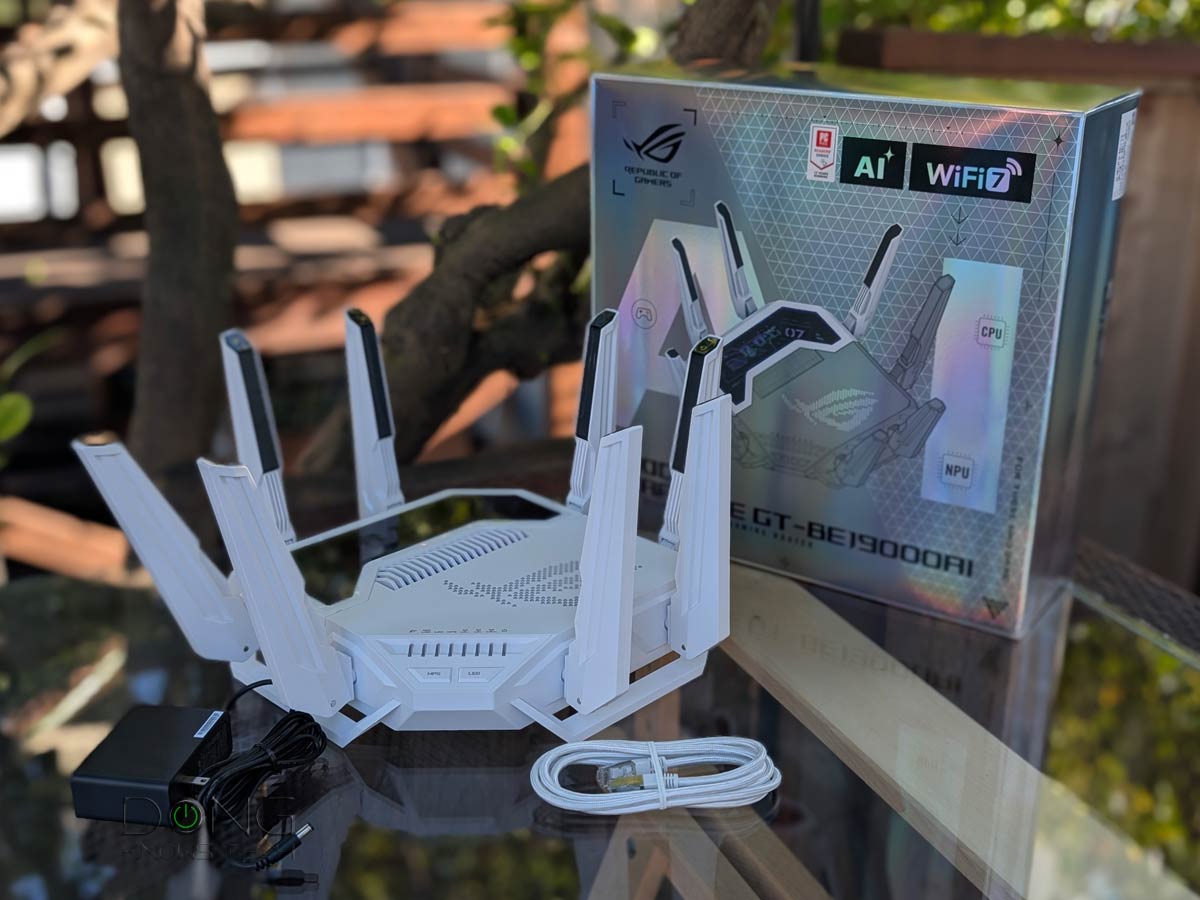
The GT-BN98 Pro is slated to support the AFC feature, joining ASUS’s existing small group of AFC-enabled models that includes the GT-BE19000AI and GS-BE18000. It’s important to note that, like the case of ASUS’s previous AFC-enabled router, the GT-BN98 Pro didn’t have this feature with its initial firmware, but ASUS repeatedly told me that it would be available before 2026 is out, likely in November.
AFC, which extends the 6GHz band to match the 5GHz band, requires certification, and the process generally delays its availability in hardware that supports it.
The GT-BE98 Pro, originally released with AFC in mind, hasn’t had it even in late 2026 and likely won’t have it at all. Subsequently, the GT-BE19000 and GS-BE18000 had this feature after a few rounds of firmware updates. Up to now, AFC has been available in only a handful of Wi-Fi 7 access points/routers, with the top five shown below.
Top 5 best Wi-Fi 7 access points/routers with AFC
 |  | 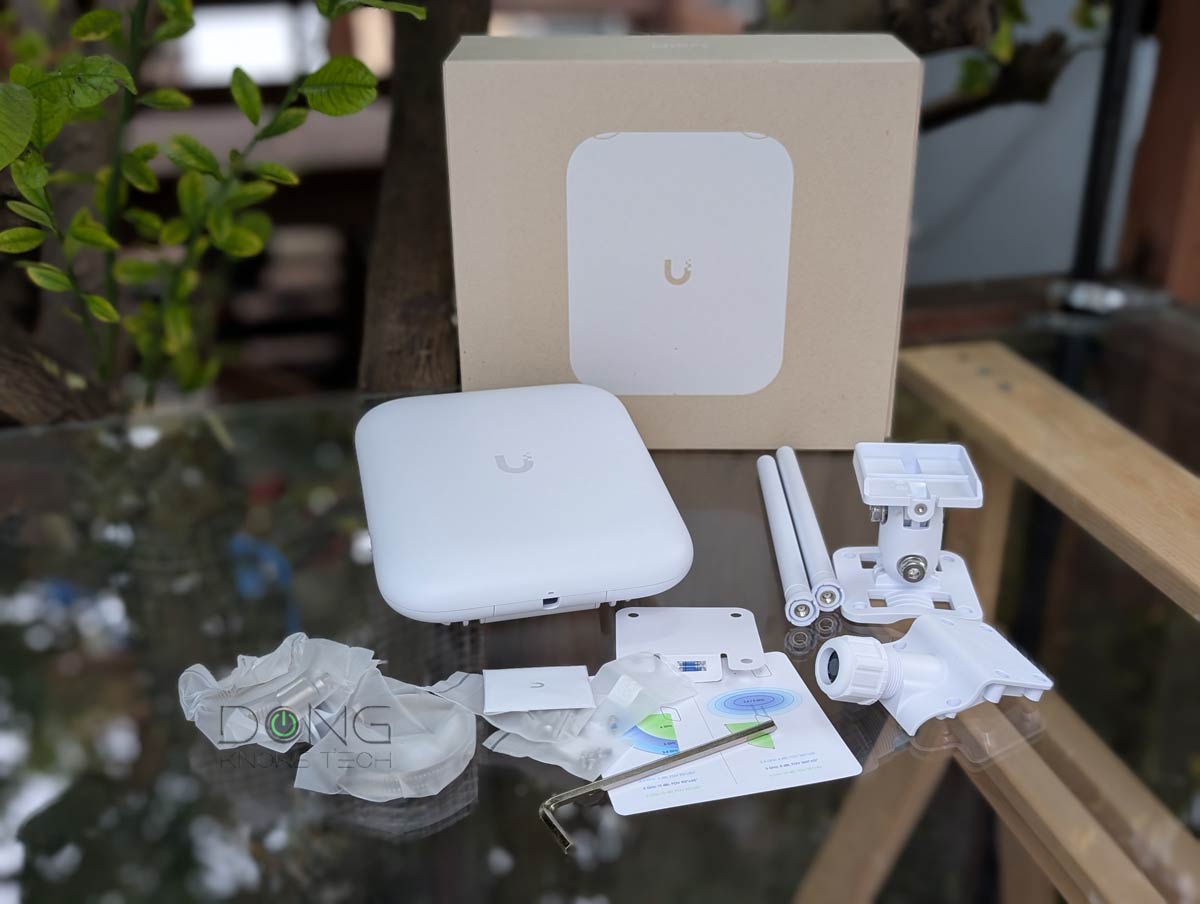 |  | 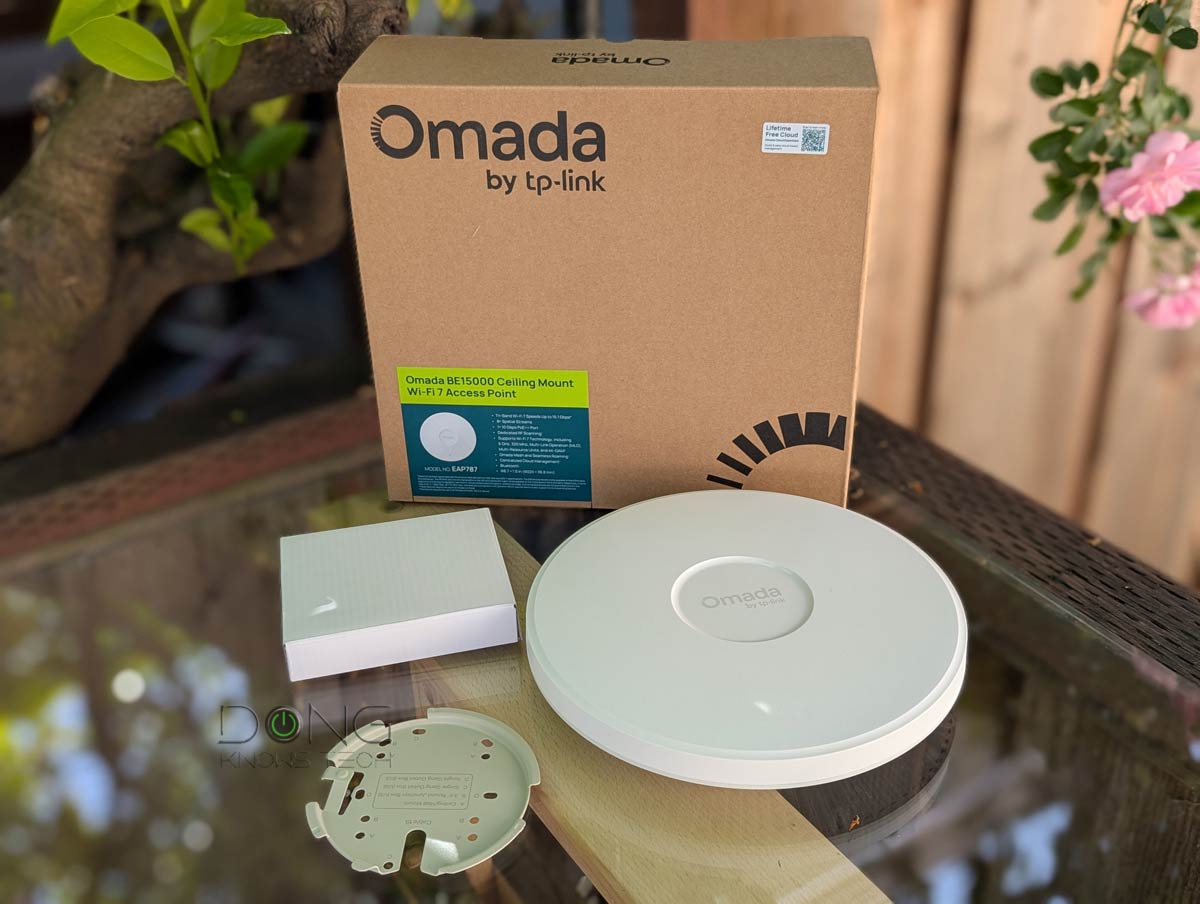 | |
| Name | Ubiquiti Enterprise7 (UniFi E7)'s Rating | ASUS ROG Rapture GT-BE19000AI's Rating | Ubiquiti U7 Pro Outdoor's Rating | ASUS ROG Strix GS-BE18000's Rating | TP-Link Omada EAP787's Rating |
| Price | – | – | – | – | – |
| Rating | |||||
| Description | |||||
| Statistics | |||||
| Buy this product |
There are two things to note about AFC, applicable to the case of the GT-BN98 Pro as well as any AFC-enabled access points:
- This feature only increases the range of the 6GHz band and not its ceiling bandwidth. That said, its effect is generally only measurable in terms of bandwidth when you have a client at a certain distance from the access point. Within a line of sight, this distance is generally farther than 40 feet (13 meters).
- When enabled, AFC is in effect only when the access point can report its precise real-time location.
Different networking vendors implement the real-time location report differently, and most outdoor access points come with a built-in GPS receiver.
The GT-BN98 Pro, like the rest of ASUS’s AFC-enabled indoor routers, doesn’t feature GPS, which only works in the open receiver. Instead, it receives the GPS signal via the ASUS mobile app running on a connected client, such as a smartphone, as detailed in the case of the GS-BE1800. Here are the conditions required for AFC to work on the GT-BN98 Pro:
- You must use the router in regions where AFC is available.
- You must have the ASUS Router mobile app running on a connected GPS-enabled client, like a smartphone, with all-time real-time location access permission, and this device must have a clear GPS signal while connected to the router via Wi-Fi at least once every 24 hours.
The point here is that, while AFC is exciting, there can be quite a few hoops to jump over before you can enjoy it.

3. ASUSWRT 6 firmware
Finally, the GT-BN98 Pro is the second router, after the GT-BE19000AI, to run ASUS’s latest ASUSWRT 6.0 firmware.
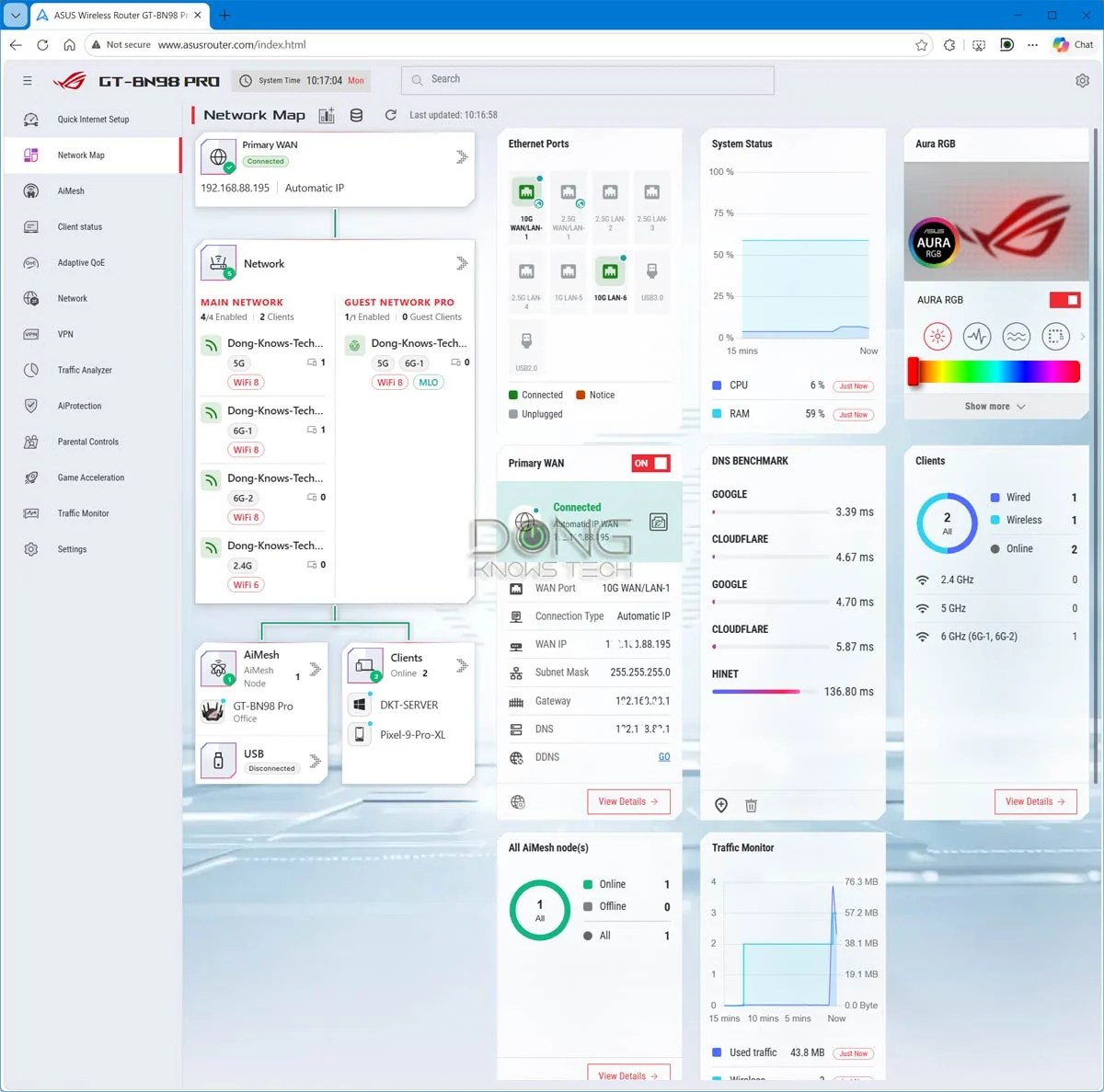
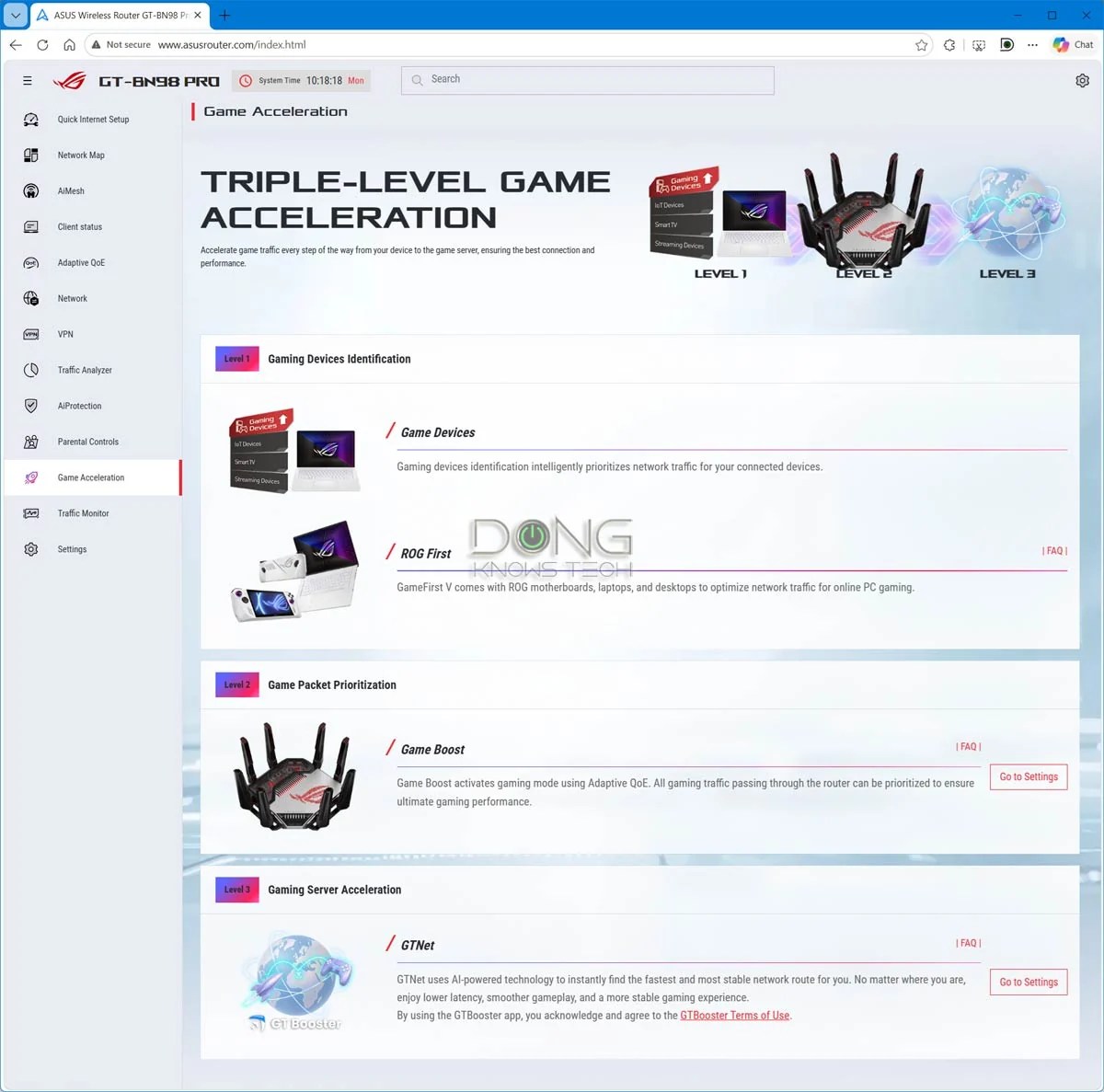
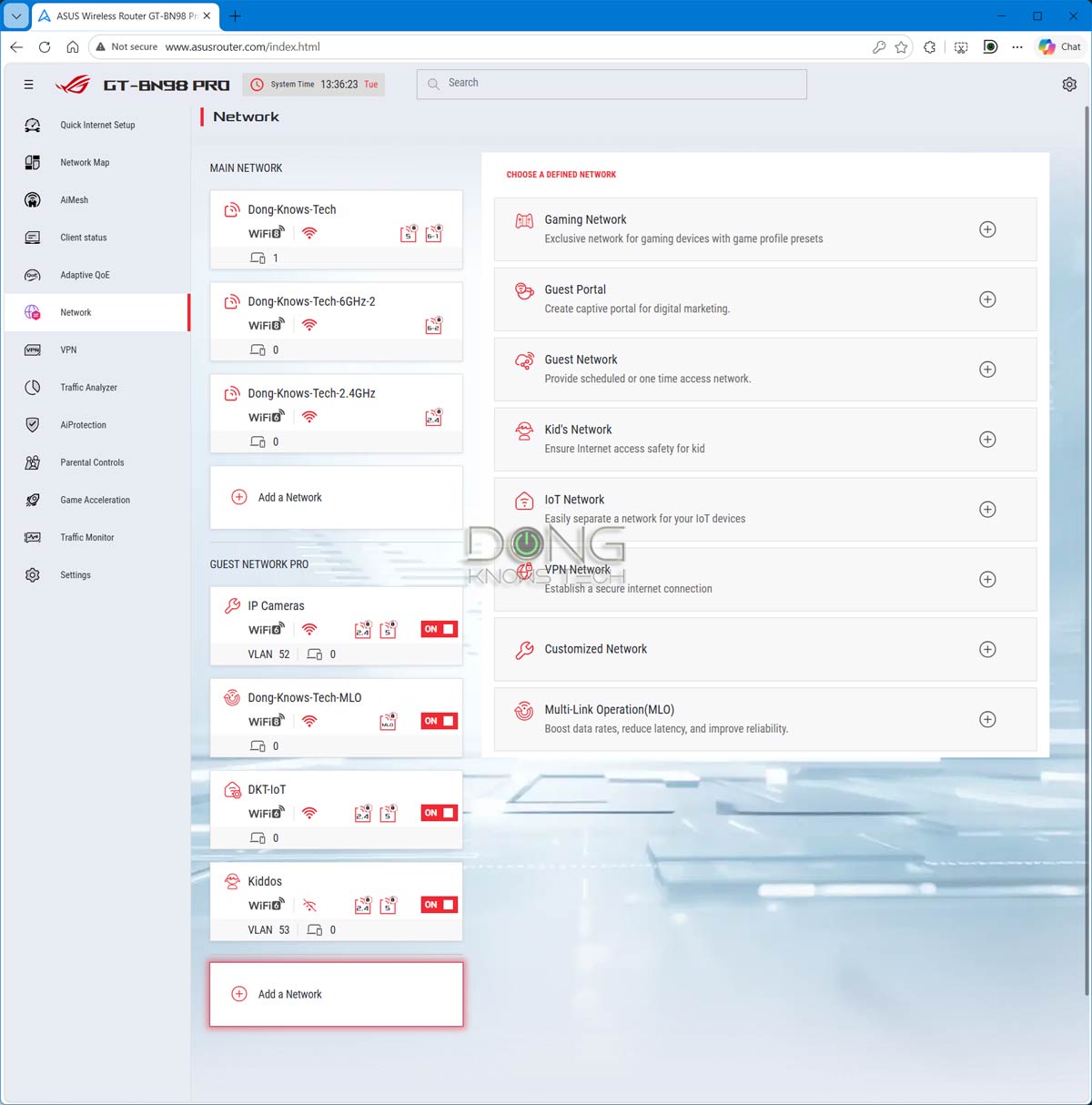
Among other things, the new firmware introduces a new and more robust web-based user interface that provides more information and is easier to use. The interface itself was responsive in my trial, with most changes requiring significantly less time to apply.
The biggest change in design is the fact that its left granular menu now contains its major features, including AiMesh, Adapter QoS, VPN, AiProtection, Parental Controls, Game Acceleration, and more. The more advanced network settings, including those of the router’s Wireless access points, have now been moved into the Settings section of the interface.
Additionally, features and settings now come with user-friendly and visually pleasant widgets, making managing the router fun.
Other than that, the interface itself is still self-explanatory for those familiar with the ecosystem and includes lots of customization. As for features, the GT-BN98 Pro has everything a top-tier ASUS gaming router has to offer, including support for the new GT Booster private network for gamers.

ASUS GT-BN98 Pro: A familiar advanced gaming router
Other than the three items above, the GT-BN98 Pro is largely a typical ASUS gaming router. It shares a rich feature set as found in previous ASUS routers, including (as confirmed in my trial):
- Flexible WAN/LAN configurations:
- The GT-BN98 Pro can auto-detect any of its ports as the WAN port, and depending on broadband speed, you can use any of its ports for this role. For example, if you have sub-Gigabit Internet, you can use the sole Gigabit port as WAN and the rest of the Multi-Gig ports for local devices. It can also use its USB port to tether a WAN source (such as a connected cellular modem).
- The router features dual-WAN, allowing users to turn one of its LAN ports or the USB port into a second WAN port.
- The GT-BN98 Pro supports Link Aggregation on the LAN side, allowing you to combine its first two 2.5Gbps LAN ports into a 5Gbps bonded link, or two of its 10Gbps ports into a 20Gbps bonded link.
- Universal backup restoration: Despite the new firmware with a web user interface, the GT-BN98 Pro can accept backups from almost any other ASUS router, making upgrading from one router to another quick and easy. I tried using the backup files of the GT-BE98 Pro, GS-BE18000, and a few others, and they loaded without any issues. (Note, though, that not all settings can be ported, depending on the models, and generally, it’s best to set up a router from scratch.)
- Standard management: The router has a robust web user interface with an optional ASUS Router mobile app. You can set up the router as you would any standard router via its default IP address, 192.168.50.1.
- AiMesh support: GT-BN98 Pro works best with backhaul, but thanks to MLO, you can use multiple units in a wireless setup. Note: MLO backhaul is available only when you use multiple GT-BN98 Pro units in a system and only via the star topology.
- Free online protection: The router has built-in Parental Controls and online protection (AiProtection), plus other traffic-related features. It also features Advertisement Blocking.
- A rich USB-based feature set: The GT-BN98 Pro has all available USB-based features (cellular tethering, network storage, media streaming server, etc.)
- Advanced VPN: The router supports all advanced VPN protocols, including WireGuard and Instant Guard, in both server and client modes.
- Lots of customization: There are tons of helpful network/Wi-Fi settings, tools, and other features, including the new Quality of Experience (QoE), which replaces Quality of Service (QoS), and web-based remote management via Dynamic DNS. For special applications, the GT-BN98 Pro can handle:
- For the primary Wi-Fi network, it can use one SSID per band or combine multiple bands into a single SSID with optional MLO. After that, users can create up to eight virtual SSIDs to segment their network.
- VLAN support for all of its network ports as well as each virtual SSID.
- Up to 128 IP reservation entries.
- Up to 64 port forwarding (virtual server) entries.
- Up to 32 port trigger entries.
- Flexible operation role: In addition to the default router mode, the GT-BN98 Pro can also function as an access point (either as a single unit or as part of a system), a repeater (range extender), a media bridge (Wi-Fi adapter), or an AiMesh satellite node.
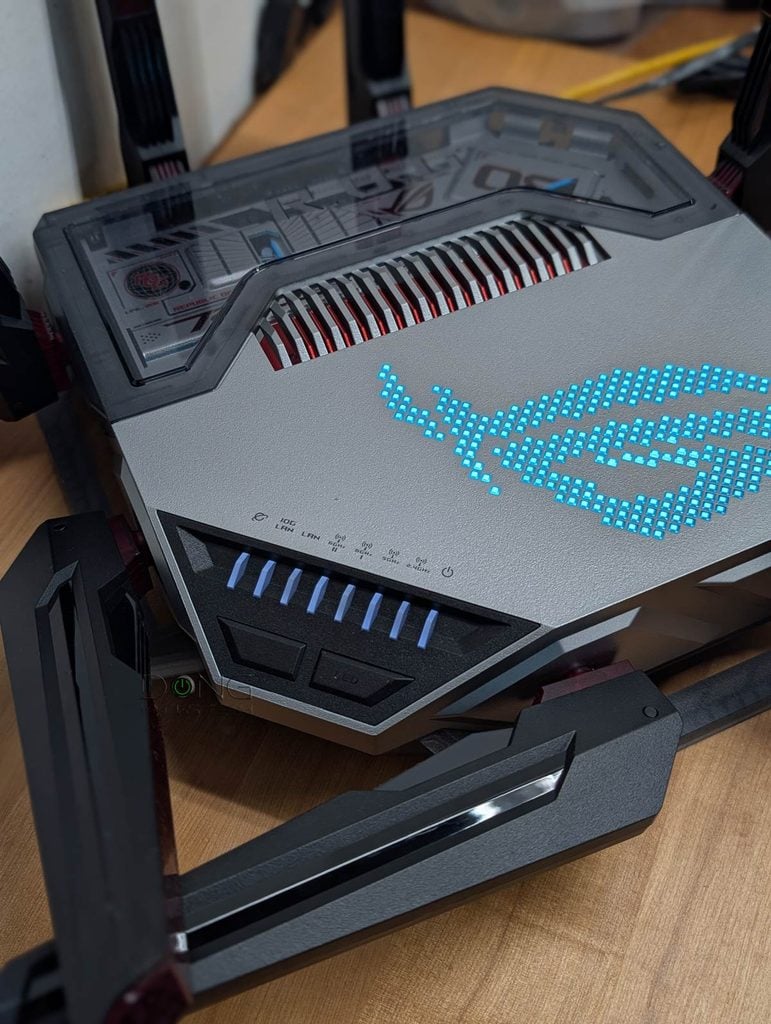
Additionally, as the top-tier gaming router, the GT-BN98 Pro has all gaming features available in ASUS routers, as shown in the table below.
| Multi-Gig Port | Gaming Private Network | ROG First, Game Radar | Gaming Port | GeForce Now | Aura Lights | |
| GT-BN98 Pro | 2x10GbE 4×2.5GbE | GT Booster | Yes | No | Yes | |
| TUF-BE9400 | 4×2.5GbE | No | Yes | No | ||
| GT-BE19000AI | 2x10GbE 4×2.5GbE | GT Booster | Yes | No | Yes | |
| TUF-BE6500 | 4×2.5GbE | WTFast | No | Yes | No | |
| GS-BE18000 | 8×2.5GbE | No | Yes | No | Yes | |
| RT-BE86U | 1x10GbE 4×2.5GbE | No | Yes | No | ||
| RT-BE88U | 1x10GbE 1xSFP+ 4×2.5GbE | No | Yes | No | ||
| RT-BE96U | 2x10GbE | No | ||||
| GT-BE98 Pro | 2x10GbE 4×2.5GbE | WTFast | Yes | No | Yes | |
| RT-AX88U Pro | 2×2.5GbE | WTFast | No | |||
| GT6 (mesh router) | 1×2.5GbE | No | Yes | No | Yes | |
| GT-AXE16000 | 1×2.5GbE 2x10GbE | WTFast | Yes | No | Yes | |
| GT-AX11000 Pro | 1×2.5GbE 1x10GbE | WTFast | Yes | |||
| GT-AXE11000 | 1×2.5GbE | Outfox | Yes | No | Yes | |
| GT-AX11000 | 1×2.5GbE | WTFast | Yes | No | Yes | |
| GT-AX6000 | 2×2.5GbE | No | Yes | No | Yes | |
| GS-AX5400 | None | No | Yes | No | Yes | |
| GS-AX3000 | None | No | Yes | No | Yes | |
| RT-AX88U | None | WTFast | No | |||
| RT-AX89X | 1x10GbE 1xSFP+ | No | ||||
| RT-AX86U | 1×2.5GbE | No | Yes | No | ||
| RT-AX86S | None | No | Yes | No | ||
| RT-AX82U | None | No | Yes | No | Yes | |
| RT-AX92U (canned mesh) | None | WTFast | No | |||
| TUF-AX5400 | None | No | Yes | No | Yes | |
All of these routers have the standard set of ASUS’s gaming features, including Mobile Game Mode, Open NAT, Gear Accelerator, and VPN Fusion.
ASUS GT-BN98 Pro: Excellent performance
For this review, I used two units of the ASUS GT-BN98 Pro for over a month and was quite happy with them.
As a single router, the GT-BN98 Pro proved to be a significant improvement over the GT-BE98 Pro when working with Wi-Fi 7 and older clients, as shown in the performance charts below. Additionally, the pair performed well as an AiMesh system, with MLO backhaul and all. Considering the cost, though, I’d recommend the upcoming ZenWiFi BN12 if you need a Wi-Fi 8 mesh.
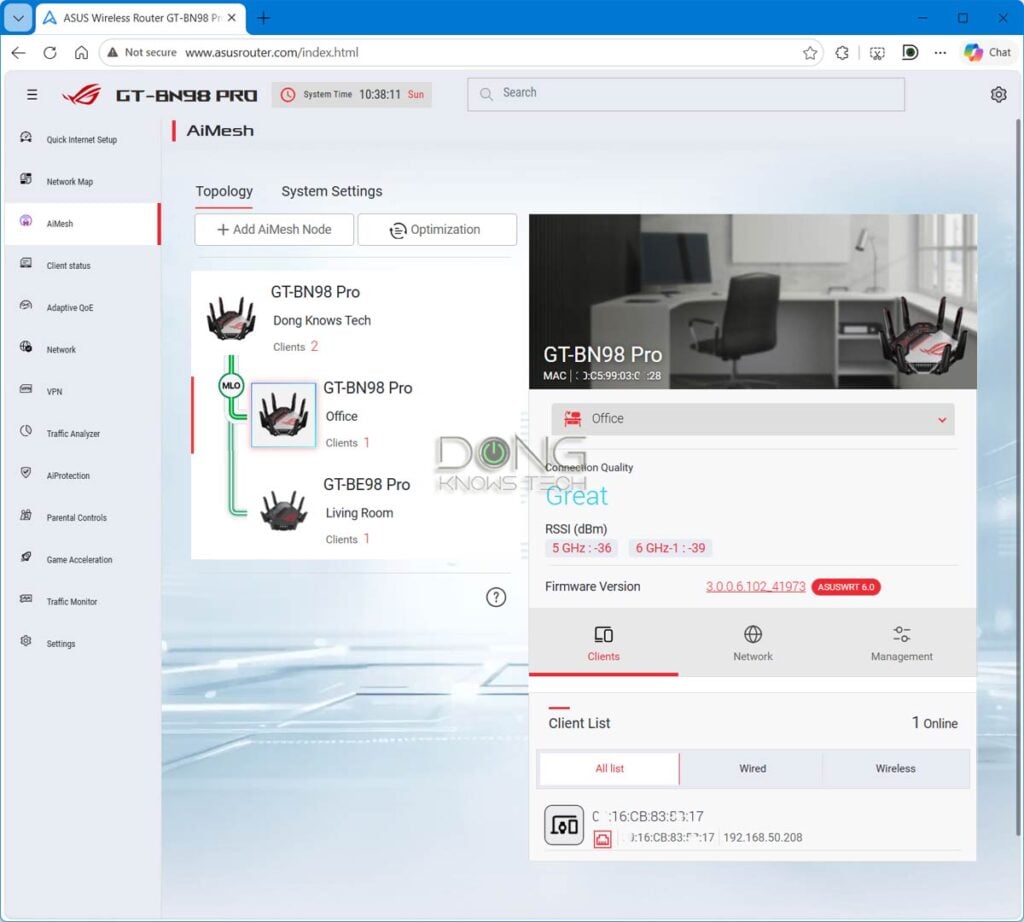
By the way, I also tried using the GT-BE98 Pro as a satellite node, but in this case, it didn’t have an MLO backhaul, which is to be expected, as generally MLO uplink is only available when you use the same unit throughout in an AiMesh system.
Important note: As I used a second GT-BN98 Pro unit as a quad-band (4×4) client, the Wi-Fi 8 throughput scores in the charts are only for reference and don’t reflect the true performance of normal Wi-Fi 8 clients, which are not yet available and will likely only support the dual-stream (2×2) specs of the standard.
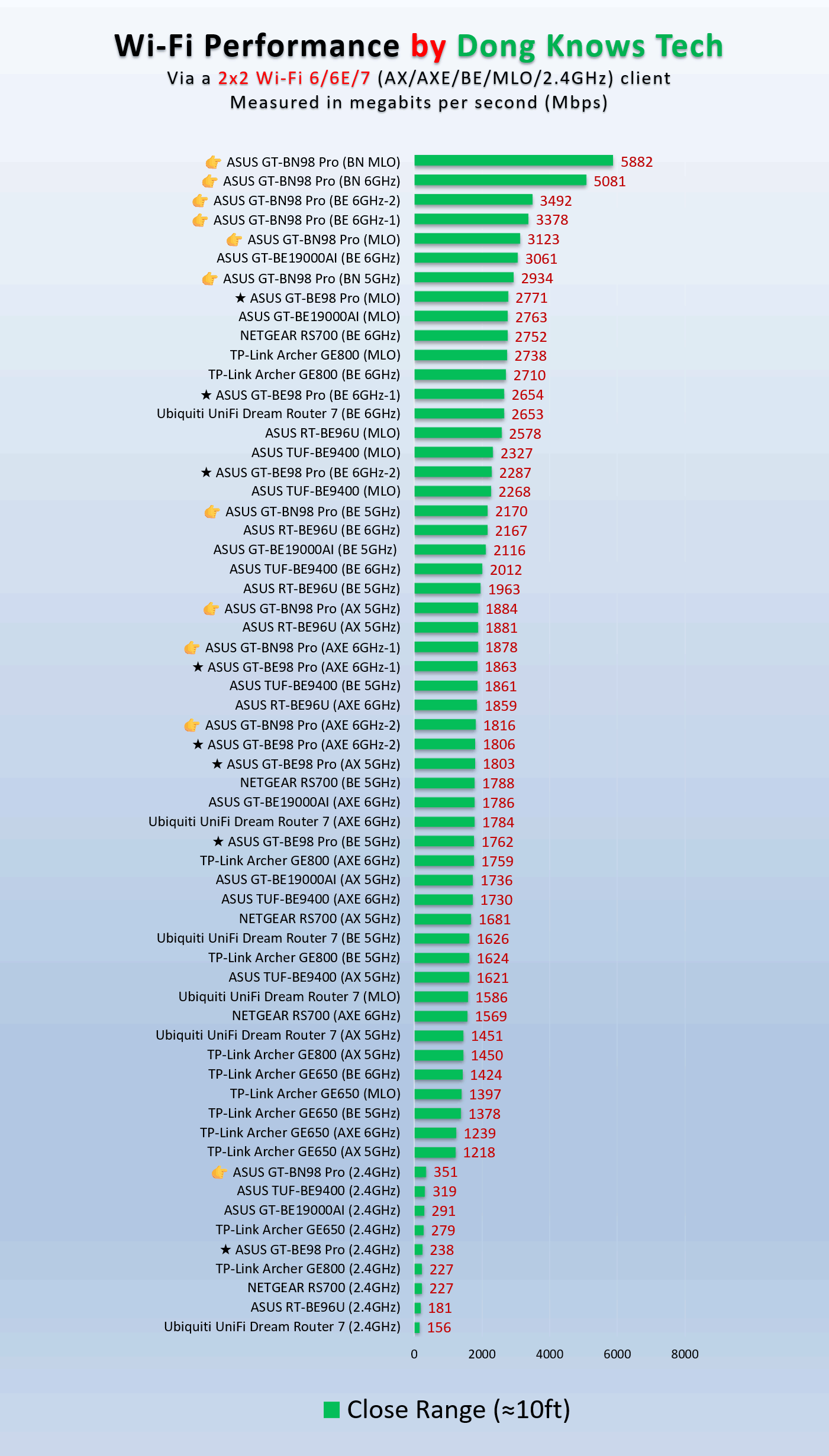
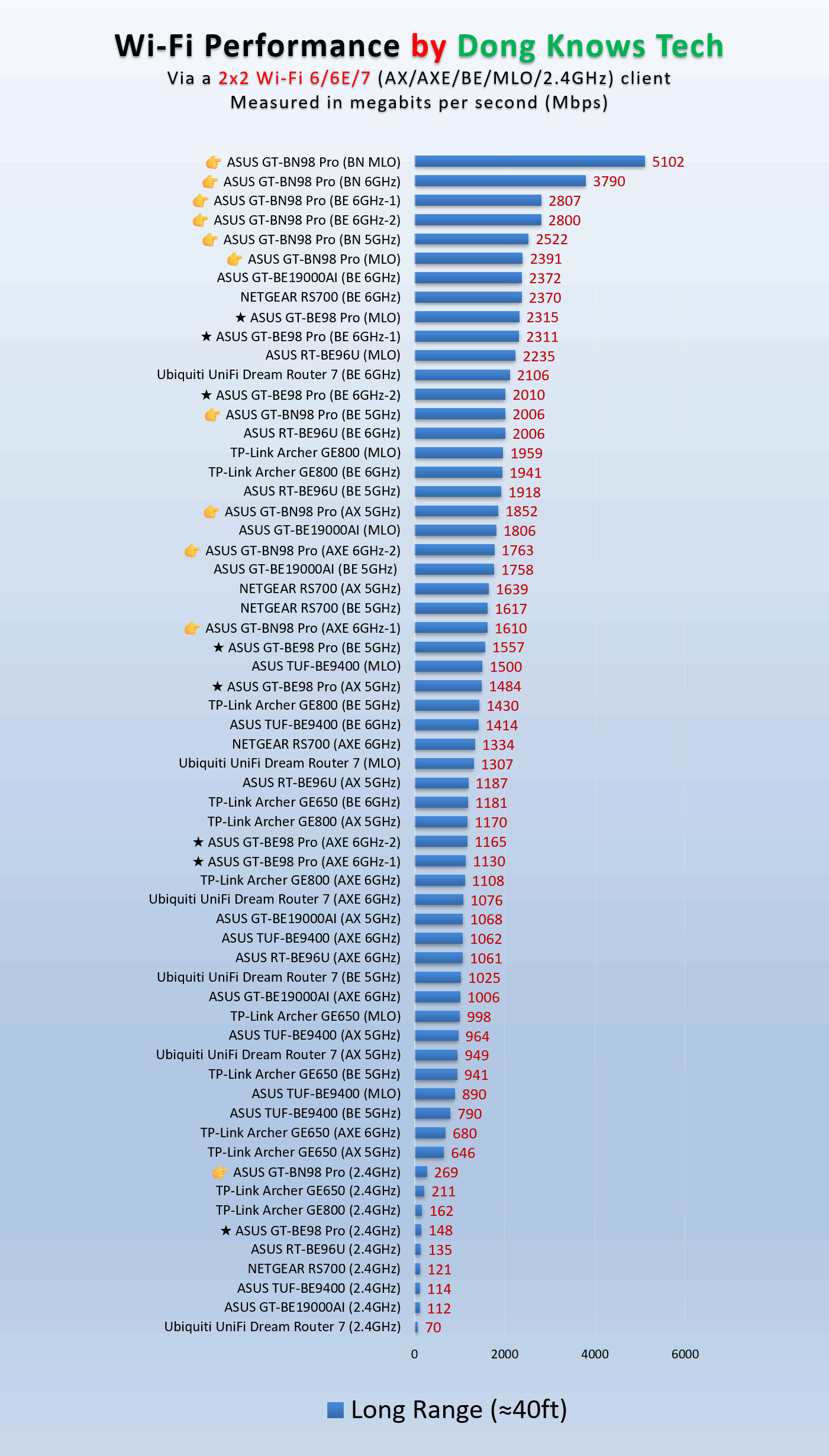
Note that the Wi-Fi 8 (BN) performance was that of a second unit being used as a 4×4 client and not representative of traditional Wi-Fi 8 devices, which weren’t available during the testing.
In any case, you’ll note that the GT-BN98 Pro topped the charts in most cases, edging out the GT-BE98 Pro by a noticeable margin. It has excellent range, too, similar to that of the GT-BE19000AI. It’s always hard to put Wi-Fi range in numbers, but my estimate is that, without AFC, it could cover around 2,500 ft2 (232 m2) of residential area when placed at the center.
The new router did well as a mini NAS server when hosting a portable SSD via its USB port, too, averaging almost 350 MB/s for reading, making it a viable network-attached storage for those wanting to do casual data sharing and backups.
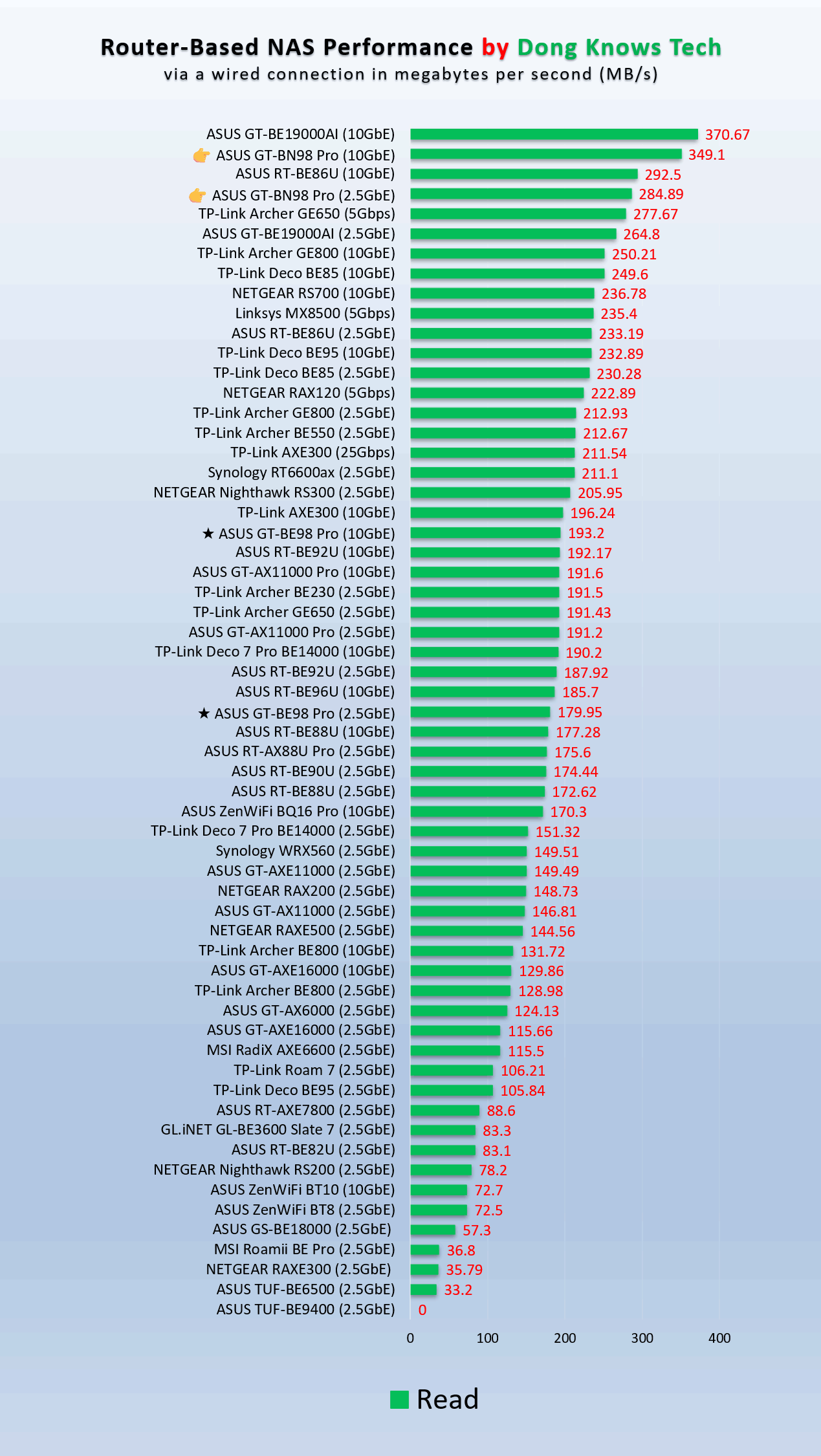
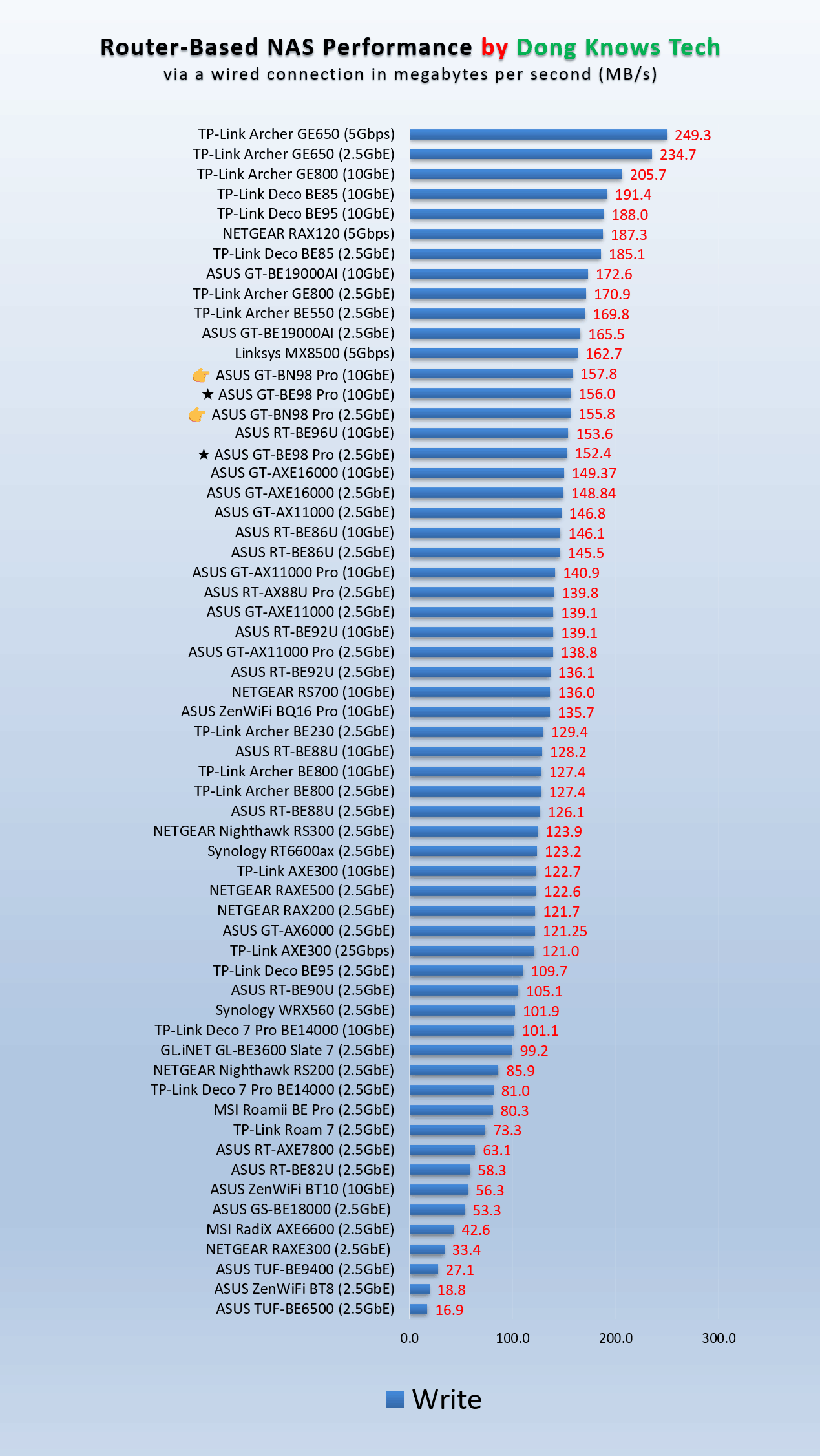
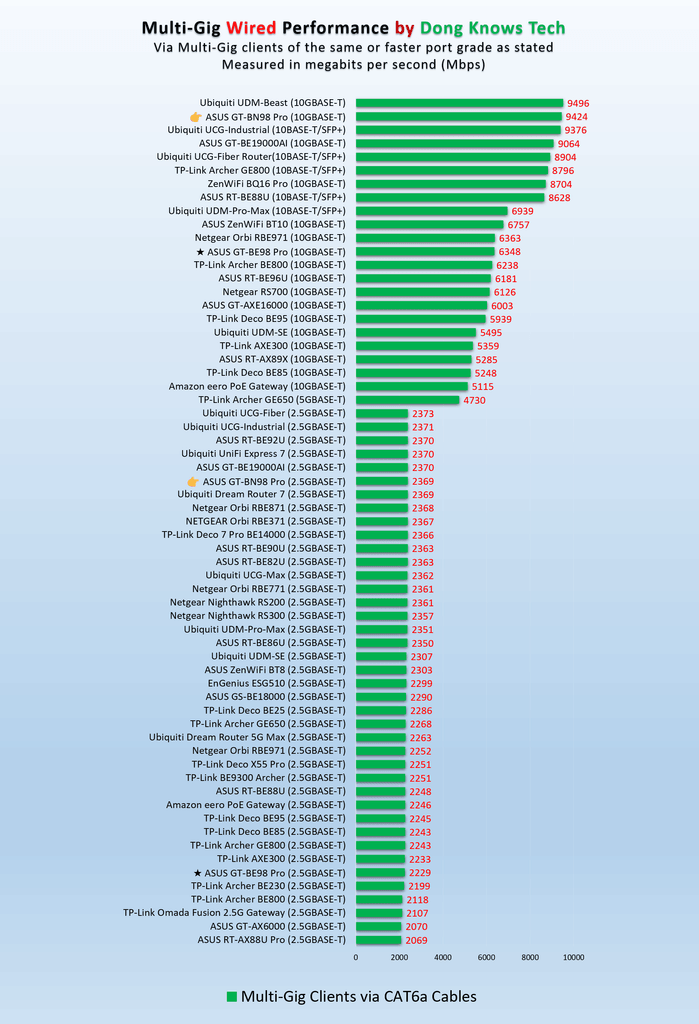
The GT-BN98 Pro did well as a wired router, too, with its ports generally showing the real-world speeds of their grades, namely 10Gbps or 2.5Gbps. The router has a handful of multi-gigabit devices right out of the box, but if you get a 10Gbps switch, you’ll get a top-tier wired network. On this front, keep in mind that it has no SPF+ port, which is often used as the uplink for many switches.
As mentioned, before publishing this review, I used the two GT-BN98 Pro units for over a month without any issue. They proved to be reliable, whether used as a single router, a Wi-Fi bridge, or as a mesh system. The hardware was totally silent and was generally cool to the touch, which is always a bonus.
Conclusion
As mentioned, Wi-Fi 8 won’t be official until next year. That said, there’s no rush to get the ASUS ROG Rapture GT-BN98 Pro today. However, according to my experience, it’s safe to do so, as the router will fit well in a home with lots of Wi-Fi 7 and legacy devices. And like many other ASUS routers, it’ll likely only get better over time as the new Wi-Fi standard matures.
That said, if you’re happy with your current Wi-Fi 7 or even Wi-Fi 6 router, there’s no need to upgrade, but if you’re in the market for a new router, have some cash to burn, and don’t mind its large “dead spider” design, the GT-BN98 Pro is worth a splurge. Get one or a couple today!


I really wish ASUS would release (somehow make available for purchase) both the Pro and non-Pro models in North America. Having 2 separate 5GHz radios (each with their own frequency) is way more useful for those of us who are doing a wired backhaul and don’t need the second channel for a wireless backhaul, especially since there still aren’t many 6GHz devices on my home network. This is the main reason I’m still on the AXE16000 and haven’t upgraded to their Wi-Fi 7 stuff. And by the looks of it, I won’t be able to upgrade to their Wi-Fi 8 stuff if I want to keep my setup with two 5GHz bands. I thought about buying the BE98 non pro from Europe or Asia but wanted the warranty, and didn’t want to get an AC adapter plug adapter…
They may. The AXE16000 is still great and you don’t need to replace it yet.
i have been reading your content for so long and i love your content
will eventually go back to this updated post when you are already able to experience the product
with that said, this article has typos, kindly check on it.
You can report the typos by highlighting them and hit the red box that jump out from the top right corner of the screen. That’d help a lot. Thanks!
Sir I have been following you and subscribed to you for years as I truly value the content you put out. Today however, trying to read through this article I was bombarded by the same full screen Walmart dog food add with an “X” so small at the top corner of the screen that I could not physically press it with my finger and had to get my stylus out 5 separate times before I have up trying to finish the article. Honestly if was like every other scroll up it would pop up. Please fix this somehow…
Sorry to hear that. I’ll look into this. I don’t actually manage the ads myself.
If you could share a screenshot by emailing it to dongknowstech(at)gmail.com, that’d great. Thanks!