
In simple terms, ASUS’s TUF Gaming BE9400 Tri-Band Wi-Fi 7 router (model TUF-BE9400), which was first announced in May 2025, is the TUF-BE6500 plus a 6GHz band. However, that extra band makes all the difference. Thanks to it, the new gaming router offers a full Wi-Fi 7 experience at a relatively low cost.
Here’s the bottom line: At a friendly price of less than $280, the TUF-BE9400 is an overall excellent Wi-Fi 7 router for those with 2.5Gbps or lower bandwdith needs—that is, for example, if you have 2Gbps or slower broadband. And then, the included gaming features are a pure bonus. Get one today! (Or you can get a couple of units to form an AiMesh system, preferably via wired backhaul.)
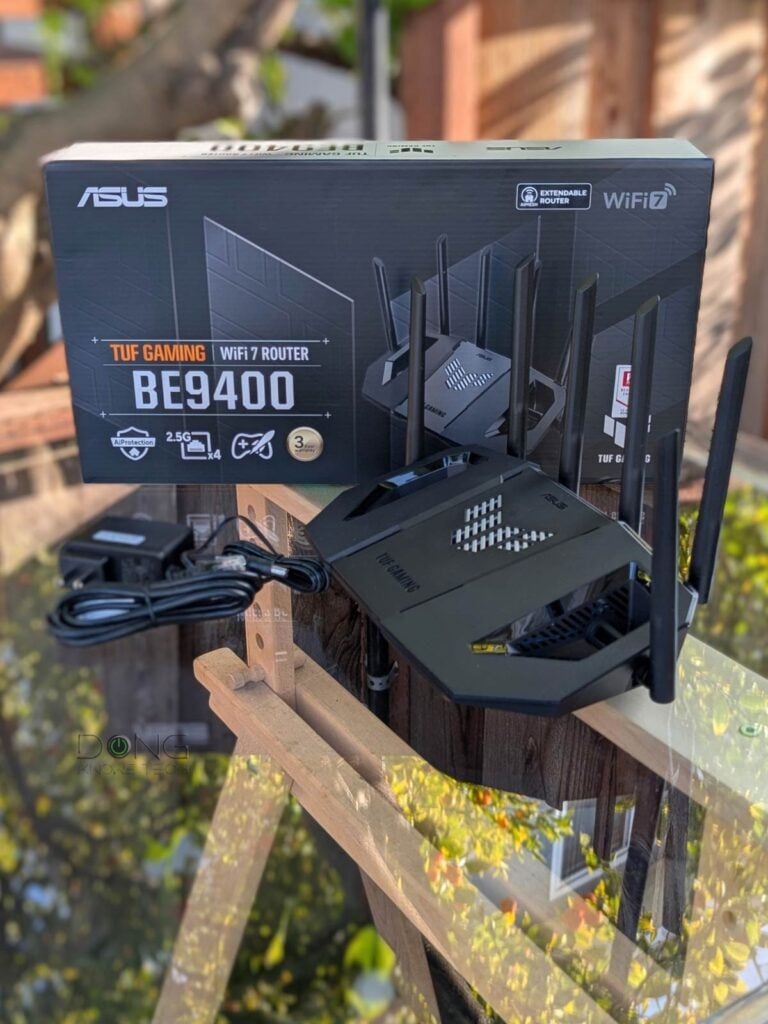
ASUS TUF-BE9400: The whole Wi-Fi 7 experience for most homes
The TUF-BE9400 is the latest in ASUS’s TUF gaming brand for the budget-minded.
Short for “The Ultimate Force,” the brand is designed primarily for the ASIA and EU markets. It’s a non-ostentatious alternative to ASUS’s Republic of Gamers (ROG) brand. TUF gaming routers generally don’t include the fancy RGB lighting and are slightly more moderate in hardware specs. However, they don’t compromise on functionality. They are frill-free, practical gaming routers.
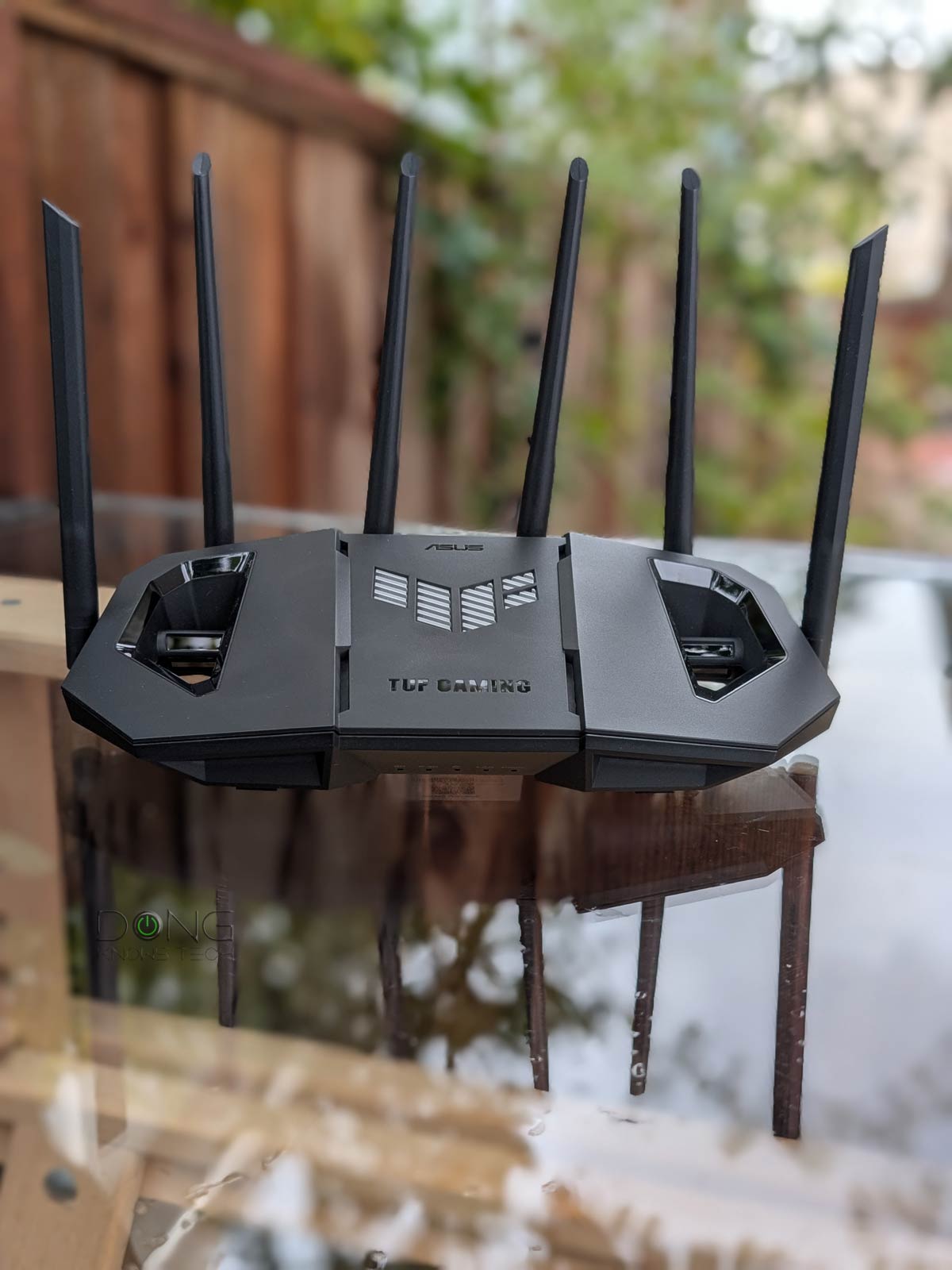
Out of the box, the tri-band TUF-BE9400 shares the same design as the dual-band TUF-BE6500. In fact, unless you look at the hardware, there’s no way to tell the two apart. Both feature the typical design of a Wi-Fi router, with six non-detachable, swivelable antennas protruding from the back and sides.
The TUF-BE9400 is an entry-level Multi-Gig router with five 2.5Gbps ports on the back, including one WAN port and four LAN ports. The first LAN port is dubbed the gaming port by default—plug a wired device into this port and it’ll automatically be prioritized for games. Other than that, there’s also a USB 3.0 port, the usual power port, an on/off switch, WPS, and a recessed reset button.
The router’s body features two large holes that serve only as a cool factor. On the underside, you’ll see it’s wall-mount-ready if you don’t want to place it on a surface. Again, it looks identical to the TUF-BE6500.
In terms of Wi=Fi specs, as mentioned, the TUF-BE9400 has a 6GHz band to be a tri-band router. In return, its 5GHz band has lower specs than the dual-band TUF-BD6500, resulting in slightly lower real-world bandwidth in most cases, as you’ll see in the performance charts.
On this front, a couple of things to note:
- The TUF-BE6500 features four streams (4×4) on the 5GHz band, which offers double the bandwidth of the dual-stream (2×2) TUF-BE9400 when using the 160MHz channel width.
- The TUF-BE9400 features the new 240MHz channel width on the 5GHz band, potentially delivering the highest bandwidth in this band. However, this new channel width is not supported by any client—all existing clients, including Wi-Fi 7 clients, only support 160MHz at most on this band. As a result, the 240MHz channel width is only meaningful when you use multiple TUF-BE9400 units in an AiMesh system, where it can be used for the backhaul link.
Wi-Fi bands vs. channels vs. stream
Wi-Fi uses three frequency bands: 2.4GHz, 5GHz, and 6GHz. The width of each band is measured in MHz—the wider the band, the more MHz it has. Depending on local regulations, only a section or sections of a band may be used for Wi-Fi.
In real-world usage, the Wi-Fi-allowed section of each band is divided into multiple smaller portions, called channels, of different fixed widths. Depending on the Wi-Fi standards and bands, a channel can be 20MHz, 40MHz, 80MHz, 160MHz, 240MHz, or 320MHz wide. The wider a channel is, the more bandwidth it has. The number of channels in each Wi-Fi band varies depending on the channel width and the width of the Wi-Fi-allowed section of the band.
The 6GHz band is the widest of the three, with a total width of 1200MHz, ranging from 5.925GHz to 7.125GHz and enough space for three 320MHz, five 240MHz, seven 160MHz, or fourteen 80MHz channels, etc.
Data moves in one channel of a particular band at a time, using streams, often dual-stream (2×2), three-stream (3×3), or quad-stream (4×4). The more streams, the more data can travel simultaneously. Thanks to the ultra-high bandwidth per stream, Wi-Fi 6 and later tend to have only 2×2 clients.
Here’s a crude analogy:
If a Wi-Fi band is a freeway, channels are lanes, and streams are vehicles (bicycles, cars, buses). On the same road, you can combine multiple adjacent standard lanes (20MHz) into a larger one (40 MHz, 80 MHz, or higher) to accommodate oversized vehicles (a higher number of streams) that carry more goods (data) per trip (connection).
Depending on the standard and band, Wi-Fi clients generally only support 20MHz, 80MHz, 160MHz, and 320MHz channel widths, and use only one at any given time. Generally, no devices (clients) support the 240MHz channel width.
A Wi-Fi connection generally occurs on a single channel (lane) of a single band (road) at a time. The actual data transmission is always that of the lowest denominator—a bicycle can carry just one person at a relatively slow speed, even when used on a super-wide lane of an open freeway.


The table below compares the hardware specs and real-world power consumption of the two.
ASUS TUF-BE9400 vs. TUF-BE6500: Hardware specifications and real-world power consumption
| ASUS TUF-BE9400 Dual-Band Gaming Wi-Fi 7 Router | ASUS TUF-BE6500 Dual-Band Gaming Wi-Fi 7 Router | |
|---|---|---|
 |  | |
| Model | TUF-BE9400 | TUF-BE6500 |
| Wi-Fi Bandwidth | Tri-band BE9400 | Dual-band BE6500 |
| 2.4GHz Band (channel width) | 2×2 BE: Up to 688 Mbps(20/40MHz) | |
| 5GHz Band (channel width) | 2×2 BE: Up to 4323Mbps (20/40/80/160/240MHz) | 4×4 BE: up to 5764Mbps (20/40/80/160MHz) |
| 6GHz Band | 2×2 BE: Up to 5764 Mbps (20/40/160/320MHz) | None |
| Stream per Band | 2×4 | |
| Network Standards | IEEE 802.11a, IEEE 802.11b, IEEE 802.11g, IEEE 802.11n,IEEE 802.11ac, IEEE 802.11ax,IEEE 802.11be, IPv4, IPv6 | |
| Web-based Remote Management | Yes (via Dynamic DNS) | |
| Vendor Login Account Required | No | |
| Mesh-Ready | Yes (AiMesh) | |
| Operating Mode | Router, Access Point, Repeater, Media Bridge, AiMesh Router/Node | |
| Multi-Gig Port | 1x 2.5Gbps WAN, 3x 2.5Gbps LAN | |
| Gigabit Port | None | |
| Automated Frequency Coordination (AFC) | No | |
| Multi-Link Operation (MLO) | Yes | |
| Link Aggregation | No | |
| Dual-WAN | Yes | |
| USB Port | 1 x USB 3.0 | |
| Dimensions | 11.97 x 6.85 x 8.43 in (30.4 x 17.4 x 21.4 cm) | |
| Weight | 1.7 lb | |
| Processing Power | 1.5GHz Quad-core CPU, 256 MB Flash, 1GB DDR4 RAM | |
| Power Intake | 110-240V | |
| Firmware (at review) | 3.0.0.6.102_58138 | 3.0.0.6.102_57125 |
| Real-World Power Consumption (measured in 24 hours) | ≈ 280 Wh | ≈ 200 Wh |
| US Release Date | Q3, 2025 | Q1, 2025 |
| US Launch Price (Check availability!) | $279.99 | $199.99 |


TUF-BE9400: One of many gaming routers from ASUS
As mentioned, the TUF-BE9400 is a gaming router with a wide range of gaming features, despite lacking the signature AURA RGB lighting. Compared to the TUF-BE6500, the tri-band router doesn’t support WTFast integration, which isn’t a huge deal since the service requires a monthly subscription.


Most noticeably, it’s one of many gaming routers ASUS has released to date, as shown in the table below.
| Multi-Gig Port | Gaming Private Network | ROG First, Game Radar | Gaming Port | GeForce Now | Aura Lights | |
|---|---|---|---|---|---|---|
| TUF-BE9400 | 4×2.5GbE | No | Yes | No | ||
| GT-BE19000AI | 2x10GbE 4×2.5GbE | GTNET | Yes | No | Yes | |
| TUF-BE6500 | 4×2.5GbE | WTFast | No | Yes | No | |
| GS-BE18000 | 8×2.5GbE | No | Yes | No | Yes | |
| RT-BE86U | 1x10GbE 4×2.5GbE | No | Yes | No | ||
| RT-BE88U | 1x10GbE 1xSFP+ 4×2.5GbE | No | Yes | No | ||
| RT-BE96U | 2x10GbE | No | ||||
| GT-BE98 Pro | 2x10GbE 4×2.5GbE | WTFast | Yes | No | Yes | |
| RT-AX88U Pro | 2×2.5GbE | WTFast | No | |||
| GT6 (mesh router) | 1×2.5GbE | No | Yes | No | Yes | |
| GT-AXE16000 | 1×2.5GbE 2x10GbE | WTFast | Yes | No | Yes | |
| GT-AX11000 Pro | 1×2.5GbE 1x10GbE | WTFast | Yes | |||
| GT-AXE11000 | 1×2.5GbE | Outfox | Yes | No | Yes | |
| GT-AX11000 | 1×2.5GbE | WTFast | Yes | No | Yes | |
| GT-AX6000 | 2×2.5GbE | No | Yes | No | Yes | |
| GS-AX5400 | None | No | Yes | No | Yes | |
| GS-AX3000 | None | No | Yes | No | Yes | |
| RT-AX88U | None | WTFast | No | |||
| RT-AX89X | 1x10GbE 1xSFP+ | No | ||||
| RT-AX86U | 1×2.5GbE | No | Yes | No | ||
| RT-AX86S | None | No | Yes | No | ||
| RT-AX82U | None | No | Yes | No | Yes | |
| RT-AX92U (canned mesh) | None | WTFast | No | |||
| TUF-AX5400 | None | No | Yes | No | Yes | |
All of these routers have the standard set of ASUS’s gaming features, including Mobile Game Mode, Open NAT, Gear Accelerator, and VPN Fusion.
Other than that, running ASUSWRT 5.0, the TUF-BE9400 has the core features of all ASUS routers, with slight variations according to its hardware specs.
Here’s a summary of what it has and doesn’t have compared to other ASUS routers, per my real-world trial:
- Flexible WAN/LAN configurations:
- The TUF-BE9400 features dual-WAN. You can turn one of its LAN ports or the USB port into a second WAN port. The USB port can host a cellular modem or a tethered smartphone.
- Unlike many ASUS routers, including the TUF-BE6500, the TUF-BE9400 does not support Link Aggregation.
- Universal backup restoration: In my trial, the TUF-BE9400 can restore the backup setting file of the TUF-BE6500 but not of other ASUS routers. It seems this restoration is limited to the TUF brand.
- Robust web user interface with optional ASUS Router mobile app. You can set up the router as you would any standard router via its default IP address, 192.168.50.1.
- AiMesh support. The TUF-BE9400 works best with wired backhauling. If you need a wireless setup, it’s best to use multiple units. That’s only when MLO will work for the backhaul. The wireless backhauling is also the only time you should use the 240MHz channel width on the 5GHz band, as mentioned above.
- Built-in Parental Controls and online protection (AiProtection) plus other traffic-related features.
- USB-based features (cellular tethering, network storage, media streaming server, etc.). Unfortunately, its NAS performance when hosting a portable drive was very slow—more in the performance section below.
- The new router supports all advanced VPN protocols, including WireGuard and Instant Guard.
- Tons of helpful network/Wi-Fi settings, tools, and other features, including QoS and web-based remote management via Dynamic DNS. The router can handle up to 128 IP reservation entries and 64 port forwarding entries.
The point is that, at the end of the day, the TUF-BE9400 is a familiar ASUS router; if you have used one before, you’ll find yourself at home with it.


ASUS TUF-BE9400: Excellent Wi-Fi performance for the specs
I tested the ASUS TUF-BE9400 for over a week, during which it proved reliable, passing my 3-day stress test without a hiccup. It also provided good Wi-Fi coverage, similar to that of the TUF-BE6500.
Wi-Fi range is always tricky to put in numbers, but generally, if you live in a home of around 1,600 ft2 (135 m2) and place this router near the center, it’ll likely blanket every corner—your experience will vary.


In terms of throughput speeds, the router’s performance is limited by its 2.5Gbps port. Still, it was pretty excellent, as you’ll note in the charts. I used the TUF-BE6500 as a direct comparison. Generally, you can expect high Gig+ sustained real-world speeds from it in favorable conditions.
The router performed well on wired performance, too, slightly edging out the TUF-BE6500, which shared the same port grade.
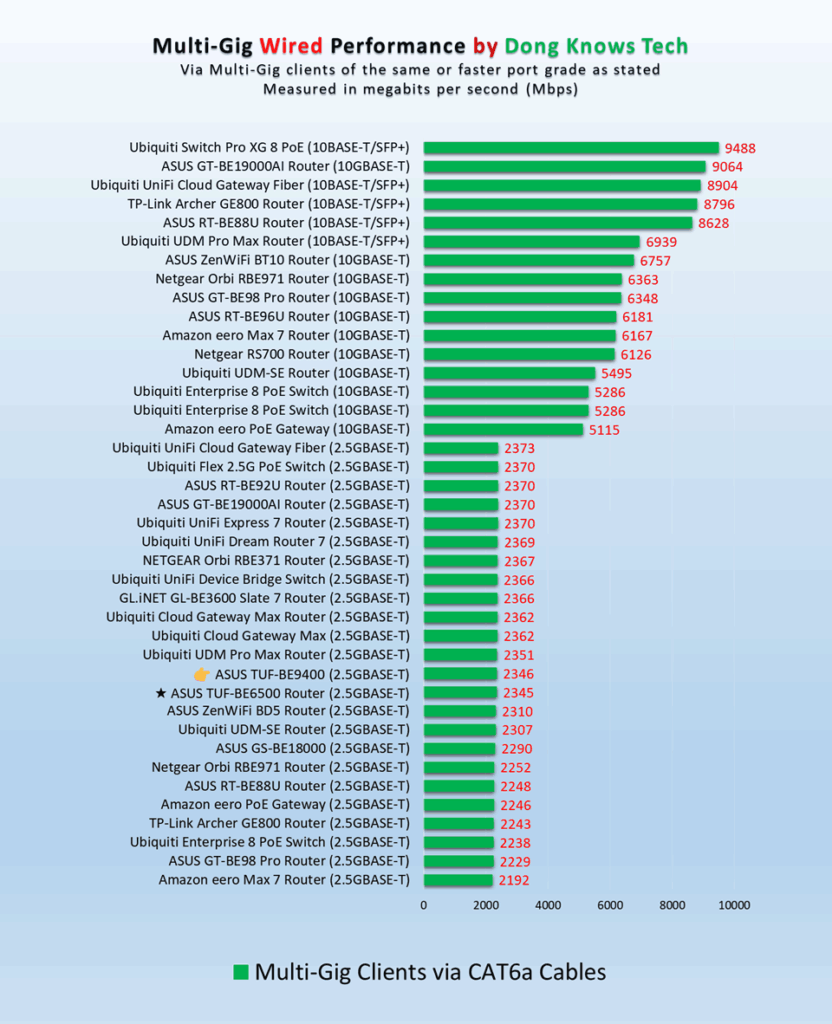
Finally, like the TUF-BE6500, the TUF-BE9400 had little to call mom about its performance as a mini NAS server when hosting a portable SSD via its USB 3.0 port.
I tested it with a few top-tier portable SSDs, and the performance was consistently subpar compared to other Multi-Gig routers, averaging around 30MB/s. At these rates, you definitely want a real NAS server for your network storage needs.


Other than that, without an internal fan, the TUF-BE9400 was completely silent during operation. It became a little warm but never hot.
ASUS TUF-BE9400 Dual-Band Wi-Fi 7 Router's Rating
Pros
Tri-band Wi-Fi 7 with reliable and fast Wi-Fi performance for the specs, four 2.5GbE ports
A generous set of free features for gamers and general consumers
No vendor required login account; practical, mount-ready, fanless design; runs cool and quiet
Cons
No 10Gbps port, no gamer private network support, mid-tier Wi-Fi specs
Slow NAS performance (when hosting a portable SSD)
Conclusion
ASUS’s TUF-BE9400 is a sensible, just-right tri-band Wi-Fi 7 router for anyone living in a home that needs a single Wi-Fi access point, or for those with a wired network who can use multiple units to form a robust Wi-Fi system. After that, its gaming-related features are what casual gamers can appreciate. If that sounds like your situation, get one or two today!


Is there a typo in the comparsion table? It says dual band, but the router is triple band. Just to make sure, can I use 5Ghz and 6Ghz for wireless backhaul at the same time?
That was a typo, Marek. Next time you can just highlight the text and hit the red box that jump out from the top right corner. Thanks!
Hey Dong
Is there a obvious best router out of the ASUS TUF-BE9400, TP-Link Archer BE550/GE550 and ASUS RT-BE92U? Just 1 main router for the house, most devices would be on the 2.4/5g bands. I’ll personally be on ethernet and need the 6g band for vr
i’ve been trying to pick out a router. i’ve leaned towards this asus and the be550 but i’m stumped, have no idea really
Thanks
Among those you mentioned, Scott, I’d go with the RT-BE92U. It’s a well-rounded router. Good luck!
Sorry Dong i just noticed i need to import the router and it wouldn’t be here for a month +
Which one would you choose from the remaining 3 or would you recommend something different around that $200-300 usd price range
I have all of them, Scott, literally, and can’t comment on specific situations, especially those outside of the US. In any case, this post on the best options will help. If you follow the “Read More” link, the post will also give you all the alternatives. Good luck!