
You must have experienced it. You got a new (possibly expensive) router or Wi-Fi system, but it failed to meet your expectations for performance or coverage.
Over the years, I’ve received plenty of emails and messages about how my Wi-Fi picks turned out to be underwhelming.
This post aims to explain, in simple and blunt terms, how ambiguity leads to the wrong hardware purchase and, ultimately, to false assumptions. When you’re through, you’ll know how to set your expectations straight, which is the first step in choosing the proper hardware for your needs.
Let’s start with how Wi-Fi signals work.
Dong’s note: I first published this post on February 4, 2024, and updated it on December 13, 2025, to add up-to-date relevant information.
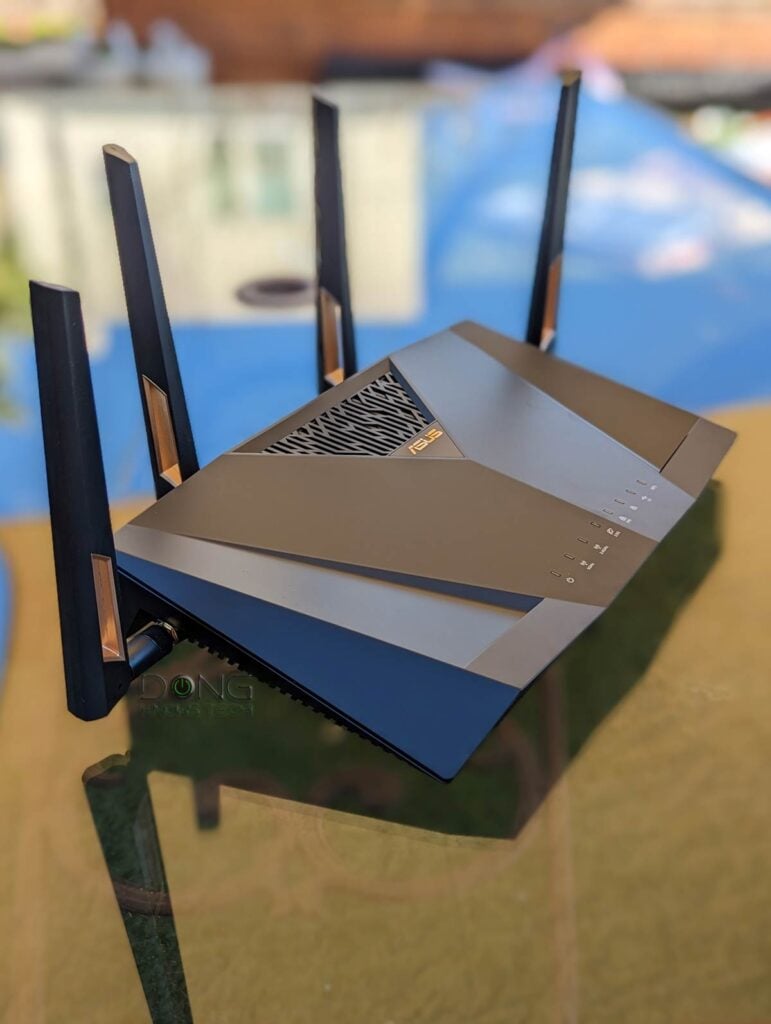
Home router and your expectations: How Wi-Fi works vs. misleading marketing numbers
Wi-Fi uses radio frequencies, measured in Hertz, to transmit data from one party to another. It follows the same principle as other radio-wave technologies, including the radio itself.
One Hertz vs. lots of Hertz
To understand Wi-Fi radio frequencies, we need to know what constitutes one Hertz.
Heinrich Hertz was a German physicist who conclusively proved the existence of electromagnetic waves in the late 19th century.
As shown in the GIF below, Hertz is the number of radio-wave crests—or wave cycles—in 1 second. How frequently a wave crests per second is its frequency. It’s simple enough.
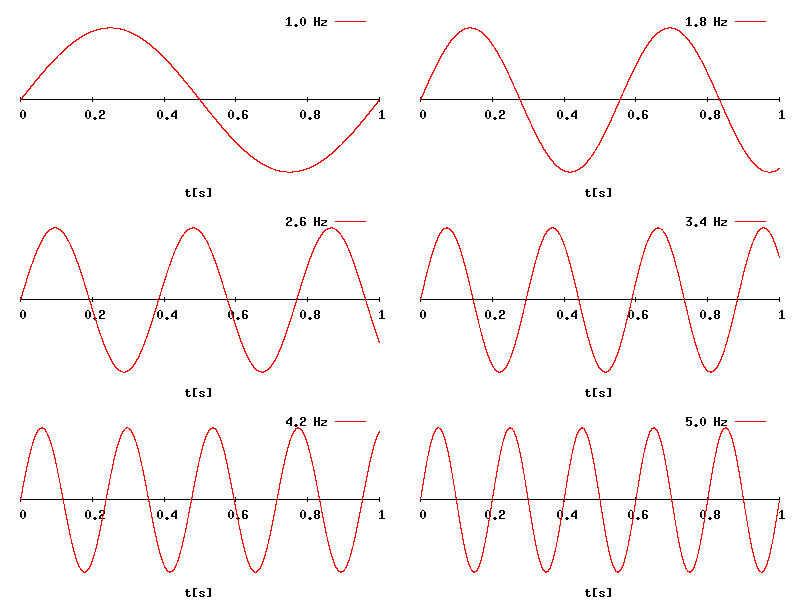
The higher the frequency, the closer the distance between two consecutive wave crests, which means the wave itself can travel a shorter distance and, in radio transmission, more information can be packed in.
FM and AM radio broadcasting stations use frequencies measured in megahertz (MHz), kilohertz (kHz), or even lower frequencies. At these frequencies, a broadcasting station can cover a large area, like a big city.
Signal coverage also depends on the station’s broadcasting power. At the same power level, signals travel farther with lower frequencies than with higher ones.
Traditional Wi-Fi access points (standalone or integrated into other devices, such as routers) operate at much higher frequencies in the Gigahertz (GHz) range, including 2.4 GHz, 5 GHz, and 6 GHz. Additionally, per regulations, they use no more than 1 watt (or 30 dBm) of broadcast power. As a result, a single Wi-Fi “broadcaster” can generally only blanket a modest-sized home.
Wi-Fi is also available on two additional distinct frequencies: the short-lived 60 GHz band (802.11ad), which has extremely high bandwidth at extremely short range, and the upcoming 900 MHz band (Wi-Fi HaLow), which has mile-long range but extremely low bandwidth.
Real-life Wi-Fi visualization and interference
You can visualize how Wi-Fi, or any wireless radio transmission, works by dropping a rock in a still pond and watching the ripples move outward on the water’s surface.
The size of the rock and how hard you throw it equals the “broadcasting power”.
Pick a particular ripple and count the number of times it reaches its highest point in one second. If it crests only once per second, you get one Hertz, twice equals two Hertz, and so on. That’s the idea.
Radio wave crests can’t be counted with the naked eye—we can’t see them to begin with—and, as mentioned, Wi-Fi uses frequencies in the Gigahertz (GHz) range. For example, 5GHz means there are 5,000,000,000 wave crests per second. So, instead of counting, I’d take the science’s word for it!
Now, if you drop another pebble at a different spot, that’d be your neighbor’s Wi-Fi signal. Toss a rubber duck in the water! That’s a microwave. See what happens when the ripples collide? Those are signal distortions—when your Wi-Fi signal drops, disconnects, or degrades.
Here’s the thing: the pond was never entirely serene. Wind, insects, fish, debris, the liquid’s viscosity, etc., are always there to affect the ripples. Similarly, both visible and invisible objects around us can adversely affect Wi-Fi signals. The point is that at any given time, there are more things in the air that hinder a router’s Wi-Fi signals than those that don’t. And there’s always something in the air.
Signal distortions and degradations are part of radio transmission. As radio waves travel through the air, their signal strength degrades with distance and other factors—the fact that Wi-Fi works at all is remarkable.
Wi-Fi bands and their actual signal coverage and data speeds
As mentioned, Wi-Fi generally uses three popular frequencies, called “bands”, including 2.4GHz, 5GHz, and 6GHz. They have significant Hertz gaps and, therefore, are different in range and bandwidth.
The links in the previous sentence explain things in great detail, but briefly, how Wi-Fi works depends on the band. Specifically, here’s what you can expect from them when using the hardware indoors:
- 2.4GHz: This is the original Wi-Fi band with the most extended coverage of between 1600 ft2 (150 m2) and 3000 ft2 (279 m2), but the lowest bandwidth. Regardless of the Wi-Fi standard or hardware specs, this can hardly deliver real-world speeds over 300 Mbps.
- 5GHz: This band has a medium coverage of between 1200 ft2 (112 m2) to 2800 ft2 (260 m2) and good bandwidth—over 10 times that of 2.4GHz. It became prominent with Wi-Fi 5 and has been the mainstay since Wi-Fi 6.
- 6GHz: This is the band with the shortest range—between 800 ft2 (74 m2) to 1800 ft2 (167 m2)—and the highest bandwidth, about double that of 5GHz, depending on the Wi-Fi standards. It was first introduced with Wi-Fi 6E and further improved with Wi-Fi 7, the first Wi-Fi standard to incorporate all three bands. Some Wi-Fi 7 access points (or routers) support Automated Frequency Coordination (AFC) to increase this band’s range to be on par with that of the 5GHz.
Wi-Fi Coverage vs. speeds
So, in terms of range, the gist is that a single consumer-grade access point (standalone or integrated within a router) can deliver no more than 3000 ft2 (279 m2) of indoor coverage, often much less.
Things will get even more complicated when it comes to data speeds, which depend on how far the client is from the broadcaster—the farther away, the slower.
Generally, a Wi-Fi access point supports either two bands (Dual-band) or all three bands (Tri-band). You can also find tri-band or quad-band, where the 5GHz or 6GHz is split into two to increase bandwidth efficiency. However, from the client’s point of view, a connection generally happens on a single band at a time—even with Wi-Fi 7’s MLO feature.
Most importantly, in a Wi-Fi connection, the lowest denominator, often the client, decides the connection speed.
For example, if you use a top-tier quad-stream (4×4) Wi-Fi 7 router, such as the ASUS RT-BE96U, with a mid-tier dual-stream (2×2) Wi-Fi 6 client, such as the Intel AX200, the best theoretical connection speed you will get is 2402Mbps, with the real-world speed capping around 1500Mbps at most, after overhead.
Wi-Fi bands vs. channels vs. streams
Wi-Fi uses three frequency bands: 2.4 GHz, 5 GHz, and 6 GHz. The width of each band is measured in MHz—the wider the band, the more MHz it has. Depending on local regulations, only one or more sections of a band, not the entire band, may be used for Wi-Fi.
In real-world usage, the Wi-Fi-allowed section of each band is divided into multiple smaller portions, called channels, of different fixed widths. Depending on the Wi-Fi standards and bands, a channel can be 20 MHz, 40 MHz, 80 MHz, 160 MHz, 240 MHz, or 320 MHz wide. The wider a channel is, the more bandwidth it has. The number of channels in each Wi-Fi band varies depending on the channel width and the width of the Wi-Fi-allowed section of the band.
The 6GHz band is the widest of the three, with a total width of 1200 MHz, ranging from 5.925 GHz to 7.125 GHz, and enough space for three 320 MHz, five 240 MHz, seven 160 MHz, or fourteen 80 MHz channels.
Data moves in one channel of a particular band at a time, using streams, often dual-stream (2×2), three-stream (3×3), or quad-stream (4×4). The more streams, the more data can travel simultaneously. Thanks to the ultra-high per-stream bandwidth, Wi-Fi 6 and later tend to have only 2×2 clients.
Here’s a crude analogy:
If a Wi-Fi band is a freeway, channels are lanes, and streams are vehicles (bicycles, cars, buses). On the same road, you can combine multiple adjacent standard lanes (20 MHz) into a larger one (40 MHz, 80 MHz, or higher) to accommodate oversized vehicles (more streams) that carry more goods (data) per trip (connection).
Depending on the standard and band, Wi-Fi clients generally support 20 MHz, 40 MHz, 80 MHz, 160 MHz, and 320 MHz channel widths, and use only one at a time. Generally, no devices (clients) support a 240 MHz channel width.
A Wi-Fi connection generally occurs on a single channel (lane) of a single band (road) at a time. The actual data transmission is always that of the lowest denominator—a bicycle can carry just one person at a relatively slow speed, even when used on a super-wide lane of an open freeway.
The table below shows what data rates you can expect for each Wi-Fi standard when using compatible hardware and at the optimal distance.
| Standard (name) | Debut Year | Channel Width (in MHz) and Theoretical Speed (in Mbps) per Stream (rounded numbers) | Max Number of Streams Used in Clients (Max Speed Theoretical(•) /Real-world) | Security | Bands | Status (as of 2026) |
| 802.11b | 1999 | 20MHz/11Mbps | Single-stream or 1×1 (11Mbps/≈6Mbps) | Open WEP | 2.4GHz | Obsolete |
| 802.11a | 2000 | 20MHz/54Mbps | 1×1 (54Mbps/≈30Mbps) | Open WEP | 5GHz | Obsolete |
| 802.11g | 2003 | 20 MHz/54Mbps | 1×1 (54Mbps/≈35Mbps) | Open WEP | 2.4GHz | Obsolete |
| 802.11n (Wi-Fi 4) | 2009 | 20MHz/75Mbps 40MHz/150MBps | Quad-stream or 4×4 (600Mbps/≈400Mbps) | Open WEP WPA | 2.4GHz, 5GHz, Dual-band | Legacy |
| 802.11ac (Wi-Fi 5) | 2012 | 20MHz/108Mbps 40MHz/217Mbps 80MHz/433Mbps | 4×4 (1732Mbps/≈1000Mbps) | Open WPA WPA2 | 5GHz, Dual-band, Tri-band(••) | Legacy |
| 802.11ad (WiGig) | 2015 | 2.16GHz/multi-Gigabit | n/a | Open WPA WPA2 | 60 GHz | Limited Use |
| 802.11ax (Wi-Fi 6) | 2019 | 20MHz/150Mbps 40MHz/300Mbps 80MHz/600Mbps 160MHz/1200Mbps | Dual-stream or 2×2 (2402Mbps/≈1500Mbps) | Open WPA WPA2 WPA3 | 2.4GHz 5GHz Dual-band, Tri-band(••), | Common |
| 802.11axe (Wi-Fi 6E) | 2021 | 20MHz/150Mbps 40MHz/300Mbps 80MHz/600Mbps 160MHz/1200Mbps | 2×2 (2402Mbps/≈1500Mbps) | OWE WPA3 | 6GHz, Dual-band, Tri-band, Quad-band(••) | Common |
| 802.11be (Wi-Fi 7) | 2023 | 20MHz/225Mbps 40MHz/450Mbps 80MHz/730Mbps 160MHz/1.45Gbps 320MHz/2.9Gbps | 2×2 (5800Mbps/≈3000Mbps) | OWE WPA3 | 6GHz, 5GHz, 2.4GHz, Dual-band, Tri-band, Quad-band(•••) | Common |
| 802.11ah (Wi-Fi HaLow) | 2024 | 1MHz 2MHz 4MHz 8MHz 16MHz | (40Mbps to 150Mbps) | OWE WPA3 | 900MHz | Emerging |
| 802.11bn (Wi-Fi 8) | 2028 (estimate) | The same as Wi-Fi 7 in terms of theoretical bandwidth (likely with higher real-world rates), frequencies, and security. | Upcoming | |||
(•) The absolute theoretical bandwdith of the band or speed of a connection to a single client in an ideal connection before interference, signal degradation, and hardware incompatibility are taken into account. Depending on the number of streams and channel width in use, this theoretical ceiling speed is generally lower, often by a factor of two. Discount this ceiling number by another 30% or 60% to get real-world bandwdith, then divide it by the concurrent clients to get the real-world sustained rates.
(••) The 5GHz band is split into two portions as sub-bands.
(•••) The 5GHz or 6GHz band is split into two portions as sub-bands.
With that, let’s move on to how hardware vendors manipulate these numbers to create false expectations.
The A-B-C of clever marketing language: The root of false expectations
Home-grade networking vendors often use rosy numbers to form marketing language that promises the impossible. They count on the fact that consumers would take things at face value and make assumptions about the rest.
Let’s take a specific example: NETGEAR’s flagship Wi-Fi 7 Orbi RBK970 series. This is a quad-band mesh system with the 5GHz band split into sub-bands.
First, let’s take a look at the screenshot below, which I took from the hardware’s product webpage—the content of this page might change over time.

Pay close attention, and by dissecting this particular example, we have these standard A-B-C marketing tricks:
A. Ambiguity via the use of non-definitive terms
The vendor claims that the hardware can deliver super-high speeds and coverage. Specifically, per NETGEAR, this 3-pack Orbi RBK970 Series can deliver “speeds up to 27Gbps” and “up to 10,000 ft2 in Wi-Fi coverage.”
The claim is non-definitive, but users will likely overlook the fine print “up to” and focus on the superimposed phony numbers.
The “up to” cleverness: If somebody tells you that they’d pay you “up to” $1000, they can give you a single dollar and still call themselves generous. I’ll do better: if you pay attention to the content on this website, you’ll be up to 1000% smarter!
Still, how did NETGEAR come up with these numbers? That brings us to the next trick.
B. Best-case-scenario range presented as the norm
For coverage, the vendor specifies the best possible range of the 2.4GHz band, which, as mentioned above, can indeed cover around 3000 ft2 when used in an empty warehouse.
Now, if each Orbi unit can deliver around 3000 ft2, the simple math is that the 3-pack Orbi RBK970 can deliver three times that, or around 9000 ft2 of coverage. With that, NETGEAR rounds up to 10000 ft2, which seems reasonable enough.
What it didn’t tell you, however, is:
- This is the range of the 2.4GHz band, which is super-slow, maxing out at around 300Mbps at best. The range of the 5GHz and 6GHz bands, which are fast, is significantly worse.
- A single Wi-Fi access point can rarely deliver 3000 ft² of coverage. For that to happen, it has to operate in an ideal environment, which is never the case in any home.
Still, keep this 10000 ft2 of coverage in mind before we move to the final trick: The nonsensical Wi-Fi bandwidth.
C. Combined bandwidth presented as “speed”
When a Wi-Fi broadcaster has more than one band—dual-band, tri-band, or quad-band—each of the bands has its own bandwidth and generally works independently from others.
In the case of the Orbi 970, which is a quad-band broadcaster, NETGEAR combines these bands’ bandwidths:
- 2.4GHz: 1147 Mbps
- 5GHz-1: 8647 Mbps
- 5GHz-2: 5765 Mbps
- 6GHz: 11530 Mbps
Again, the numbers above are theoretical per Wi-Fi 7’s standard. Still, adding them all together, we get the total bandwidth of 26909 Mbps or 26.909 Gbps. Now, NETGEAR rounds that up to get the 27 Gbps and calls that the “speed” of the hardware.
It’s important to note that bandwidth and speed are two different things, and NETGEAR’s speed calculation above is false at many levels. Specifically:
- In the Orbi family, hardware with a split band or one sub-band of the split frequency—the 5GHz-1 in the case of the RBK970—exclusively for wireless backhauling. As a result, the hardware needs to remove this band’s bandwidth (8647Mbps) from the “speed” pool.
- As mentioned, Wi-Fi generally operates on a single band at a time. So, the best speed would be on the 6GHz band (11530 Mbps). But even that’s not true because:
- The client limits the speed of any particular connection. Since we only have 2×2 clients, the best speed would be around 5800Mbps. But even that is also not true because:
- A Wi-Fi connection has massive overhead. The best real-world sustained Wi-Fi 7 connection I’ve experienced out of a 2×2 client topped out at around 3000Mbps, or 3Gbps, or one-ninth of 27Gbps.
In my real-world testing, the fastest connection I could get from the RBK970 is 2.1Gbps, as shown in its performance charts, a far cry from the numbers above. And scientifically, it had to be so.
So, the gist of these A-B-C tricks is that the vendor, NETGEAR in this case, combines the bandwidth of all bands (2.4GHz, 5GHz, and 6GHz) as a massive speed and the range of the slowest band (2.4GHz) as extensive coverage to insinuate the false assumption that the hardware can deliver both of these impossible qualities simultaneously.
In reality, on a good day, you can get either the extended range or the high bandwidth (of a short-range band).
To put things in perspective: You can be an impressive marathoner on one day and a fast sprinter on another. Nobody can sprint an entire marathon.
It’s a foolish Wi-Fi speed game
It’s worth noting that 3Gbps max real-world speed (or 2.1Gbps in the case of the RKB970) is already breakneck. It’s so fast that most people don’t know what to do with it or even have the right equipment to experience it, and the vendor (NETGEAR in this case) could have used this honest number and remained impressive.
The problem is that they have gotten so deep into exaggerating Wi-Fi speeds for so long—since dual-band became a thing—that they have had to keep finding new ways to make up ridiculously large numbers to show progress and competitiveness.
The point is this: Believe anything mentioned on the hardware’s product page, and you’ll be hugely disappointed. None was close to reality. Most are outright nonsense backed by ambiguity.

How Wi-Fi works: The final thoughts
It’s human nature to fall prey to confirmation bias. Online media and hardware vendors take advantage of that to further their interests. As Wi-Fi has improved over the years, we’ve come to expect more from it, and sometimes it’s easy to believe in magic. Ultimately, it’s up to you to decide what is real.
When shopping for new Wi-Fi hardware, keep the following in mind:
- Almost everything the hardware vendor claims is false—always discount the numbers that follow “up to” by at least 30%.
- Your Wi-Fi bandwidth is, at best, equal to the real-world speed of the hardware’s fastest network port after overhead. If it’s a 10Gbps port, you can expect around 8,500 Mbps.
- Your Wi-Fi speed is, at best, as fast as your client. If it’s a 2×2 Wi-Fi 7 client—currently the fastest on the market—you’ll generally get around 3Gbps of real-world speed in favorable conditions, often much lower. (3Gbps is remarkably fast, faster than you can experience in most, if not all, existing devices.)
- Due to invisible factors in the air and at distances, Wi-Fi connection rates constantly fluctuate. It’s never as stable or reliable as a wired connection via a network cable.
- No home’s environment is ideal for Wi-Fi—vacuum space is best for radio signals, but you won’t be able to last there long, if at all.
- When mixing hardware of different Wi-Fi standards or performance grades, a connection’s performance is always that of the lowest denominator.
Here’s the bottom line: Don’t expect Wi-Fi to suit your expectations, feelings, or wishful thinking. Instead, use the correct hardware on both ends of the connections as best you can.
Finally, don’t fall for the fantastical numbers offered by networking hardware vendors via marketing or even the hardware’s specs. Those are never true and, at best, are grossly exaggerated.
A connection is only as meaningful as how it helps fulfill your needs at any given time. If it’s fast enough for that, any extra on top becomes utterly meaningless.


“A Wi-Fi connection has massive overhead. The best real-world sustained Wi-Fi 7 connection I’ve experienced out of a 2×2 client topped out at around 3000Gbps, or 3Gbps, or one-ninth of 27Gbps.”
I think this is supposed to be “…around 3000Mbps, or 3Gbps…”
Excellent article though!
Thanks for the report, Trevor. Fixed. Next time you can just highlight the typo and hit the red button that jump out from the top right corner.
it always annoyed me, converting sq-ft to linear ft. they should just advertise the expected radius, make it easy for end-users.
It’s actually a sphere. But I hear you.
Nice reading an informed and honest article without the BS marketing from vendors 😎
👍
Doug,
THANK YOU for this most informative and well reseached article.
Great work.
You did not mention the ultra low frequencies that in some cases are still used by the Navy to reach submarines as they will be receivable under water to a certain depth.(of course, this is non applicable to routers to make sure your readers do not misunderstand.)
Again, superbly researched and will written article. Well done ! Hope to get a wee bit more time out of my trusted Yeasu RT 88, with its 8 ports on my beck and call.
Albert. EI7II.
There’s Wi-Fi HaLow but it has very low bandwidth.
Ethernet connections are still the best, unless the connection is into a smart TV, then Wi-Fi is better due to the limitations of the NIC card in the TV. Nice article BTW.
Yes and no. My LG TV has 100Mb NIC, the TV’s WiFi tends to max out around 200Mb but you can plug in a USB to gigabit adapter and get over 300Mb.
Agreed. And I’ve generally advocated running cables over the years. But we can’t use cable for everything…
Good info! I always thought the numbers seemed too high.
👍