
As the model name suggests, the RT-BE90U is slightly below the previous RT-BE92U and proved less capable in real-world testing. However, it can still be an excellent alternative, even better in certain cases.
Here’s the bottom line: For those living in a small home that needs only a single access point to blanket coverage, the ASUS RT-BE90U is a sensible choice given its sub-$250 suggested retail price—street prices vary. After that, its ability to add multiple units to scale coverage can be a handy bonus. Consider one or a couple today!
ASUS RT-BE90U's Rating
Pros
Five 2.5Gbps ports with fast close-range Wi-Fi performance.
A good set of Wi-Fi and networking features, including AiMesh, online protection, Parental Controls, and multiple virtual SSIDs (SDNs)
Flexible network ports with Dual-WAN support; good NAS performance when hosting a portable SSD
Practical, fanless, wall-mount-ready design; comparatively affordable
Cons
No 10Gbps port; no Link Aggregation
Mid-tier Wi-Fi specs with subdued performance over range
Stripped-down AiProtection
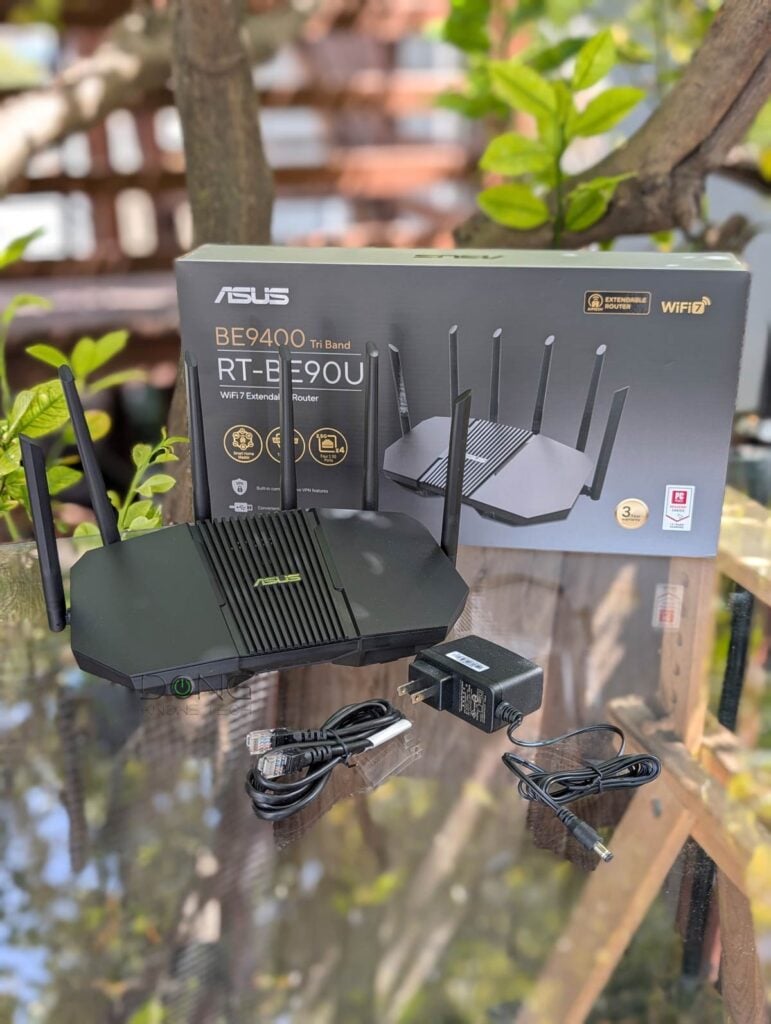
ASUS RT-BE90U: A straightforward AiMesh-ready tri-band Wi-Fi 7 router
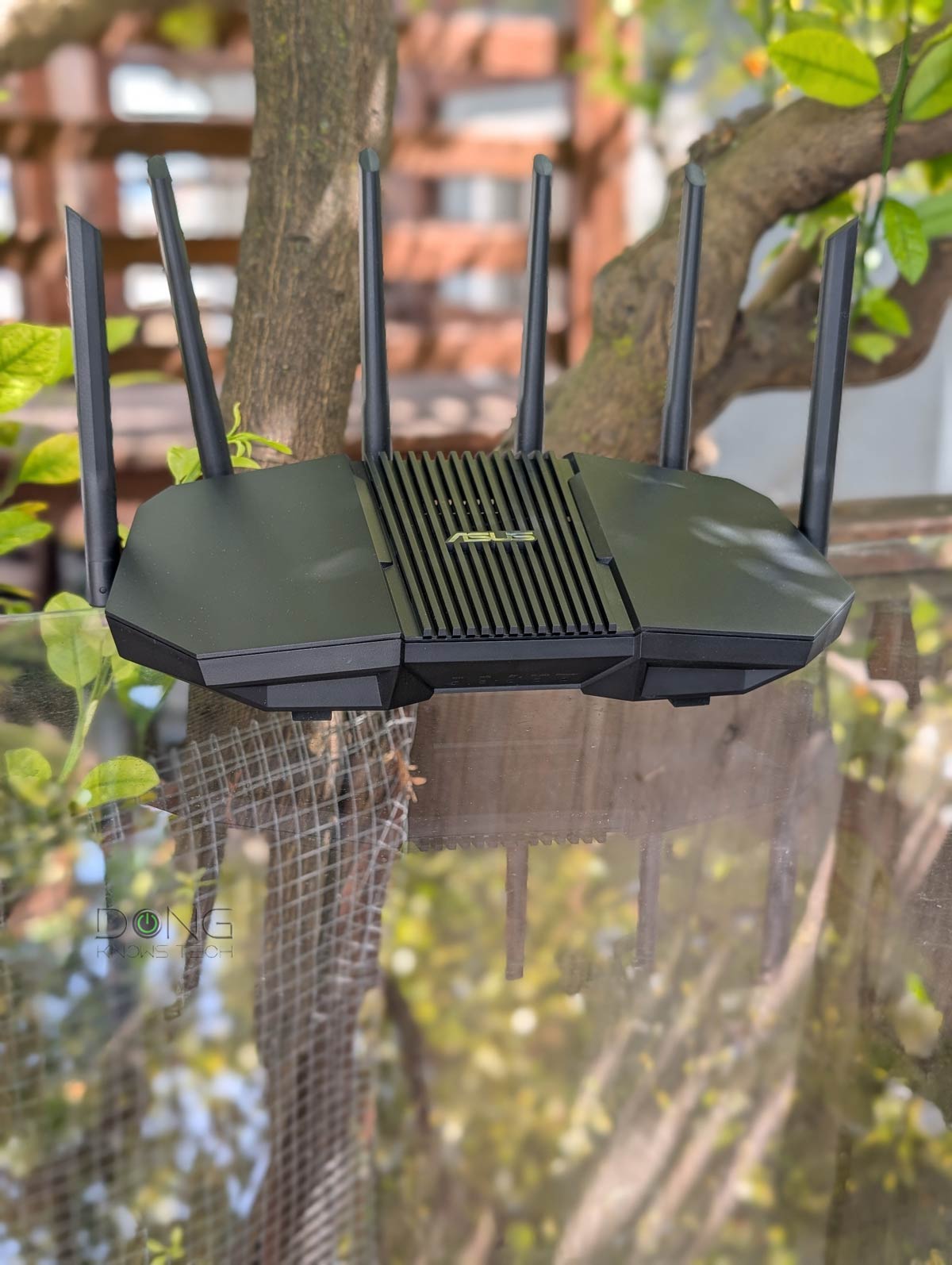
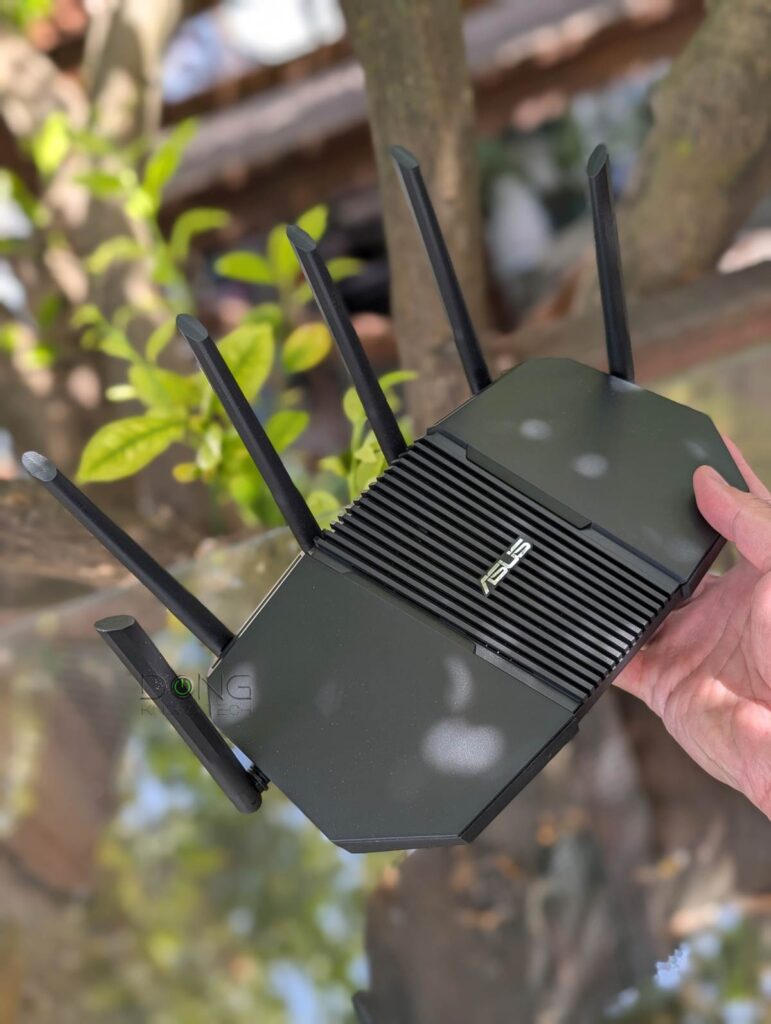
The ASUS RT-BE90U looks like a typical Wi-Fi router with six non-detachable antennas and five network ports, one WAN and five LANs by default.
All of these ports are on the back, as are four of the antennas—the other two are on its side. Each of them can swivel half a sphere around.
The router is designed to be placed on a surface, but it comes with mounting holes on the underside. Mounting accessories are included, but all you need is a couple of nails.
Compared to the RT-BE92U, aside from the totally different design, the RT-BE90U doesn’t have a 10Gbps port. Additionally, it has lower processing power and less bandwidth on the 2.4 GHz band, which in practice makes little difference, since no client supports the former’s three-stream (3×3) specification on this band.
That said, again, for a small home, the RT-BE90U is practically the same as the more expensive RT-BE92U and, therefore, also a rival to the TP-Link Archer BE550. The table below compares the hardware specs and real-world power consumption of the three.
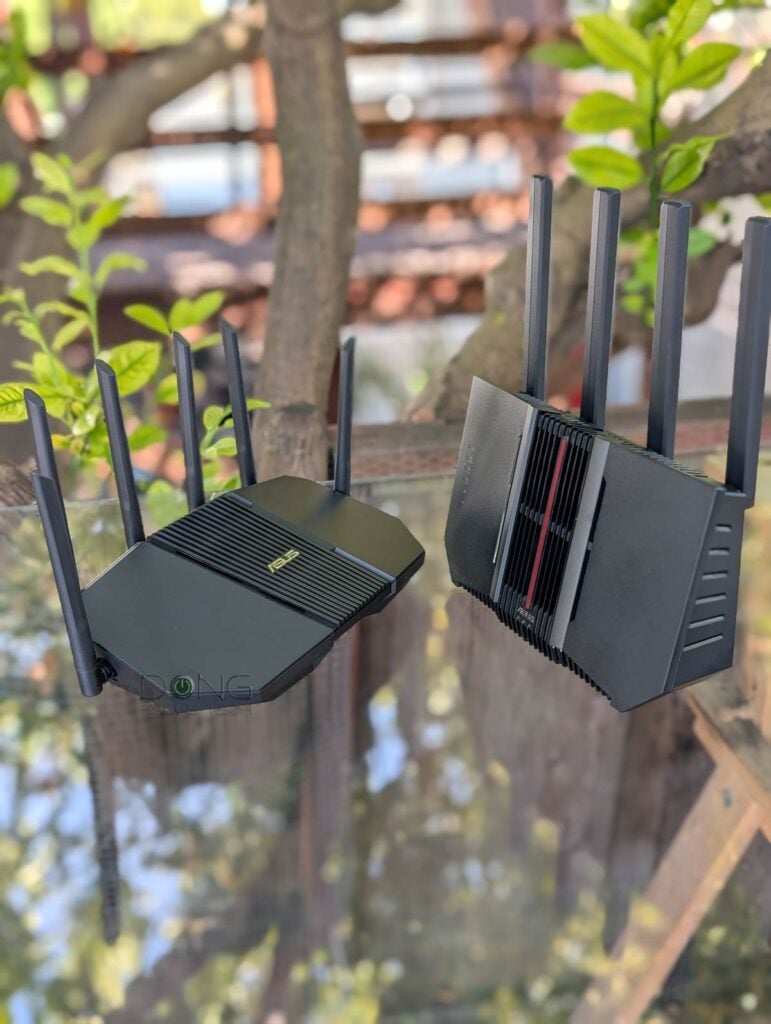
ASUS RT-BE92U vs. TP-Link Archer BE550: Hardware specifications
 |  |  | |
| Model | RT-BE90U | RT-BE92U | Archer BE550 |
| Dimensions | 12.60 x 7.09 x 7.52 in (32 x 18 x 19.1 cm) | 11.32 x 9.73 x 4 in (28.75 x 24.72 x 10.16 cm) | 9.12 x 7.99 x 2.99 in (23.16 x 20.29 x 7.59 cm) |
| Weight | 1.68 lb (761 grams) | 1.74 lb (789 grams) | 2.45 lb (1.11 kg) |
| Wall-mount-ready | Yes | No | |
| Processing Power | 1.5GHz quad-core CPU, 256 MB Flash, 1 GB RAM | 2.0GHz quad-core CPU, 256MB Flash, 1GB DDR4 RAM | Undisclosed |
| Wi-Fi Standard | Wi-Fi 7 (802.11be) | ||
| Wi-Fi Bandwidth | BE9400 | Tri-band BE9700 | Tri-band BE9200 |
| 2.4GHz Band (channel width) | 2×2 BE: Up to 688Mbps (20/40MHz) | 3×3 BE: Up to 1032Mbps (20/40MHz) | 2×2 AX: Up to 574 Mbps (20/40MHz) |
| 5GHz Band (channel width) | 2×2 BE: Up to 2880 Mbps (20/40/80/160MHz) | ||
| 6GHz Band (channel width) | 2×2 BE: Up to 5760Mbps (20/40/80/160/320MHz) | ||
| Backward Compatibility | 802.11a/b/g/n/ac/ax/axe | ||
| Wireless Security | WPA / WPA2 / WPA3 | ||
| Multi-Link Operation (MLO) | Yes | ||
| Automated Frequency Coordination (AFC) | No | ||
| Web User Interface | Yes | ||
| Gaming Features | No | ||
| Mobile App | ASUS Router (optional) | TP-Link Tether (optional) | |
| Operating Roles | Router (default) Repeater Access Point Media Bridge AiMesh Router/Node | Router (default) or Access Point | |
| Mesh-Ready | Yes (AiMesh) | Yes (EasyMesh) | |
| USB Port | 1 x USB 3.0 | 1x USB 3.0 | |
| Gigabit Port | None | ||
| Multi-Gig Port | 1 x 2.5 Gbps for WAN 3 x 2.5 Gbps for LAN | 1x 10Gbps WAN/LAN 1x 2.5Gbps LAN/WAN 3x 2.5Gbps LAN | 1x 2.5Gbps WAN 4x 2.5Gbps LAN |
| Link Aggregation | No | LAN only (LAN2 + LAN3) LACP or Static | |
| Dual-WAN | Yes | No | |
| Power Intake | 100-240V | ||
| Real-World Power Consumption (measured in 24 hours) | ≈ 275 Wh | ≈ 310 Wh | |
| Release Date | Q1 2026 | December 2024 | October 2023 |
| Firmware (at review) | 3.0.0.6.102_58390 | 3.0.0.6.102_37435 | 1.0.7 Build 20240119 |
| U.S. Launch Price (check street pricing) | $239.99 | $299.99 | |

A familiar ASUS router with a bit subdued feature set
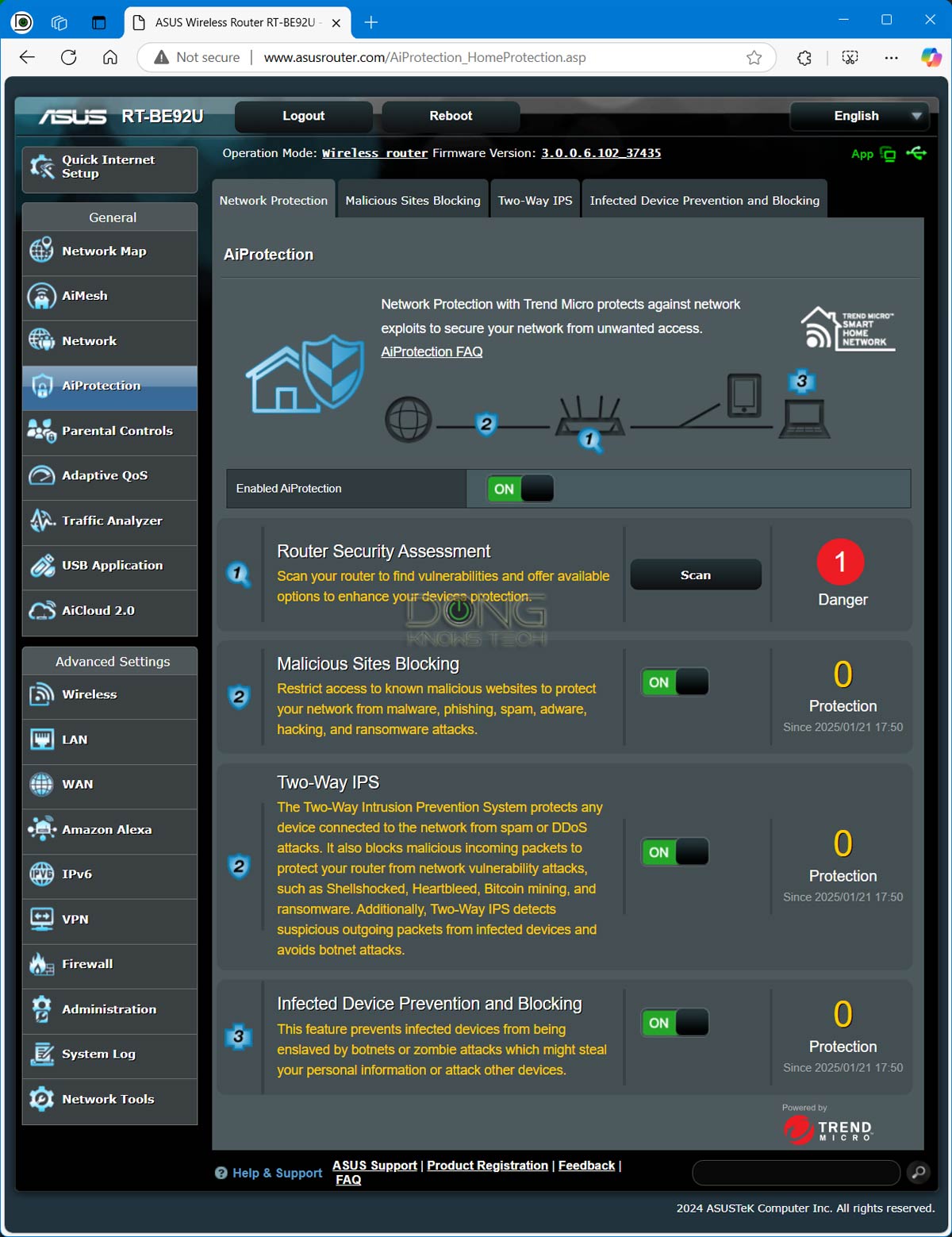
You’ll note on the table that the RT-BE90U has less processing power than its RT-BE92U cousin. As a result, its feature set is slightly weakened. Specifically, the AiProtection features lack the Infected Device Prevention and Blocking function, available even in the dual-band RT-BE82U (which also has a more powerful CPU).

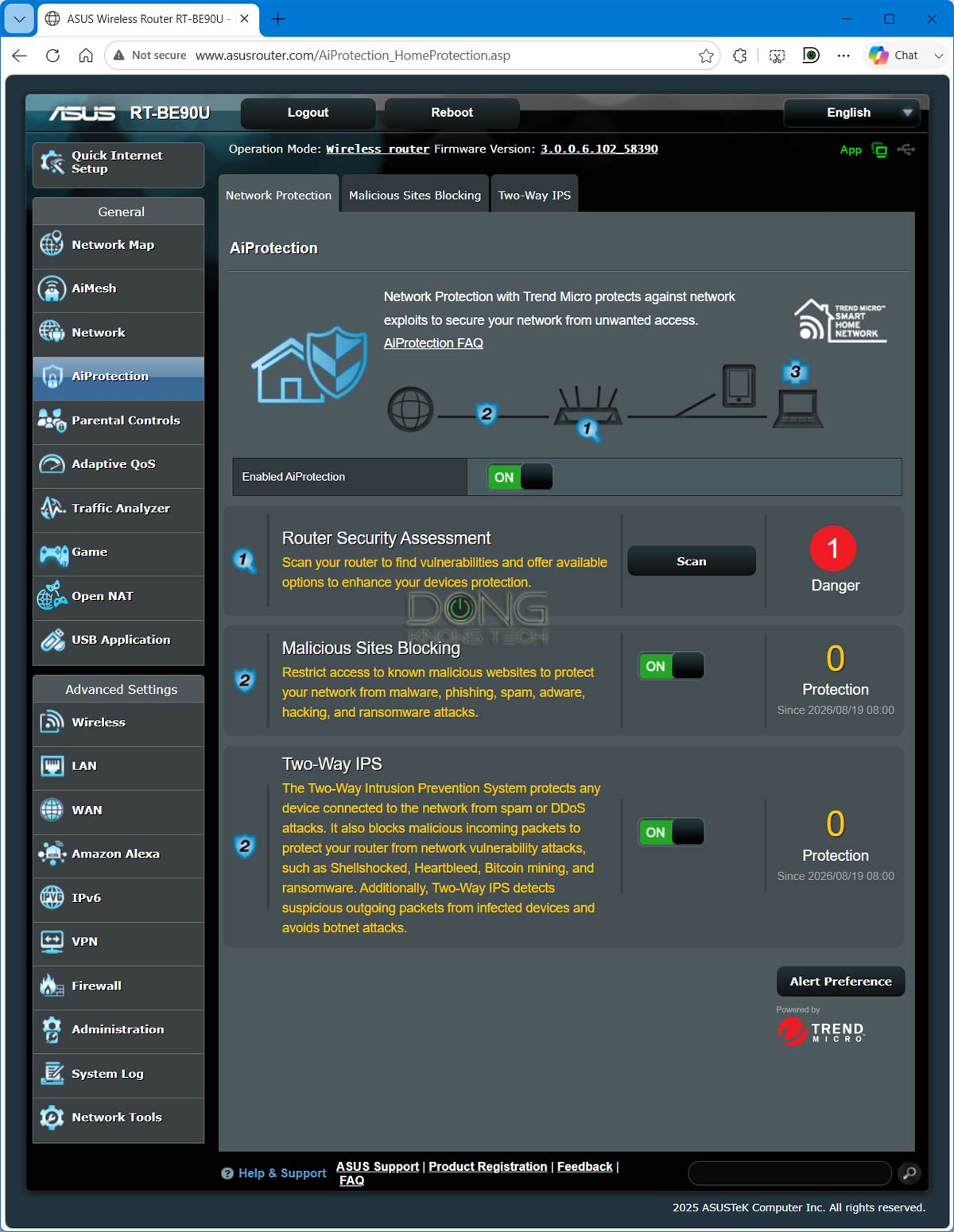
In return, however, it comes with a set of gaming features, enough to make a casual gamer happy. Overall, it’s a familiar member of ASUS’s RT series, with slight variations. That said, you can expect the following, as confirmed in my trial:
- Flexible network ports:
- The RT-BE90U features dual WAN, letting you designate any LAN port or the USB port as the primary or secondary WAN port. The USB port can also serve as a third WAN source for a tethered smartphone or cellular modem.
- Unlike most other ASUS routers, the RT-BE92U does not feature Link Aggregation.
- No universal backup restoration: The RT-BE90U is part of a small group of ASUS routers that can’t restore backup files from any other ASUS router model. As a result, if you upgrade from an older model, there’s no way to transfer existing settings—you always have to set it up from scratch.
- Flexible management: Robust web user interface with optional ASUS Router mobile app. You can set up the router the same way you would any standard router, using its default IP address, 192.168.50.1.
- AiMesh support: You can use multiple RT-BE90U units (or mix one with other AiMesh-ready routers) to form a Wi-Fi system, preferably via wired backhauling. When you use multiple units (of the same model), Wi-Fi 7’s MLO feature is available as wireless backhaul.
- Free built-in security: The RT-BE90U comes with Parental Controls, online protection (AiProtection), and other traffic-related features. Note that its AiProtection is a bit stripped down compared to other ASUS routers because of the modest CPU.
- A full set of USB-based features: Cellular tethering, network storage, Time Capsule, media streaming server, etc.
- Advanced VPN: The RT-BE90U supports advanced VPN, including WireGuard and Instant Guard. It can also work as a VPN client featuring VPN Fusion and a 6-month trial of NordVPN.
- Other features and settings: Many other helpful network/Wi-Fi settings, tools, and other features, including QoS, port forwarding (up to 64 entries), IP reservation (up to 128 entries), and web-based remote management via Dynamic DNS.
That said, if you’ve used a device with a web-based user interface before, the RT-BE90U would be a walk in the park. And if you haven’t, most settings and features are self-explanatory, or you can follow this detailed setup guide.


MLO support and multiple virtual SSIDs
Like other ASUS Wi-Fi 7 routers, the RT-BE90U, as mentioned, supports MLO, allowing users to create a separate SSID for clients using this feature.
Additionally, for the primary Wi-Fi network, you can set up three separate SSIDs for the router’s three bands, or combine all three or two into a single SSID. When two or more bands share an SSID, you can turn the MLO feature on for it.
Tip
ASUS’s self-defined networks (SDNs), a.k.a. virtual SSIDs, can be set to be part of the same subnet as the primary network. If you leave this virtual SSID off the primary subnet, which is often the default, it will be on a separate subnet, separating connected devices from those in the primary network.
Unless you want multiple subnets, use these SSIDs with the same subnet as the primary network. To change the subnet, you may need to delete and recreate the SSID.

Finally, you can also create a few more virtual SSIDs for the Guest Network, IoT network, a VPN network, and more.
The router also allows in-depth customization of its Wi-Fi bands via the “Wireless” section of its interface, including channels, channel width, and security level for each band.
ASUS RT-BE90U: Excellent performance for a small home
Considering the router has only 2.5 Gbps ports, its real-world performance is generally limited to 2500 Mbps (after overhead).
And 2.5Gbps was the ceiling I saw in real-world testing.
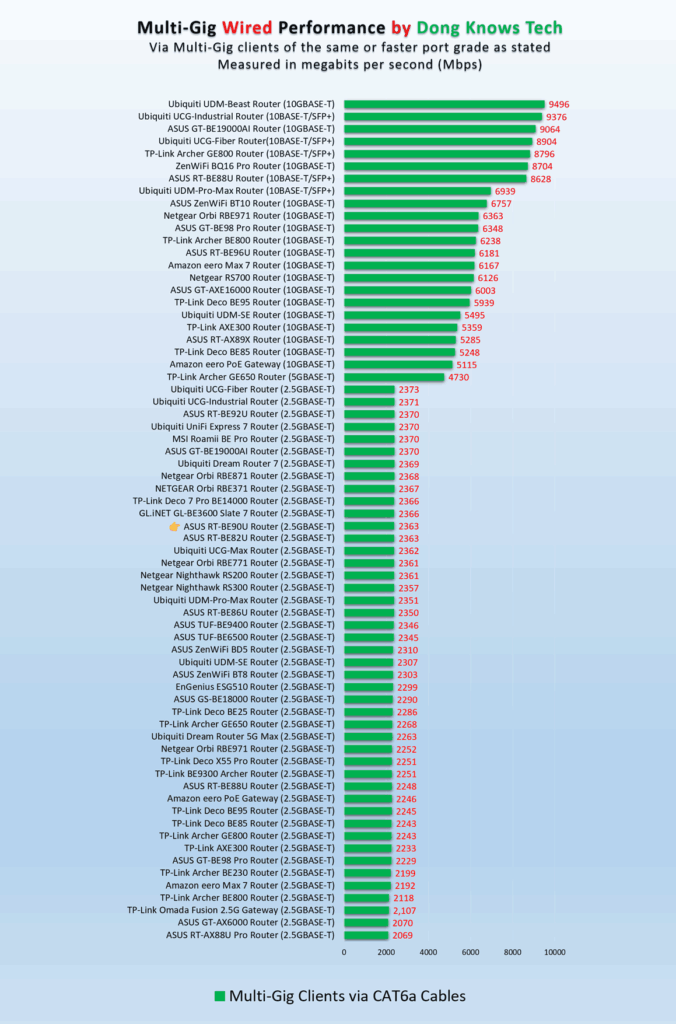
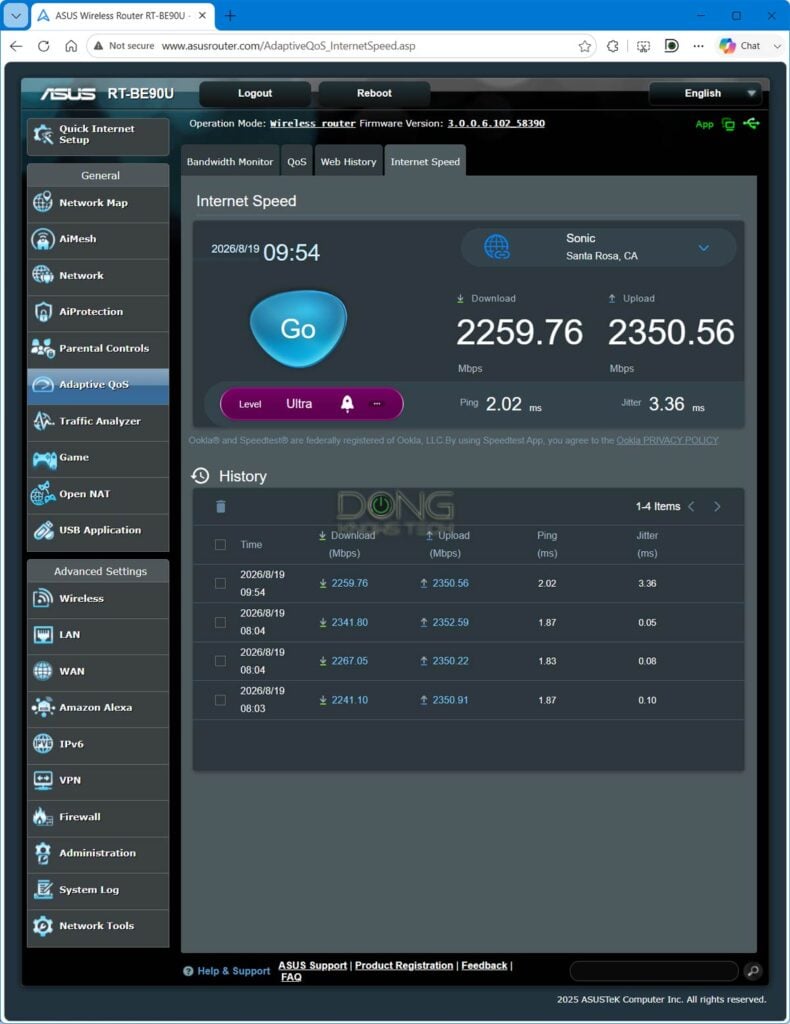
First of all, when hosting my 10Gbps fiber-optic broadband, it generally sustained download and upload speeds of around 2.3Gbps, making it a fitting router for anyone with 2Gbps or slower Internet. Its real-world wired performance averages around the same.
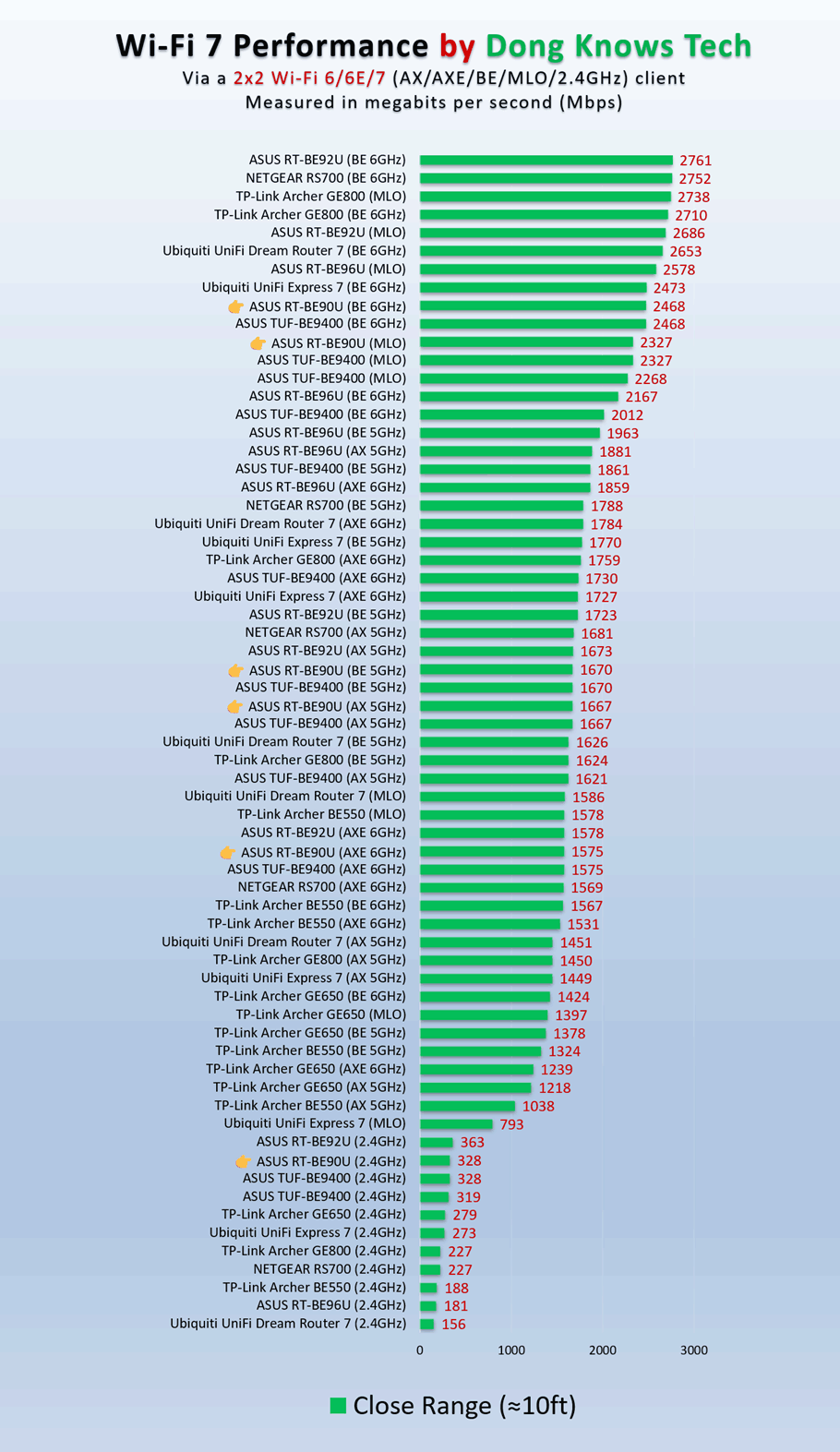
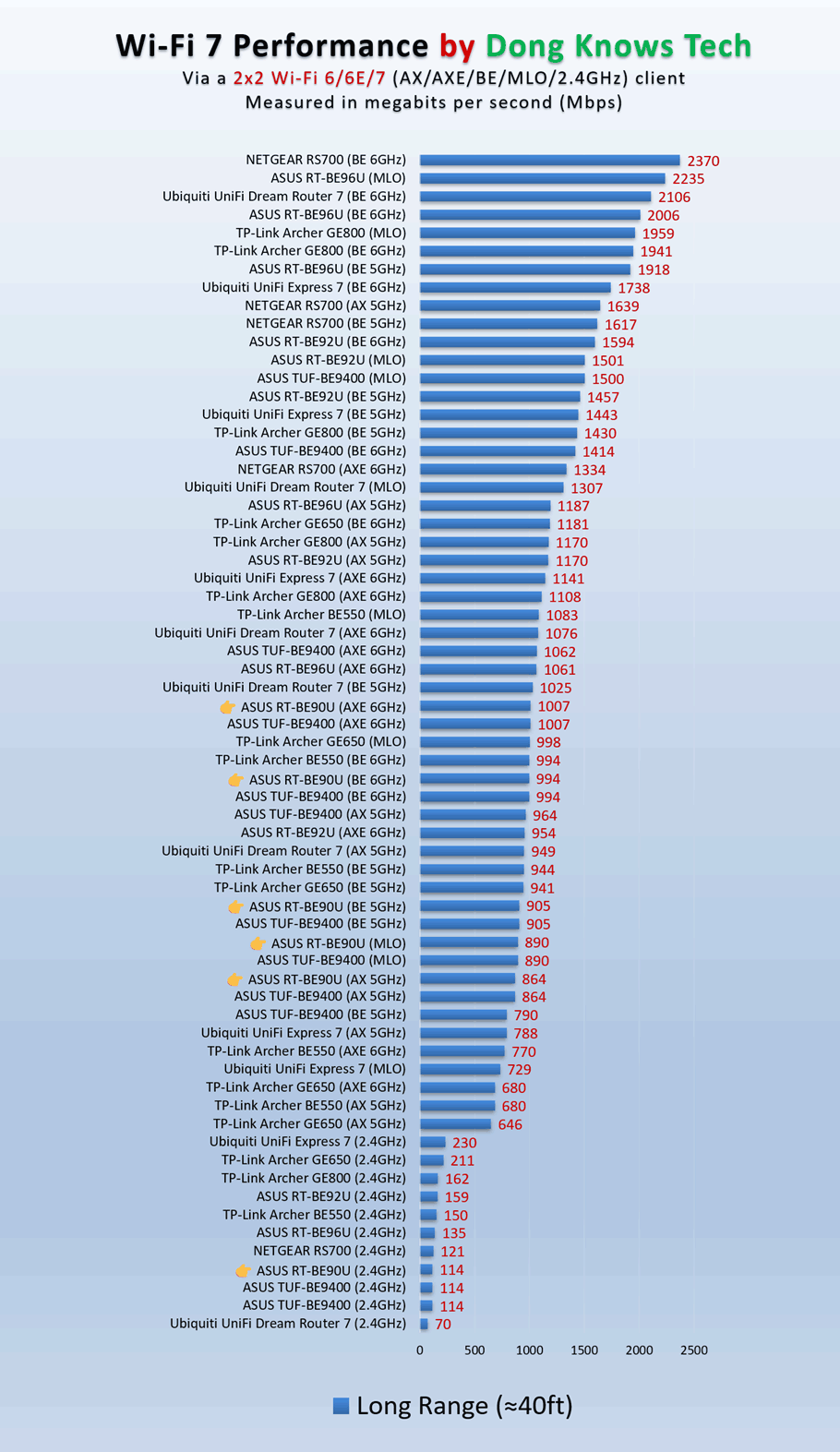
As for Wi-Fi speeds, the RT-BE90U performed excellently at close range, with clients within 20 feet (6 meters). However, its signal degraded significantly as I moved the device further away. Starting around 40 feet (13 meters), sustained rates were cut in half or more.
That said, the RT-BE90U’s coverage was similar to that of the RT-BE82U. It’s always tricky to determine a router’s actual range, but if you have a home of around 1,500 ft2 (139 m2), place this router near the center, and its signals will likely cover every corner. Your mileage will vary.
Note that, like most Wi-Fi 7 routers, the RT-BE90U doesn’t feature AFC, meaning its 6 GHz band has a much shorter range than the other two bands.
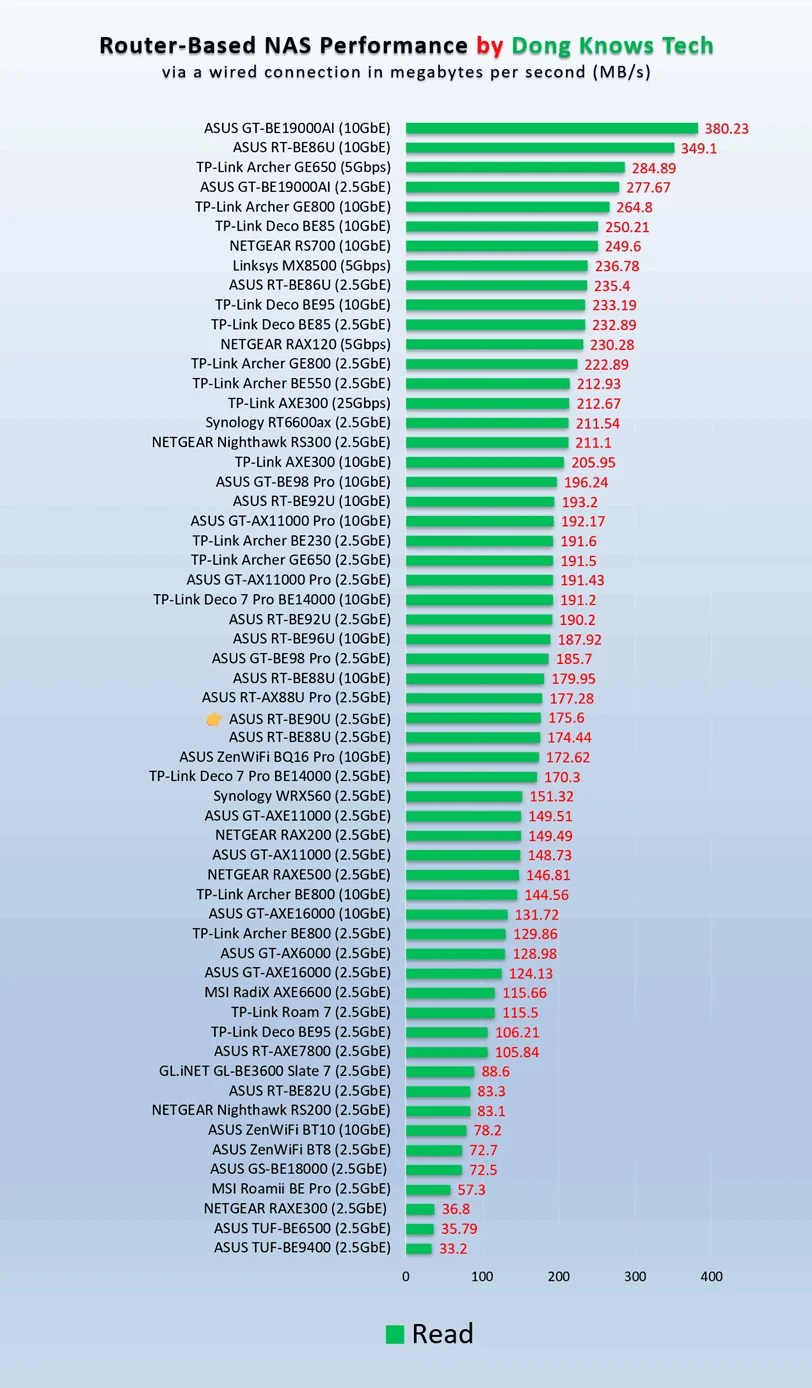
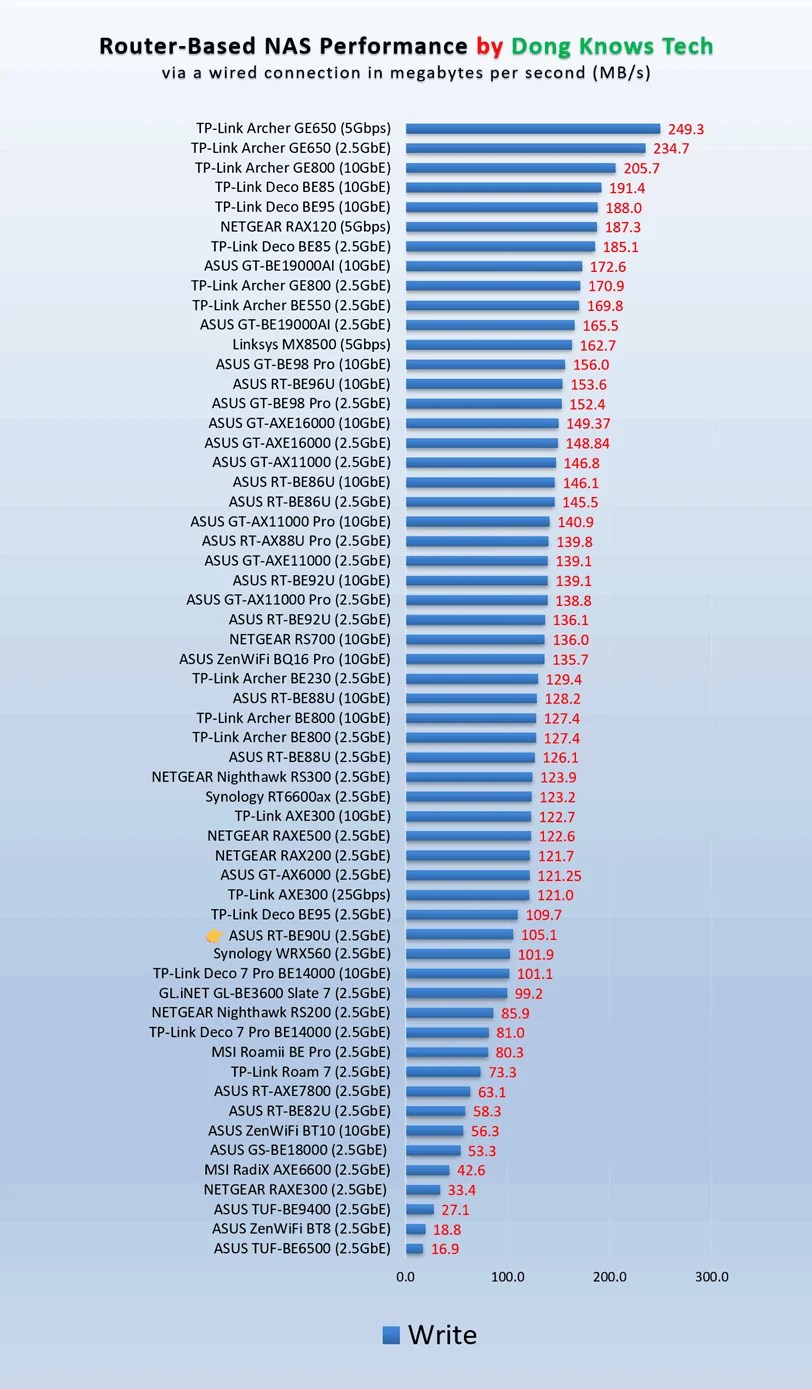
On the upside, the router’s network-attached storage (NAS) performance was quite good for its hardware specs. When hosting a portable SSD via its USB port, it delivers sustained copy speeds of over 100 MB/s for writing and close to 180 MB/s for reading.
While these numbers weren’t the fastest, especially compared to routers with 10Gbps ports, they are fast enough for most network storage needs.
Other than that, the ASUS RT-BE90U passed my 3-day stress test without any disconnections and appears to have no internal fan, remaining silent during my trial. It never became hot to the touch, just lightly warm on the underside, even during heavy operation.
Conclusion
While the ASUS RT-BE90U BE9400 tri-band Wi-Fi 7 router has nothing new, its combo of excellent performance (for the specs) and friendly pricing still makes it a great fit for a small home. Consider it today!


Comments are subject to approval, redaction, or removal. You're in the no-nonsense zone and that applies BOTH ways.
It's generally faster to get answers via site/page search. Your question/comment is one of many Dong Knows Tech receives daily.
Thank you!
(•) If you have subscription-related issues or represent a company/product mentioned here, please use the contact page or a PR channel.